4. Close the lid. Make sure that the lid
locks into position.
Fill the rinse aid dispenser
when the indicator (A) is
clear.
9. DAILY USE
1. Open the water tap.
2. Press and hold until the appliance
is activated.
3. Fill the salt container if it is empty.
4. Fill the rinse aid dispenser if it is
empty.
5. Load the baskets.
6. Add the detergent.
7. Select and start a programme.
8. Close the water tap when the
programme is complete.
9.1 Using the detergent
CAUTION!
Only use detergent
specifically designed for
dishwashers.
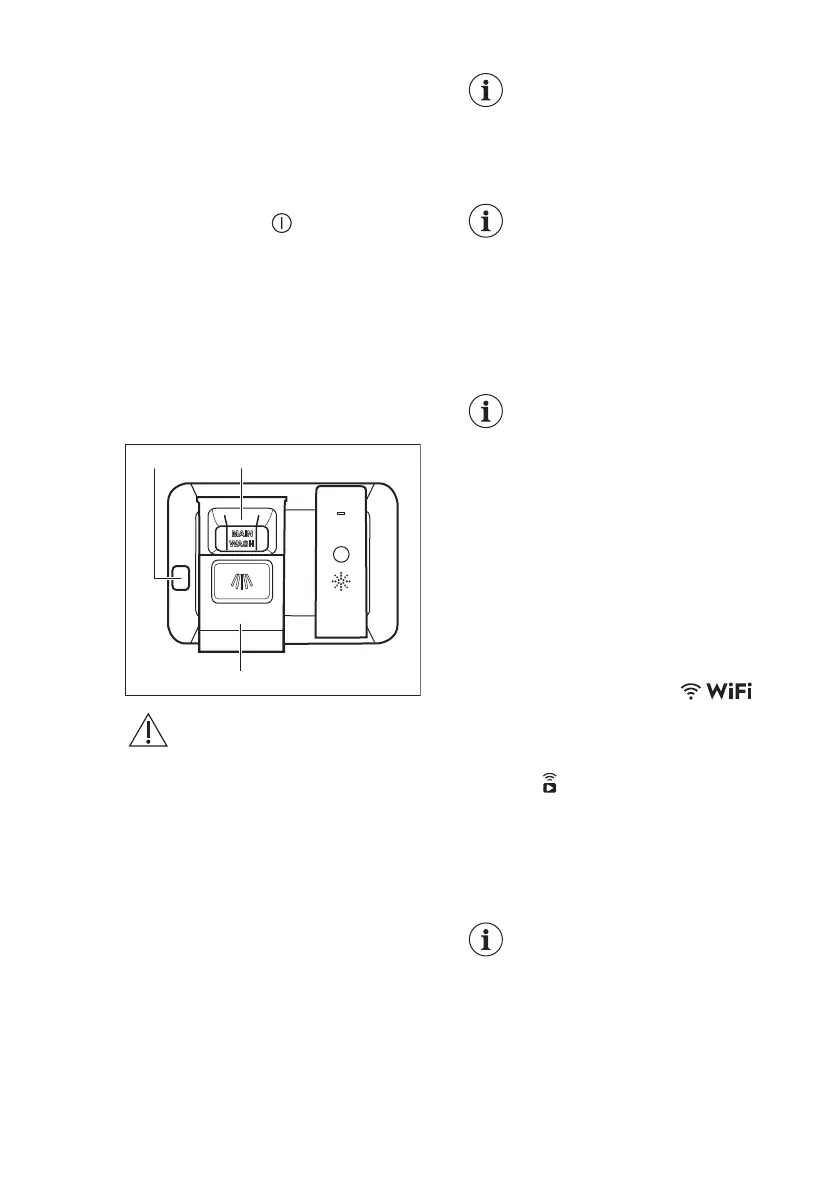
1. Press the release button (A) to open
the lid (C).
2. Put the detergent (gel, powder or
tablets) in the compartment (B).
3. If the programme has a prewash
phase, put a small quantity of
detergent on the inner part of the
appliance door.
4. Close the lid. Make sure that the lid
locks into position.
For information about the
detergent dosage, refer to
the manufacturer's
instructions on the
packaging of the product.
Usually, 20 - 25 ml of gel
detergent is adequate for
washing a load with normal
soil.
The upper ends of the two
vertical ribs inside the
compartment (B) indicate
the maximum level for filling
the dispenser with gel (max.
30ml).
9.2 Remote start
Activate this function to remotely control
and monitor your dishwasher in My
Electrolux Kitchen app.
How to activate the remote start
Make sure that the indicator is
on and your dishwasher is added in My
Electrolux Kitchen app. If not, refer to
"Wireless connection".
1. Press .
• The light related to the button is
on.
• The display shows APP.
2. Close the appliance door.
3. Use My Electrolux Kitchen app to
remotely operate the appliance.
Opening the door
deactivates the remote start.
Refer to the information
provided further in this
chapter.
www.electrolux.com18






 To Next Page