Number Settings Values
Description
1)
5 Key tones On (default)
Off
Activate or deactivate the sound of the
buttons when pressed.
6 Latest pro‐
gramme selec‐
tion
On
Off (default)
Enable or disable the automatic selec‐
tion of the most recently used pro‐
gramme and options.
1)
For more details, refer to the information provided in this chapter.
You can change the basic settings in
setting mode.
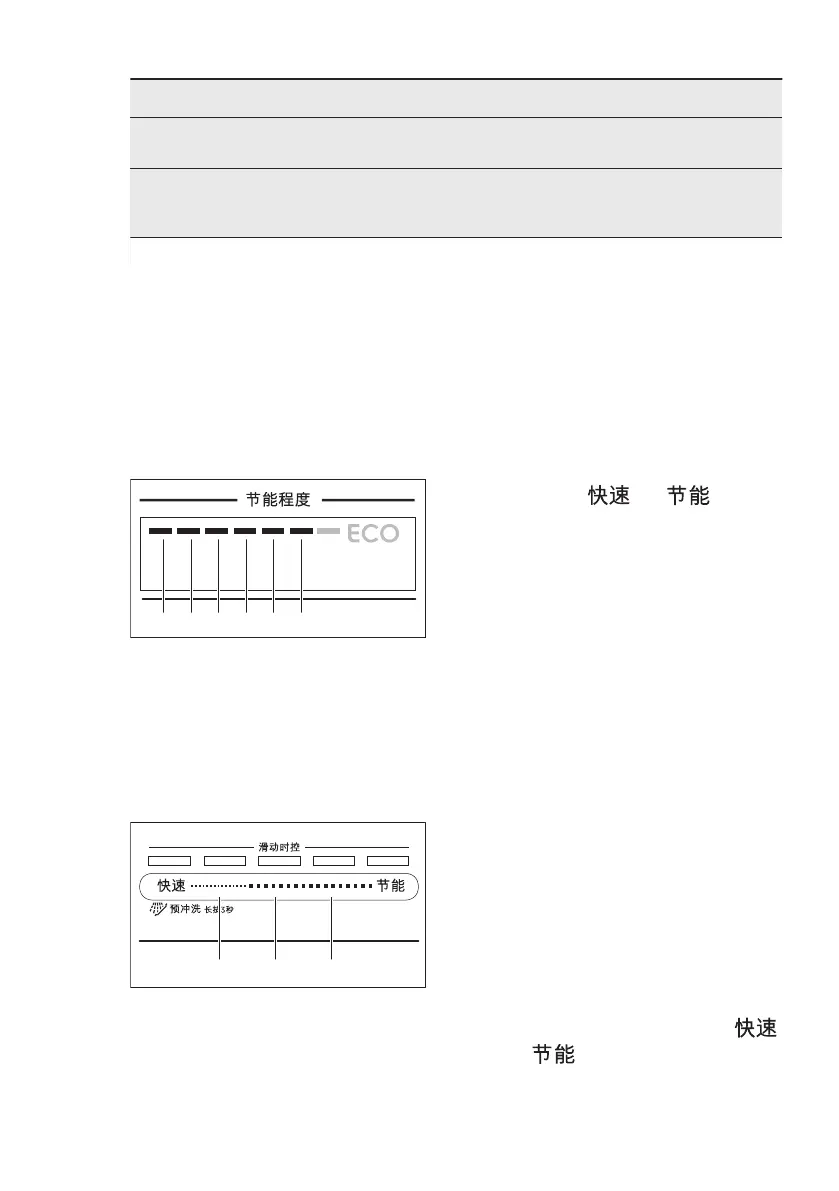
When the appliance is in setting mode,
the bars of the 节能程度 represent
available settings. For each setting, a
dedicated bar of the 节能程度 flashes.
The order of the basic settings presented
in the table is also the order of the
settings on the 节能程度:
6.1 Setting mode
How to navigate in setting
mode
You can navigate in setting mode using
滑动时控 selection bar.
A. Previous button
B. OK button
C. Next button
Use Previous and Next to switch
between the basic settings and to
change their value.
Use OK to enter the selected setting and
to confirm changing its value.
How to enter setting mode
You can enter setting mode before
starting a programme. You cannot enter
setting mode while the programme is
running.
To enter setting mode, press and hold
simultaneously and for about
3 seconds.
The lights related to the Previous, OK
and Next are on.
How to change a setting
Make sure the appliance is in setting
mode.
1. Use Previous or Next to select the
bar of the 节能程度 dedicated to the
desired setting.
• The bar of the 节能程度 dedicated
to the chosen setting flashes.
• The display shows the current
setting value.
2. Press OK to enter the setting.
• The bar of the 节能程度 dedicated
to the chosen setting is on. The
other bars are off.
• The current setting value flashes.
3. Press Previous or Next to change
the value.
4. Press OK to confirm the setting.
• The new setting is saved.
• The appliance returns to the basic
settings list.
5. Press and hold simultaneously
and for about 3 seconds to exit
setting mode.
The appliance returns to the programme
selection.
ENGLISH 11



 To Next Page