Menu item Description
Rename Change or correct the
previously saved
name.
7.12 Saving a favourite
programme
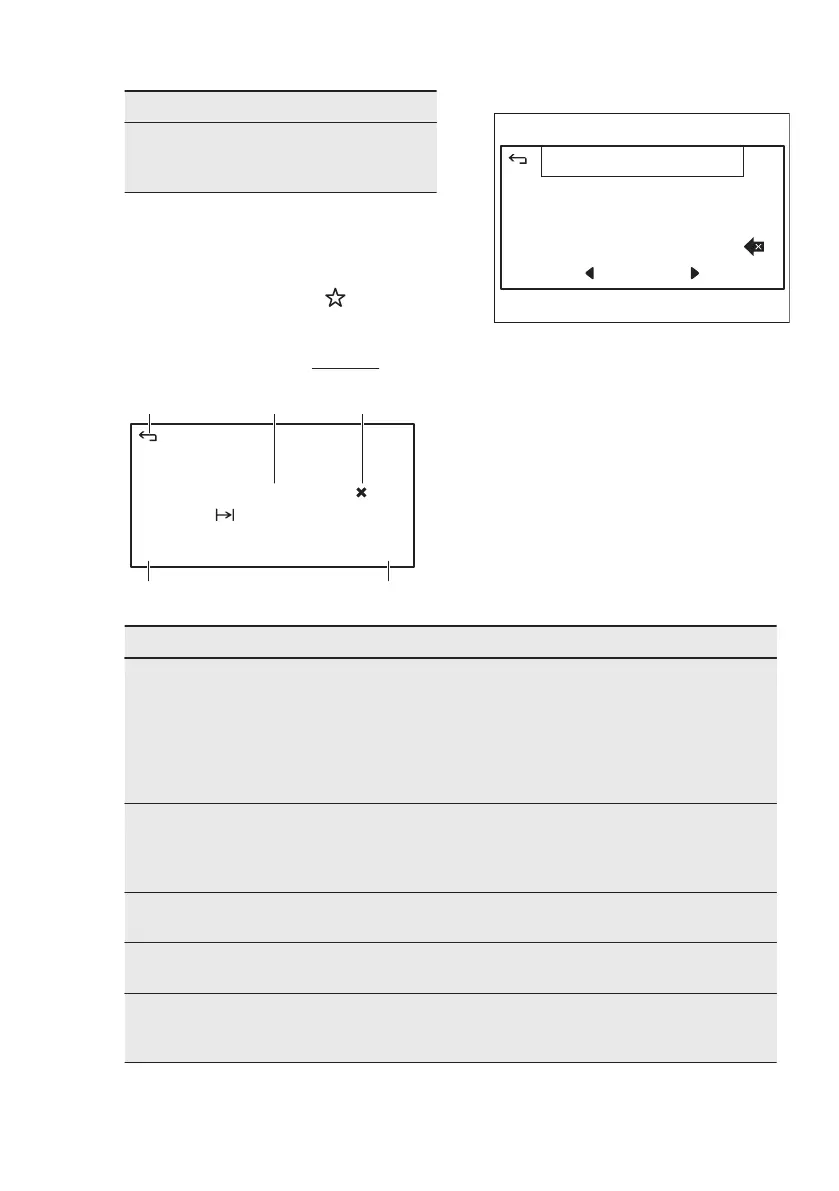
1. To save the current settings of a
heating function touch .
2. Choose: New from current settings..
3. Enter the name of the favourite
programme and touch OK.
True Fan Cooking
123
åäà
OK
Q W E R T Y U I O P
A S D F G H J K L
Z X C V B N M -
space
7.13 Submenu for: Timers
11:33
EndStart
2h 30min
1 29
3 31
Duration
09:03
4 32
0 28
A. Return to menu
B. Current set duration time
C. Reset duration time
D. End time
E. Start time
Menu item Description
Set Minute Minder To set and start a countdown, the timer will be
shown on the main screen and an alarm will
sound when the timer has finished counting
down. This timer will not interrupt the cooking
and is also available when the oven is switched
off. Scroll to set, the timer will start automatical‐
ly.
Set Duration To set and start a countdown, the timer will be
shown on the main screen and the oven will
stop and an alarm will sound when the timer
has finished counting down.
Set End Time To set the switch-off time for the current set‐
tings.
Set Start Time To set the switch-on time for the current set‐
tings.
Elapsed Time Show, hide or reset the timer that counts up
when pressing the start button. The elapsed
time is only available while the oven is active.
www.electrolux.com18



 To Next Page