10
electrolux
operation
The timer
:
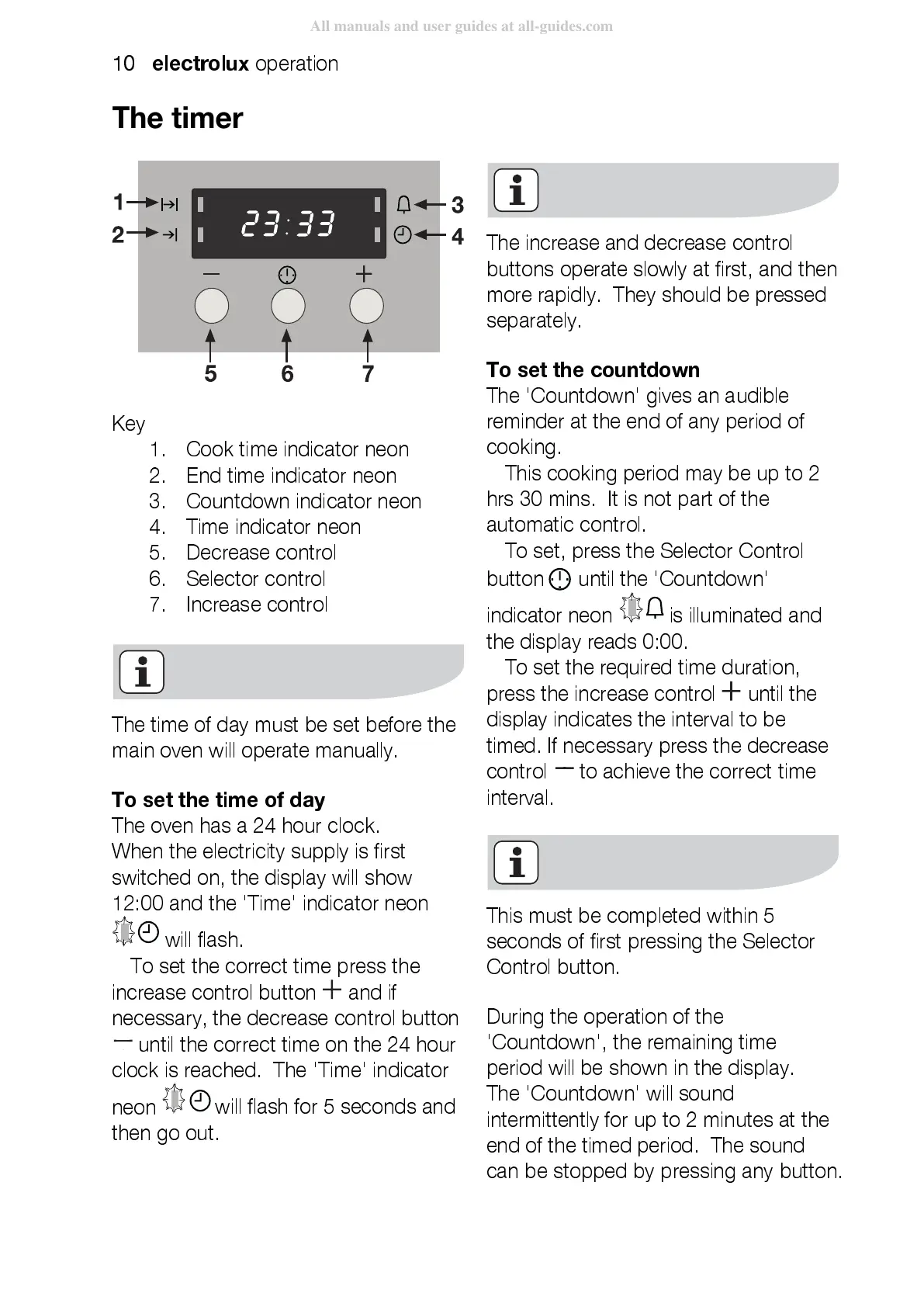
Key
1.
Cook time indicator neon
2.
End time indicator neon
3.
Countdown indicator neon
4.
Time indicator neon
5.
Decrease control
6.
Selector control
7.
Increase control
The time of day must be set before the
main oven will operate manuall y.
To set the time of day
The oven has a 24 hour clock.
When the electricity supply is first
switched on, the display wi ll show
12:00 and the 'Time' indicator neon
will flash.
To set the correct time press the
increase control button
and if
necessary, the decrease control button
until the correct time on the 24 hour
clock is reached. The 'Time' indicator
neon
will flash for 5 seconds and
then go out.
The increase and decrease control
buttons operate slowly at first, and then
more rapidly. They should be pressed
separately.
To set the countdown
The 'Countdown' gives an audible
reminder at the end of any period of
cooking.
This cooking period may be up to 2
hrs 30 mins. It is not part of the
automatic control.
To set, press the Selector Control
button
until the 'Countdown'
indicator neon
is illuminated and
the display reads 0:00.
To set the required time duration,
press the increase control
until the
display indicates the interval to be
timed. If necessary press the decrease
control
to achieve the correct time
interval.
This must be completed within 5
seconds of first pressing the Selector
Control button.
During the operation of the
'Countdown', the remaining time
period will be shown in the display.
The 'Countdown' will sound
intermittently for up to 2 minutes at the
end of the timed period. The sound
can be stopped by press ing any button.



 To Next Page