3 2:30 for a
high degree
of dirt
You can use the End function to
delay the start of the cleaning
procedure.
7. Press to confirm.
12.5 Cleaning reminder
To remind you that the pyrolytic cleaning
is necessary, the cleaning reminder
symbol flashes in the display after
each deactivation of the appliance for the
next 10 seconds.
The cleaning reminder
goes out:
• after the end of the
pyrolytic cleaning.
• when you deactivate it in
the basic settings. Refer
to "Using the settings
menu".
12.6 Removing and installing
door
The oven door has three glass panels.
You can remove the oven door and the
internal glass panels to clean them.
Read the whole "Removing and installing
door" instruction before you remove the
glass panels.
The oven door may close if
you try to remove the glass
panels before you remove
the oven door.
CAUTION!
Do not use the oven without
the glass panels.
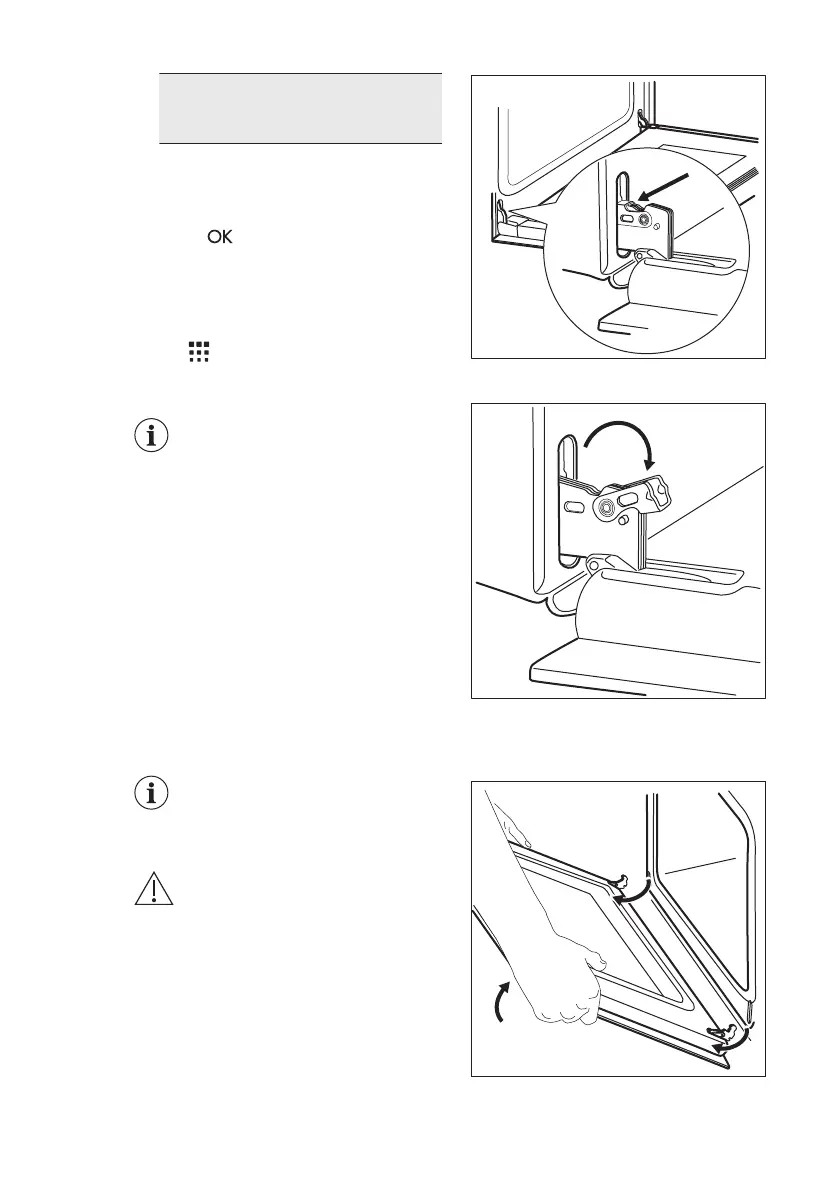
1. Open the door fully and hold both
hinges.
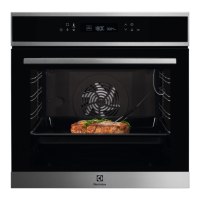
2.
Lift and turn the levers fully on both
hinges.
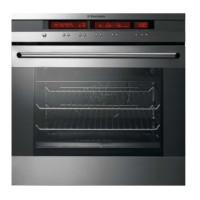
3. Close the oven door halfway to the
first opening position. Then lift and
pull forward and remove the door
from its seat.
4. Put the door on a soft cloth on a
stable surface.
ENGLISH 33





 To Next Page