5
Electrolux 818 16 24--01/9
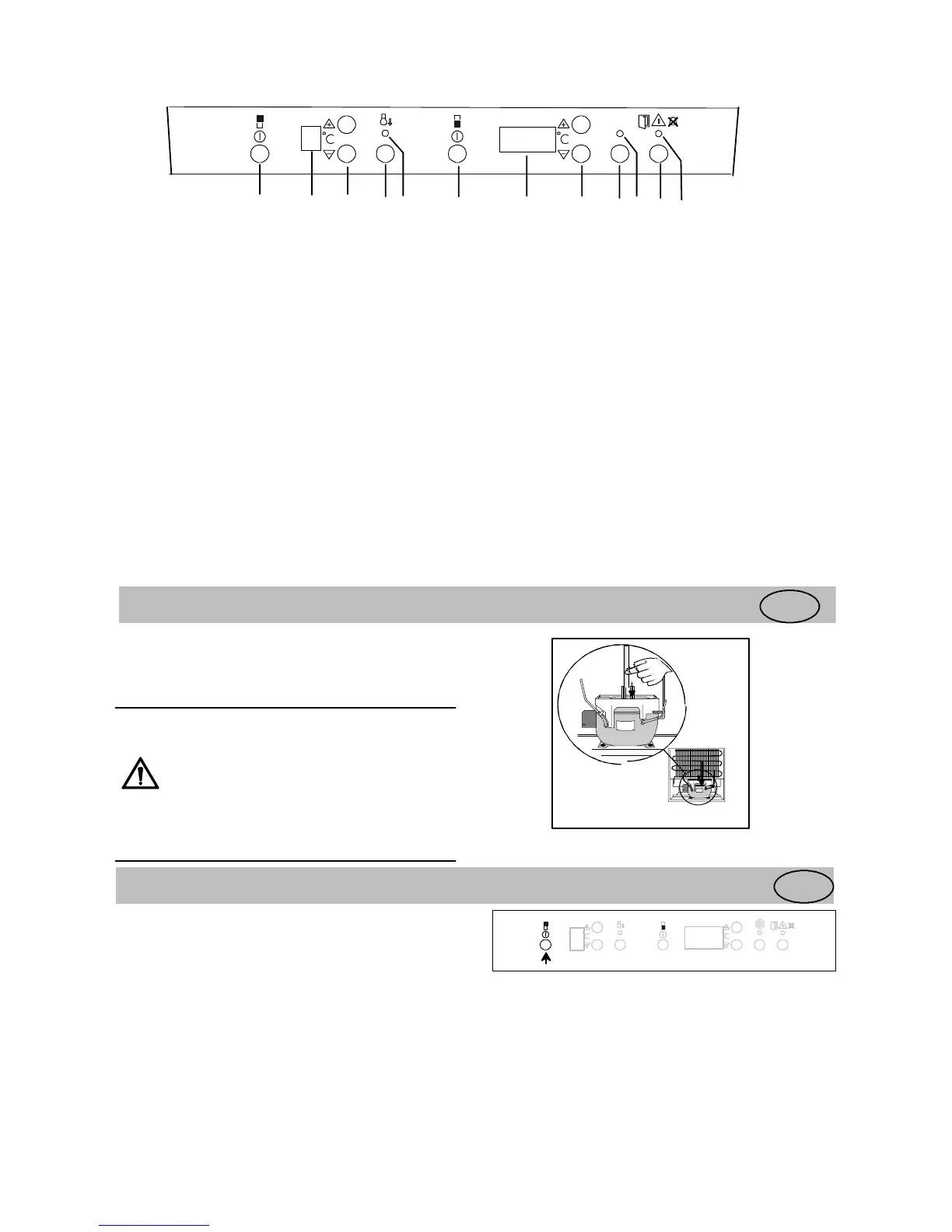
Control Panel
*
-- 1 85
ACTION COOL
ACTION FREEZE
ABCDEF GHIJKL
A. Refrigerator power switch
Switches the refrigerator on and off.
B. Temperature display
Shows the average temperature inside the
refrigerator.
C. Temperature adjustment buttons/thermostat
Used to set the temperature in the refrigerator.
D. ACTION COOL button
Used to switch the Action Cool feature on and off.
E. Yellow indicator lamp
Lights when Action Cool is operating.
F. Freezer power switch
Switches the freezer on and of f.
G. Temperature display
Shows the highest temperature inside the freezer.
H. Temperature adjustment buttons/thermostat
Used to set the temperature in the freezer.
I. FAST FREEZE button
Used to switch the fast Freeze feature on and off.
J. Yellow indicator lamp
Lights when fast Freeze is operating.
K. Alarm shut-off button
Used to turn the audible alarm off.
L. Red warning lamp
Flashes when one of the alarms in the cabinet has
been triggered.
Before use
GB
Position and clean the cabinet as explained in the
section "Installation".
Check that the drain hose at the rear of the cabinet
discharges into the drip tray.
Before inserting t he power plug into the
outlet and switching on the cabinet for
the first time, leave it standing upright
for about 30 minutes, or for 4 hours if it
was transported horizontally. Otherwise
the compressor may sustain damage.
This time will allow the oil sufficient
time to return to the compressor.
Using fridge
GB
To start the fridge and set the
correct temperature
Switching on:
Switch on the fridge by pressing the power switch.
-18
5



 To Next Page