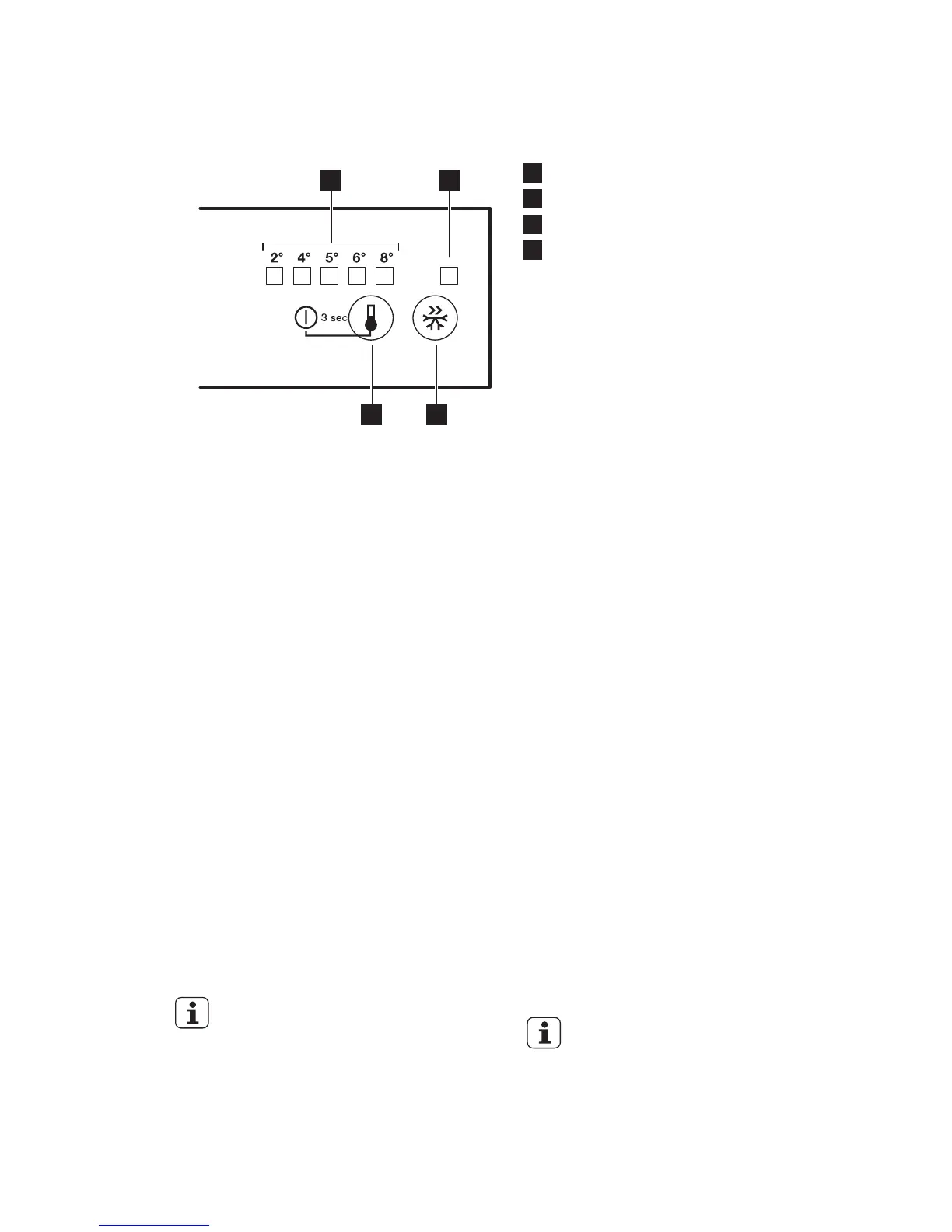
1
Temperature indicator LED
2
Intensive Cooling indicator
3
Intensive Cooling button
4
Temperature regulator
ON/OFF button
3.2 Switching on
1. Insert the plug into the wall socket.
2. Touch the temperature regulator
button if all LED are off.
3.3 Switching off
Keep touching the temperature regulator
button for 3 seconds.
All indicators light off.
3.4 Temperature regulation
To operate the appliance, touch the
temperature regulator button until the
LED corresponding to the required
temperature lights up. Selection is
progressive, varying from 2 to 8°C.
At first button touch actual setting LED
keeps blinking.
Any time the button is touch the set
temperature is moved to 1 position .
Corresponding LED will blink for a while.
Touch the setting button until the
required temperature is selected. The set
will be fixed
Coldest setting: +2°C.
Warmest setting: +8°C.
A medium setting is
generally the most suitable.
However, the exact setting should be
chosen keeping in mind that the
temperature inside the appliance
depends on:
• room temperature
• how often the door is opened
• quantity of food stored
• appliance location.
3.5 Intensive Cooling function
If you need to insert a large amount of
warm food, for example after doing the
grocery shopping, activate the Intensive
Cooling function to chill products more
rapidly and to avoid warming other food
that is already in the refrigerator.
Press the Intensive Cooling button.
The Intensive Cooling indicator appears.
The Intensive Cooling function shuts off
automatically after approximately 6
hours.
To switch off the function before its
automatic end, press the Intensive
Cooling button until the Intensive Cooling
indicator turns off
The function switches off by
selecting a different set
temperature.
www.electrolux.com6



 To Next Page