4. OPERATION
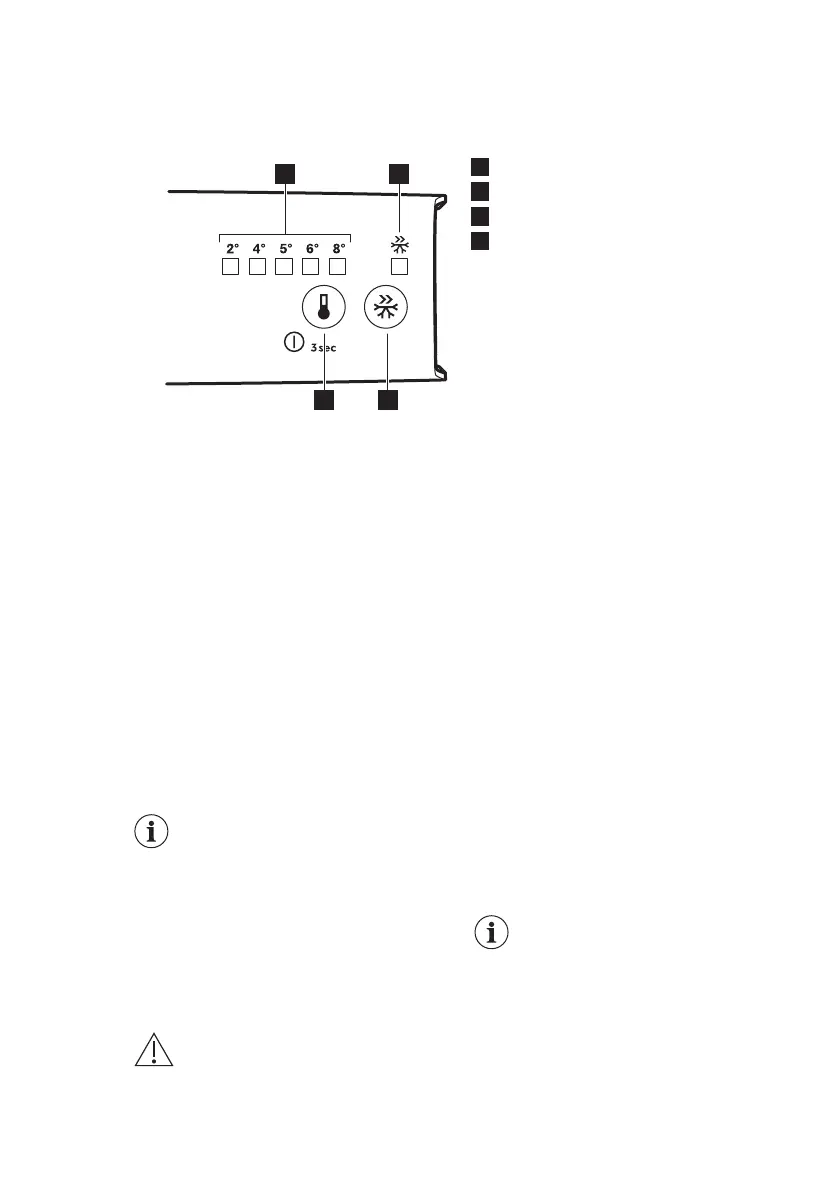
4.1 Control panel
1
Temperature indicator LED
2
FastCool indicator LED
3
FastCool button
4
Temperature regulator
ON/OFF button
4.2 Switching on
1. Insert the plug into the wall socket.
2. Touch the temperature regulator
button if all LED indicators are off.
4.3 Switching off
Keep touching the temperature regulator
button for 3 seconds.
All indicators light off.
4.4 Temperature regulation
To operate the appliance, touch the
temperature regulator until the LED
corresponding to the required
temperature lights up. Selection is
progressive, varying from 2°C to 8°C.
Coldest setting: +2°C.
Warmest setting: +8°C.
A medium setting is
generally the most suitable.
Choose the setting keeping in mind that
the temperature inside the appliance
depends on:
• room temperature
• frequency of opening the door
• quantity of food stored
• appliance location.
1. Touch temperature regulator.
Current temperature indicator blinks. Any
time you touch the temperature
regulator, the setting moves by one
position. The corresponding LED blinks
for a while.
2. Touch the temperature regulator until
the required temperature is selected.
4.5 FastCool function
You can activate FastCool function by
pressing the FastCool button.
The LED corresponding to the FastCool
indicator lights up.
You can deactivate FastCool function by
pressing the FastCool button again.
The FastCool indicator will light off.
This function stops
automatically after 6 hours.
5. DAILY USE
WARNING!
Refer to Safety chapters.
5.1 Cleaning the interior
Before using the appliance for the first
time, the interior and all internal
accessories should be washed with
ENGLISH 7



 To Next Page