EasyManua.ls Logo

Electrolux EVYP9841AX - Page 11

Electrolux EVYP9841AX
48 pages
Print Icon
To Next Page IconTo Next Page
To Previous Page IconTo Previous Page
Loading...
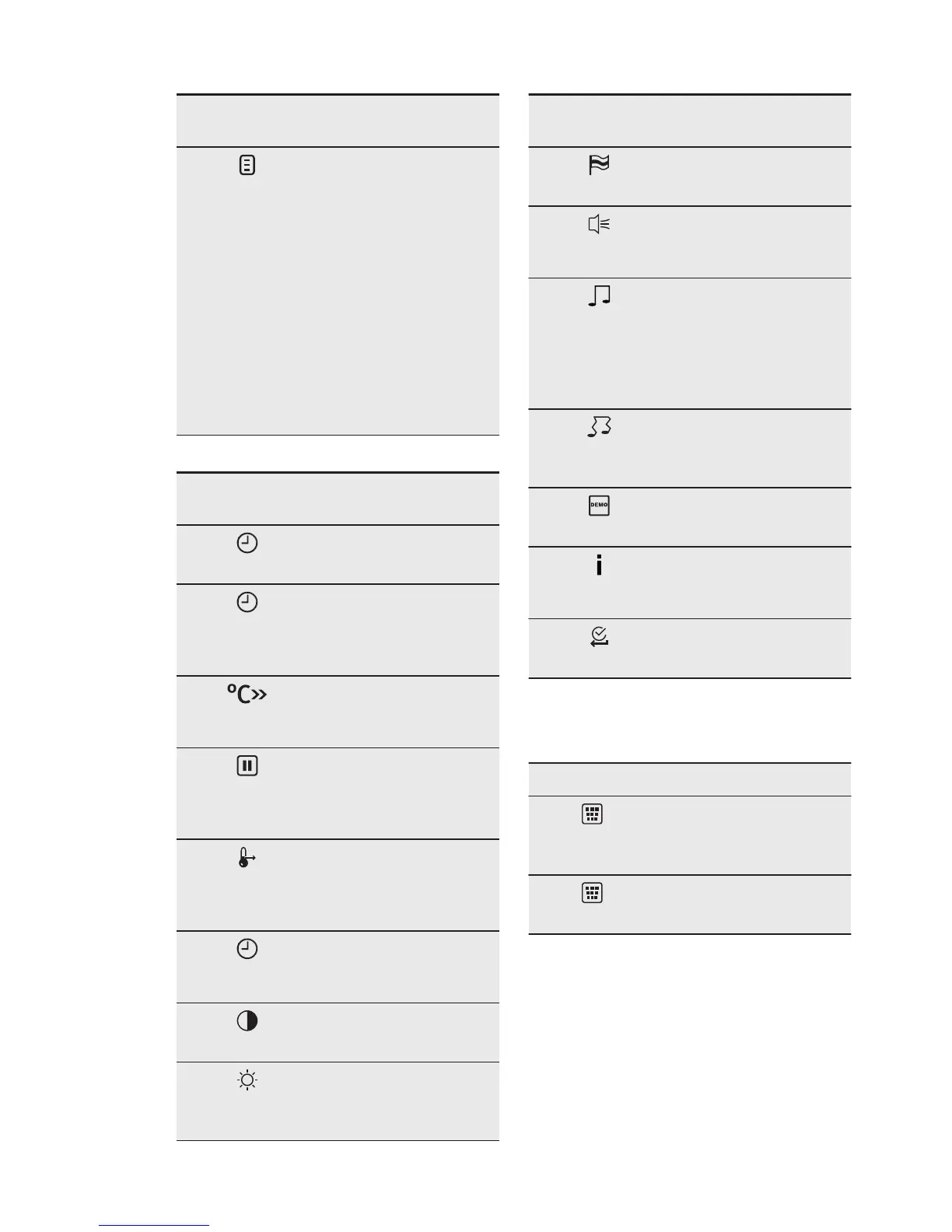
Symbol / Menu
item
Application
Assisted Cook-
ing
Contains recommen-
ded oven settings for
a wide choice of
dishes. Select a dish
and start the cooking
process. The temper-
ature and time are on-
ly guidelines for a bet-
ter result and can be
adjusted. They de-
pend on the recipes
and the quality and
quantity of the used
ingredients.
Submenu for: Basic Settings
Symbol / Menu
item
Description
Set Time of Day
Sets the current time
on the clock.
Time Indication
When ON, the display
shows the current
time when you deacti-
vate the appliance.
Fast Heat Up
When ON, the func-
tion decreases the
heat-up time.
Set + Go
To set a function and
activate it later with a
press of any symbol
on the control panel.
Heat + Hold
Keeps the prepared
food warm for 30 mi-
nutes after a cooking
cycle finished.
Time Extension
Activates and deacti-
vates the time exten-
sion function.
Display Contrast
Adjusts the display
contrast by degrees.
Display Bright-
ness
Adjusts the display
brightness by de-
grees.
Symbol / Menu
item
Description
Set Language
Sets the language for
the display.
Buzzer Volume
Adjusts the volume of
press-tones and sig-
nals by degrees.
Key Tones
Activates and deacti-
vates the tone of the
touch fields. It is not
possible to deactivate
the tone of the ON /
OFF touch field.
Alarm/Error
Tones
Activates and deacti-
vates the alarm tones.
DEMO mode
Activation / deactiva-
tion code: 2468.
Service
Shows the software
version and configura-
tion.
Factory Settings
Resets all settings to
factory settings.
6.3 Submenu for: Assisted
Cleaning
Menu item Description
Steam Clean-
ing
Cleaning the appliance
with steam.
Decalcification
Cleaning the steam
generator.
ENGLISH
11

Related product manuals