Controls 17
Setting cooling temperatures
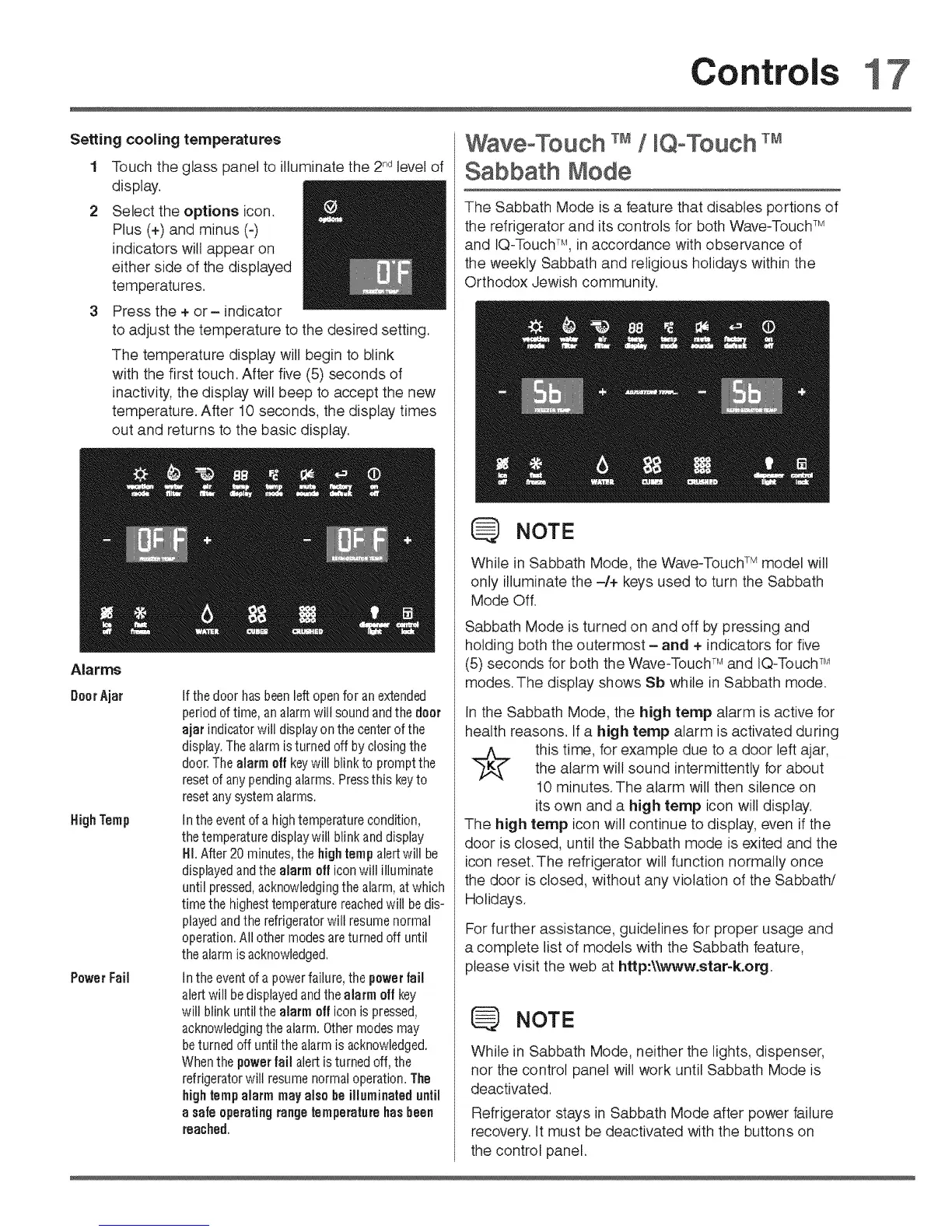
Touch the glass panel to illuminate the 2,_dlevel of
display.
Select the options icon.
Plus (+) and minus (-)
indicators will appear on
either side of the displayed
temperatures.
Press the + or- indicator
to adjust the temperature to the desired setting.
The temperature display will begin to blink
with the first touch. After five (5) seconds of
inactivity, the display will beep to accept the new
temperature. After 10 seconds, the display times
out and returns to the basic display.
Alarms
DoorAjar
HighTamp
PowerFail
If the door hasbeenleft openfor an extended
period of time, analarm will sound and the doer
ajar indicator will display on the center of the
display.The alarm isturned off by closingthe
door. Thealarm off key will blink to prompt the
reset of anypending alarms. Pressthis keyto
reset anysystem alarms.
In the eventof a high temperature condition,
the temperature disptaywill blinkand display
HI. After 20 minutes, the hightemp alert will be
displayedand the alarm officon will illuminate
until pressed,acknowledging the alarm, at which
time the highesttemperature reachedwilt bedis-
played and the refrigerator will resurnenormal
operation. All other modes are turned off until
the alarm is acknowledged.
Unthe event of a power failure, the power fail
alert will bedisplayedand the alarm off key
will blink until the alarm off icon is pressed,
acknowledgingthe alarm. Othermodes rnay
beturned off until the alarm is acknowledged.
Whenthe powerfail alert isturned off, the
refrigerator will resumenormal operation. The
highletupalarm may also be illuminateduntil
a safeoperatingrange temperaturehasbeen
reached.
WaveoTouch / Q°Touch
Sabbath Mode
The Sabbath Mode is a feature that disables portions of
the refrigerator and its controls for both Wave-Touch TM
and IQ-Touch TM, in accordance with observance of
the weekly Sabbath and religious holidays within the
Orthodox Jewish community.
NOTE
While in Sabbath Mode, the Wave-Touch TM model will
only illuminate the -/+ keys used to turn the Sabbath
Mode Off.
Sabbath Mode is turned on and off by pressing and
holding both the outermost - and + indicators for five
(5) seconds for both the W'ave-TouchTM and IQ-Touch TM
modes. The display shows Sb while in Sabbath mode.
In the Sabbath Mode, the high tamp alarm is active for
health reasons. If a high tamp alarm is activated during
this time, for example due to a door left ajar,
the alarm will sound intermittently for about
10 minutes. The alarm will then silence on
its own and a high temp icon will display.
The high tamp icon will continue to display, even if the
door is closed, until the Sabbath mode is exited and the
icon reset. The refrigerator will function normally once
the door is closed, without any violation of the Sabbath/
Holidays.
For further assistance, guidelines for proper usage and
a complete list of models with the Sabbath feature,
please visit the web at http:\\v_vw.star-k.org,
NOTE
While in Sabbath Mode, neither the lights, dispenser,
nor the control panel will 'work until Sabbath Mode is
deactivated.
Refrigerator stays in Sabbath Mode after power failure
recovery, tt must be deactivated with the buttons on
the control panel,





 To Next Page