Storage Features 25
Perfect Tem pTM Drawer (select models)
................_of_
J
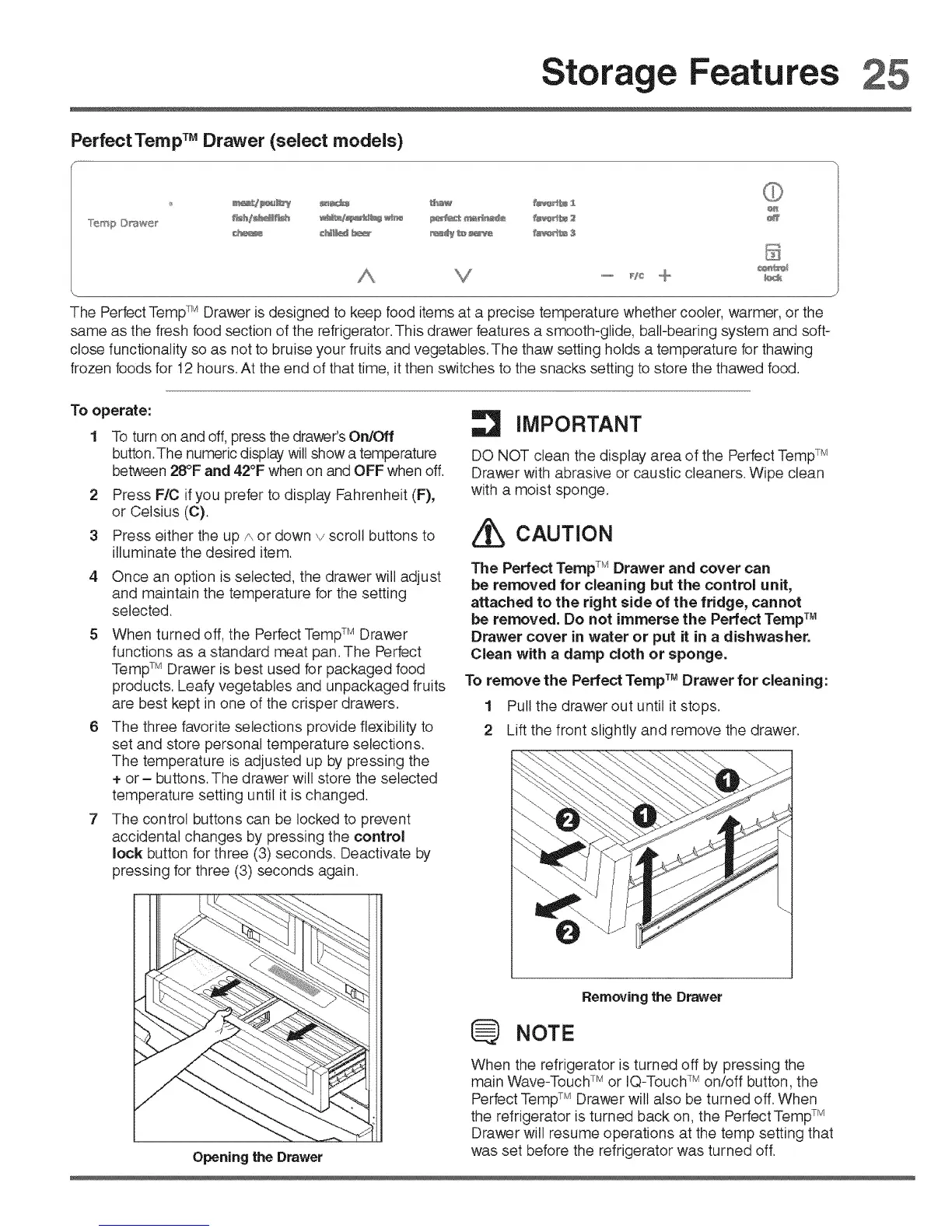
The Perfect TempTM Drawer is designed to keep food items at a precise temperature whether cooler warmer or the
same as the fresh food section of the refrigerator. This drawer features a smooth-glide, ball-bearing system and soft-
close functionality so as not to bruise your fruits and vegetables.The thaw setting holds a temperature for thawing
frozen foods for t2 hours. At the end of that time, it then switches to the snacks setting to store the thawed food.
To operate:
1 To turn on and off, press the drawer's On/Off
button.The numeric display will show a temperature
between 28°F and 42°F when on and OFF when off.
2
3
Press F/C ifyou prefer to display Fahrenheit (F),
or Celsius (C).
Press either the up p,,or down v scroll buttons to
illuminate the desired item.
4 Once an option is selected the drawer will adjust
and maintain the temperature for the setting
selected.
6
When turned off, the Perfect TempTM Drawer
functions as a standard meat pan. The Perfect
TempTM Drawer is best used for packaged food
products. Leafy vegetables and unpackaged fruits
are best kept in one of the crisper drawers.
The three favorite selections provide flexibility to
set and store personal temperature selections.
The temperature is adjusted up by pressing the
+ or - buttons. The drawer will store the selected
temperature setting until it is changed.
The control buttons can be locked to prevent
accidental changes by pressing the control
lock button for three (3) seconds. Deactivate by
pressing for three (3) seconds again.
Opening the Drawer
IMPORTANT
DO NOT clean the display area of the Perfect TempTM
Drawer with abrasive or caustic cleaners. Wipe clean
with a moist sponge.
CAUTION
The Perfect TempTM Drawer and cover can
be removed for cleaning but the control unit,
attached to the right side of the fridge, cannot
be removed. Do not immerse the Perfect Temp TM
Drawer cover in water or put it in a dishwasher.
Clean with a damp cloth or sponge.
To remove the Perfect Temp TM Drawer for cleaning:
1 Pull the drawer out until it stops.
2 Lift the front slightly and remove the drawer.
Removing the Drawer
NOTE
When the refrigerator is turned off by pressing the
main Wave-Touch TM or IQ-TouchTM on/off button, the
Perfect TempTM Drawer will also be turned off. When
the refrigerator is turned back on, the Perfect Temp TM
Drawer will resume operations at the temp setting that
was set before the refrigerator was turned off.





 To Next Page