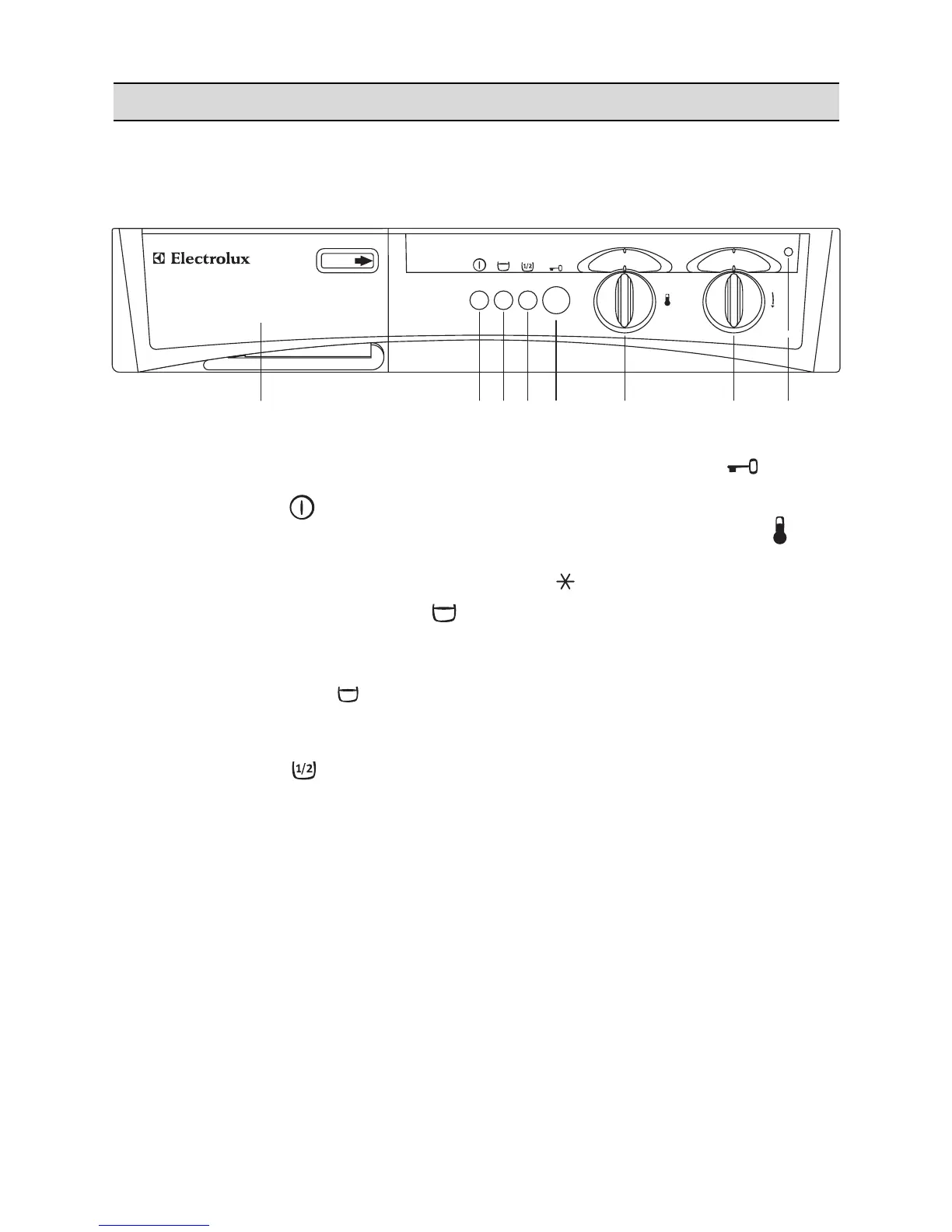
1 Detergent dispenser drawer
2 ON/OFF button
By depressing this button the machine is
switched on. By depressing it again the machine
is switched off.
3 Rinse hold (anti-crease) button
By depressing this button on programmes G-H-
J-K-L the water of the last rinse is not emptied
out to avoid any creasing in the laundry.
To drain water, depress button again. If the
laundry has to be gently spun after draining,
select programme F (short spin).
4 Half load button
Select this button to reduce water consumption
on the rinse cycle when washing a half load of
cottons or linens.
The machine will carry out 3 rinses instead of 4.
5 Door opening button
Depress it to open the door.
6 Temperature selector dial
Turn this dial to select the washing temperature.
Position = cold wash.
7 Programme selector dial
To select the required programme, turn this dial
clockwise until the programme letter is exactly
opposite the pointer.
Before selecting a programme or changing a
programme in progress the machine must be
switched off by depressing ON/OFF button.
8 Operating pilot light
This light is on whilst the machine is operating
and goes out at the end of the programme.




 To Next Page