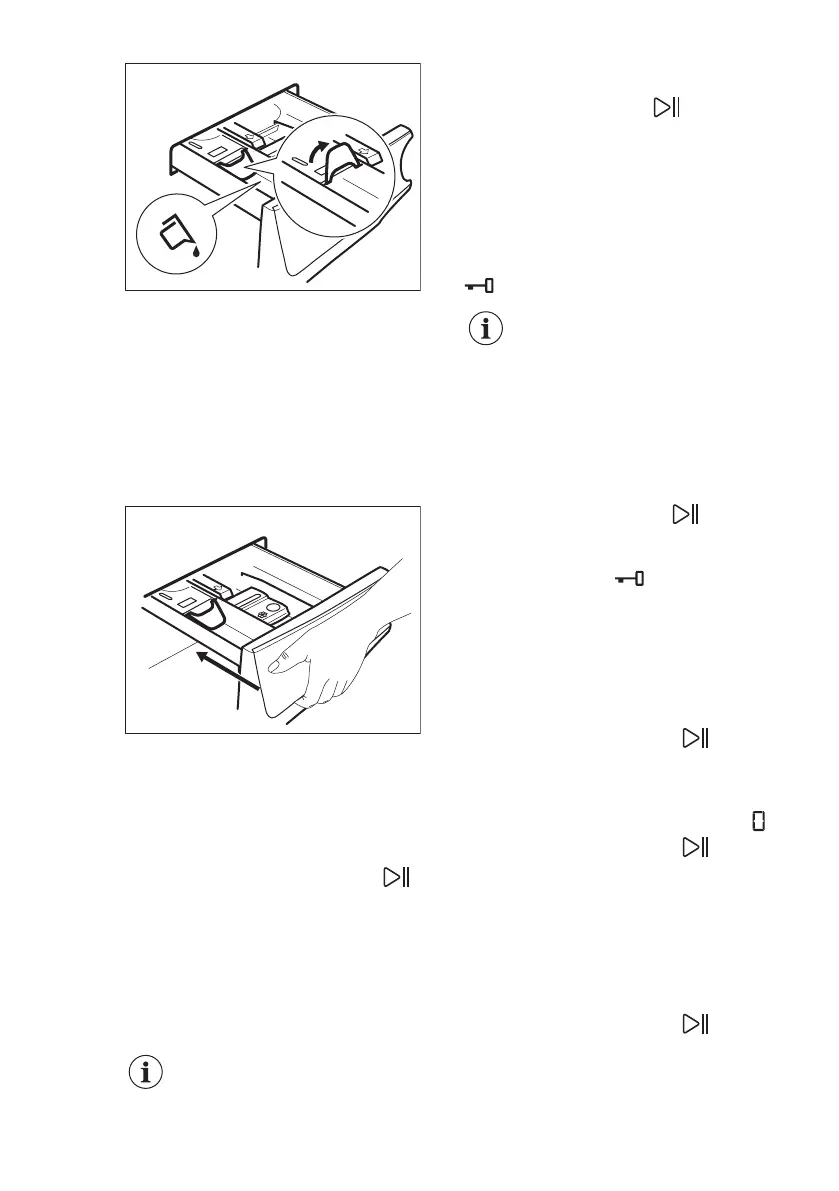
With the flap in the position DOWN:
• Do not use gelatinous or thick
liquid detergents.
• Do not exceed to liquid detergent
dose indicated on the flap.
• Do not set the prewash phase.
• Do not set the delay start function.
5. Measure out the detergent and the
fabric conditioner.
6. Carefully close the detergent
dispenser.
Make sure that the flap does not cause a
blockage when you close the drawer.
12.5 Setting a programme
1. Turn the programme dial to select the
desired washing programme.
The indicator of the Départ/Pause
button flashes.
The display shows an indicative
programme duration.
2. To change the temperature and/or
the spin speed, touch the related
buttons.
3. If desired, set one or more options by
touching the related buttons.
If a selection is not possible
an acoustic signal sounds.
12.6 Starting a programme
Touch the Départ/Pause button to
start the programme. It is not possible to
start the programme when the indicator
of the button is off and doesn't flash (e.g.
programme dial on a wrong position).
The related indicator stops flashing and
stays on.
The programme starts, the door is
locked. The display shows the indicator
.
The drain pump can operate
shortly before the appliance
fills water.
12.7 Starting a programme with
the delay start
1. Touch the Départ Différé button until
the display shows the desired delay time.
The related indicator comes on.
2. Touch the Départ/Pause button.
The appliance door locks and starts the
countdown of the delay start. The display
shows the indicator .
When the countdown is completed, the
programme starts automatically.
Cancelling the delay start after
the countdown has started
To cancel the delay start:
1. Touch the Départ/Pause button
to pause the appliance. The related
indicator flashes.
2. Touch the Départ Différé button
repeatedly until the display shows .
3. Touch the Départ/Pause
button
again to start the programme
immediately.
Changing the delay start after
the countdown has started
To change the delay start:
1. Touch the Départ/Pause button
to pause the appliance. The related
indicator flashes.
www.electrolux.com24



 To Next Page