15. TROUBLESHOOTING
WARNING!
Refer to Safety chapters.
15.1 Alarm Codes and Possible failures
The appliance does not start or it stops during operation. First try to find a solution to the
problem (refer to the tables).
WARNING!
Deactivate the appliance before carrying out any check.
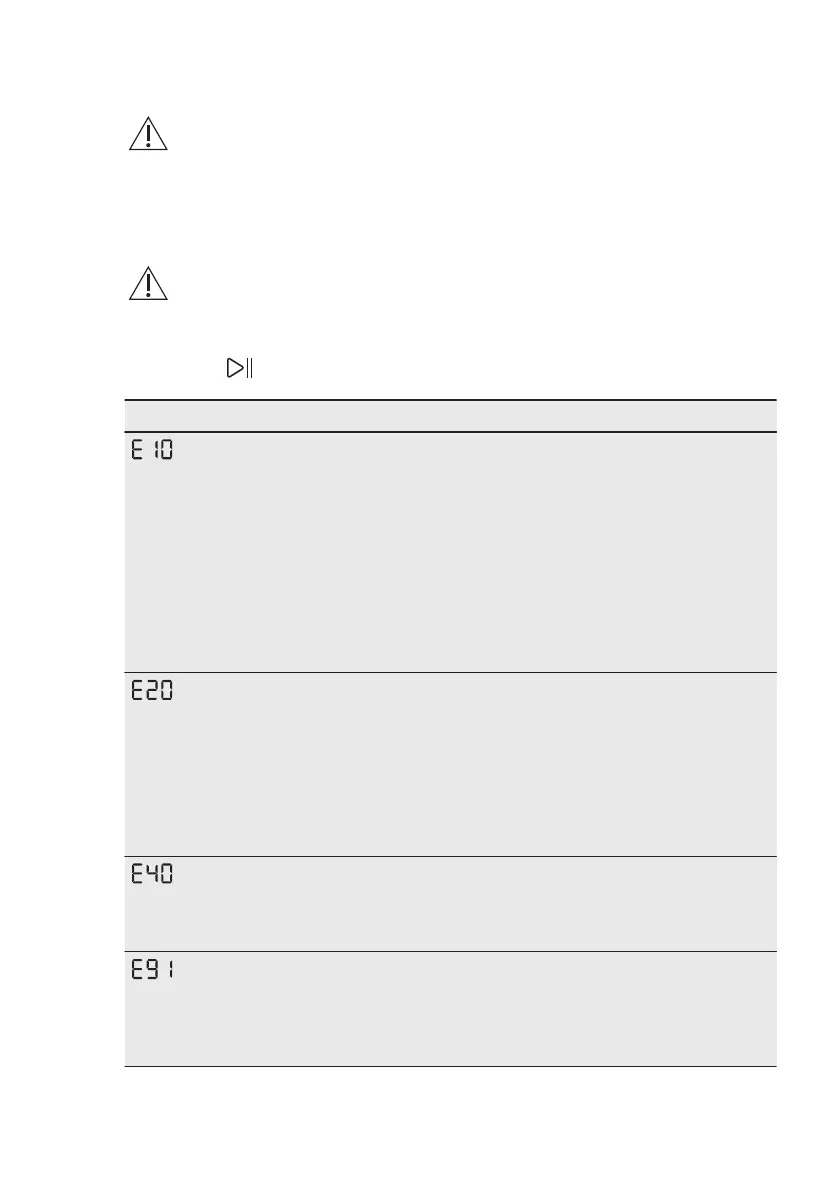
With some problems, the display shows an alarm code and the
Départ/Pause button may flash continuously:
Problem Possible solution
The appliance does
not fill with water
properly.
• Make sure that the water tap is open.
• Make sure that the pressure of the water supply is not too
low. For this information, contact your local water authority.
• Make sure that the water tap is not clogged.
• Make sure that the inlet hose has no kinks, damages or
bends.
• Make sure that the connection of the water inlet hose is
correct.
• This problem may be also caused by the clogged drain cir‐
cuit. Please contact the Authorised Service Centre.
• Make sure that the filter of the inlet hose and the filter of
the valve are not clogged. Refer to 'Care and cleaning'.
The appliance does
not drain the water.
• Make sure that the sink spigot is not clogged.
• Make sure that the drain hose has no kinks or bends.
• This problem may be caused by the clogged drain circuit.
Please contact the Authorised Service Centre.
• Make sure that the connection of the drain hose is correct.
• Set the drain programme if you set a programme without
drain phase.
• Set the drain programme if you set an option which ends
with water in the tub.
The appliance door
is open or not closed
correctly.
• Make sure that the door is properly closed.
Internal fail. No com‐
munication between
electronic elements
of the appliance.
• The programme was not finished properly or the appliance
stopped too early. Switch the appliance off and on again.
• If the alarm code appears again, contact the Authorised
Service Centre.
www.electrolux.com32



 To Next Page