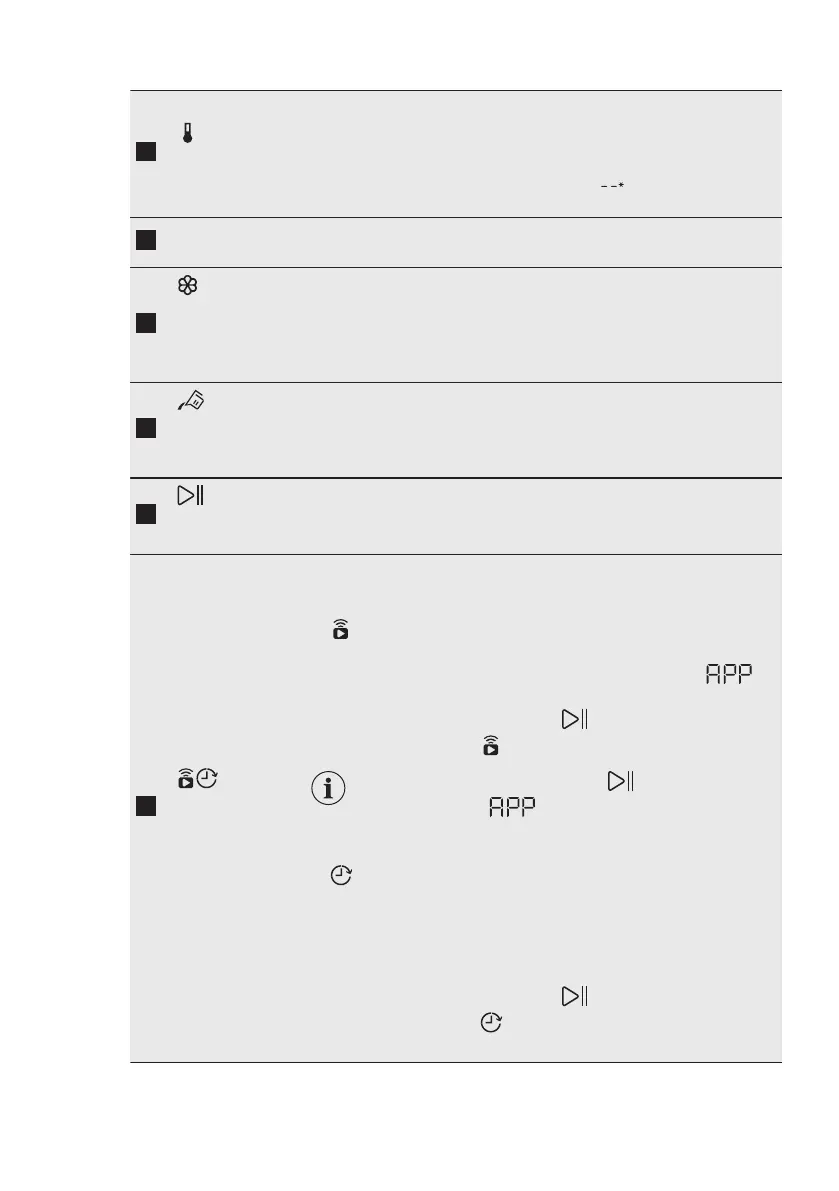
Temperature
touch button
When you select a washing programme, the appliance auto‐
matically proposes a default temperature.
Touch this button repeatedly until the desired temperature val‐
ue appears on the display.
When the display shows the indicators , the appliance does
not heat the water.
Display
It provides information about the setting programme. Refer to
"Display" paragraph for more details.
AutoDose
Fabric Soften‐
er touch but‐
ton
For activating and deactivating the automatic fabric softener
loading. Refer to "The AutoDose Technology (Autodosing)"
chapter for more details.
AutoDose Liq‐
uid Detergent
touch button
For activating and deactivating the automatic detergent load‐
ing. Refer to "The AutoDose Technology (Autodosing)" chap‐
ter for more details.
Start/Pause
touch button
Touch this button to start, pause the appliance or interrupt a
running programme.
Remote start/
Delay Start
touch button
Press this button repeatedly to activate one of the two options
or both.
The relevant indicator comes on in the display.
• Remote start
Select this option to connect appliance with App.
Touch this button, the display shows the indicator
blinking for a few seconds.
After touching the Start/Pause button, the display
shows the indicator
and the Remote start is confirmed.
When touching the Start/Pause button af‐
ter the indicator stops blinking, the Re‐
mote Start is not activated, but the set pro‐
gramme starts.
• Delay Start
With this option you can delay the start of a programme in
a more convenient time.
Touch the button repeatedly to set the required delay. The
time increases by steps of 30 minutes up to 90' and from 2
hours up to 20 h.
After touching the Start/Pause button, the display
shows the indicator and the selected delay time and the
appliance begins the countdown.
ENGLISH 13




 To Next Page