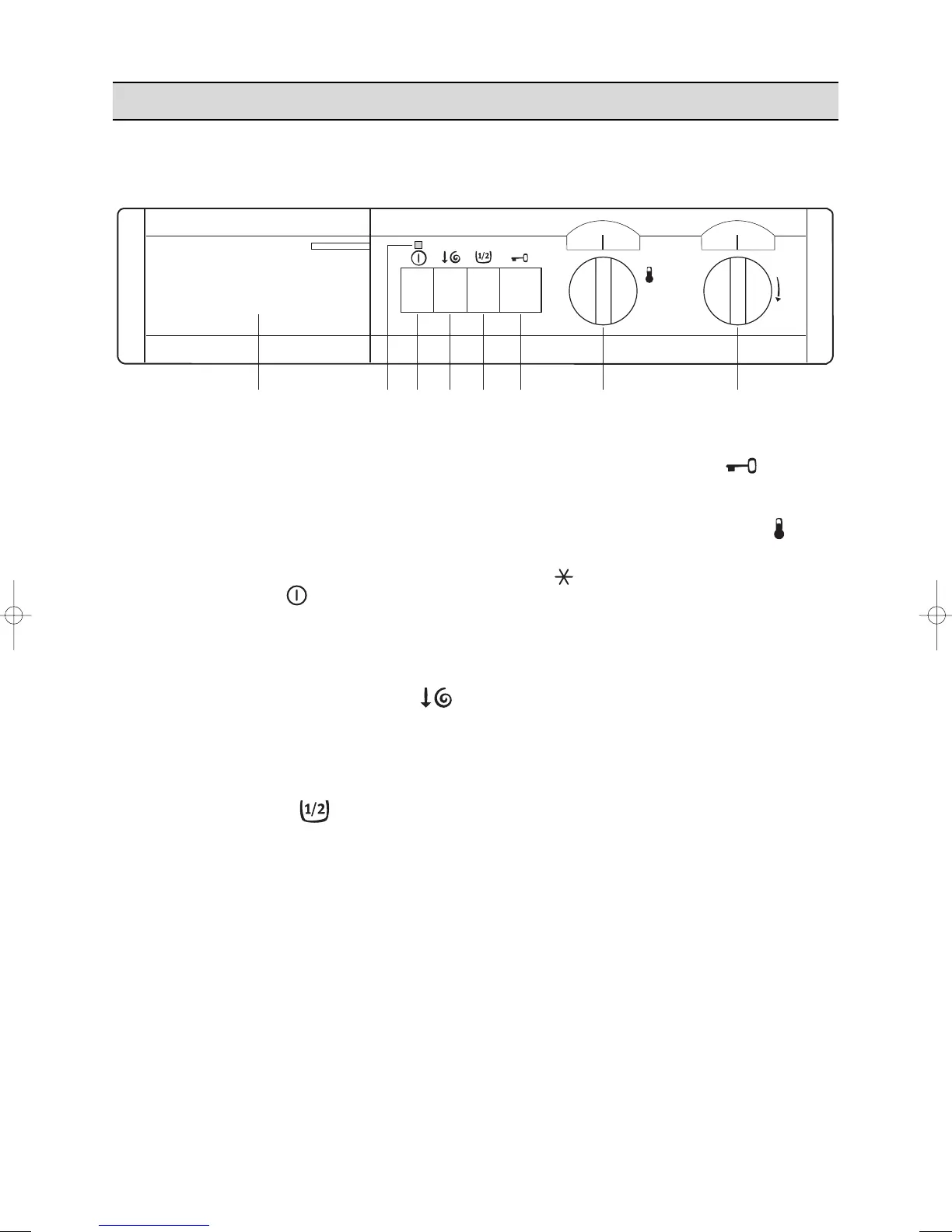
1 Detergent dispenser drawer
2 Operating pilot light
This light is on whilst the machine is operating
and goes out at the end of the programme.
3 ON/OFF button
By depressing this button the machine is
switched on. By depressing it again the machine
is switched off.
4 Spin speed reduction button
By depressing this button the spin speed is
reduced from 900 to 500 rpm in the cotton
programmes and from 550 to 400 rpm in
programme L (Short spin).
5 Half load button
Select this button to reduce water consumption
on the rinse cycle when washing a half load of
cottons or linens.
The machine will carry out 3 rinses instead of 4.
6 Door opening button
Depress it to open the door.
7 Temperature selector dial
Turn this dial to select the washing temperature.
Position = cold wash.
8 Programme selector dial
To select the required programme, turn this dial
clockwise until the programme letter is exactly
opposite the pointer.
Before selecting a programme or changing a
programme in progress the machine must be
switched off by depressing ON/OFF button.



 To Next Page