ENGLISH
79
Use
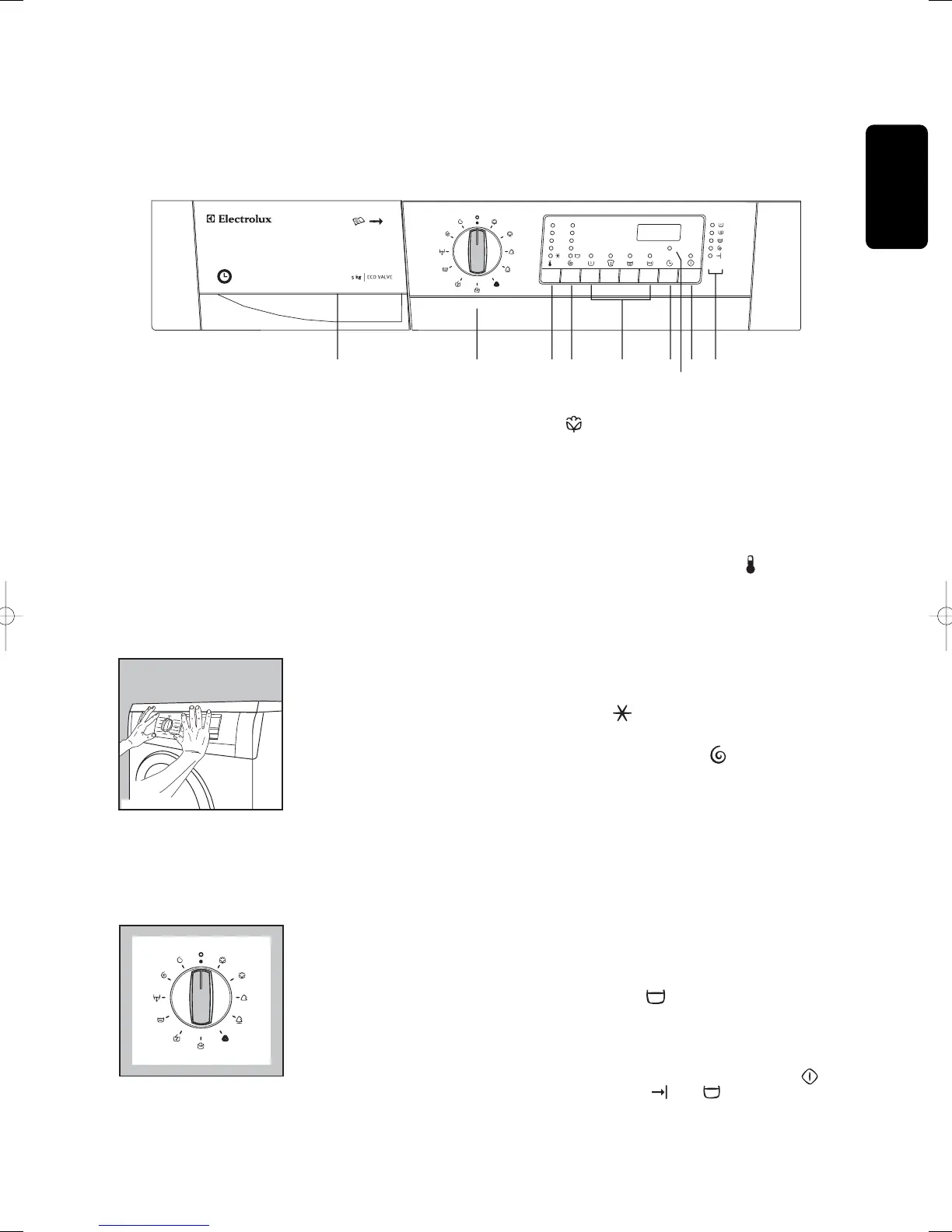
Control panel
Position E corresponds to the ENERGY SAVING
programme for cottons.
Position O corresponds to Reset programme/-
Switching OFF of the machine.
At the end of the programme the selector dial must
be turned to position O, to switch the machine OFF.
3 TEMPERATURE button
Press this button repeatedly to increase or decrease
the temperature, if you want your laundry to be
washed at a temperature different from the one
proposed by the washing machine.
Maximum temperatures are 95°C for white cottons,
60°C for coloured cottons and synthetics, 40°C for
delicates, wool and fabrics to be handwashed, 30°C
for mini 30’, while corresponds to cold wash.
4 SPIN SPEED button
Press this button repeatedly to change the spin
speed, if you want your laundry to be spun at a
speed different from the one proposed by the
washing machine. The relevant light will light up.
Maximum speeds are:
• for cottons: 1200 rpm (EWF 1229),
1400 rpm (EWF 1429),
1600 rpm (EWF 1629)
• for synthetics, wool, and fabrics to be
handwashed: 900 rpm
• for delicates and mini 30’: 700 rpm
Rinse hold position : When you choose this
option, the machine will not drain the water of the
last rinse, so as not to wrinkle the laundry.
At the end of the programme the door remains
blocked, the light of the START/PAUSE button
goes off, the pilot lights and remain lit,
to indicate that the water must be drained.
To empty out water there are 2 possibilities:
1 Programme chart
A programme chart is in the interior part of the
detergent dispenser drawer.
2 Programme selector dial
Note! With the instruction booklet you will also find
stickers for the programme selector dial. Choose the
sticker in the desired language.
Clean the control panel with a dry cloth to eliminate
duster residue.
Remove the back of the sticker and place it around
the programme selector dial as shown in the photo.
The selector dial is divided into following sections:
• Cottons, linens (blue section)
• Synthetics (green section)
• Delicates, wool, handwash, mini 30’, rinses,
drain, spin and delicate spin (grey section)
The selector dial can be turned either clockwise or
anticlockwise.
E
P1196
7
12345689
1
20
0
900
500
95
°
60
°
40
°
30
°
700
EWF 1229
E
+
TIMELINE
132984680GB.qxd 21/07/2005 17.27 Pagina 79



 To Next Page