8
Use
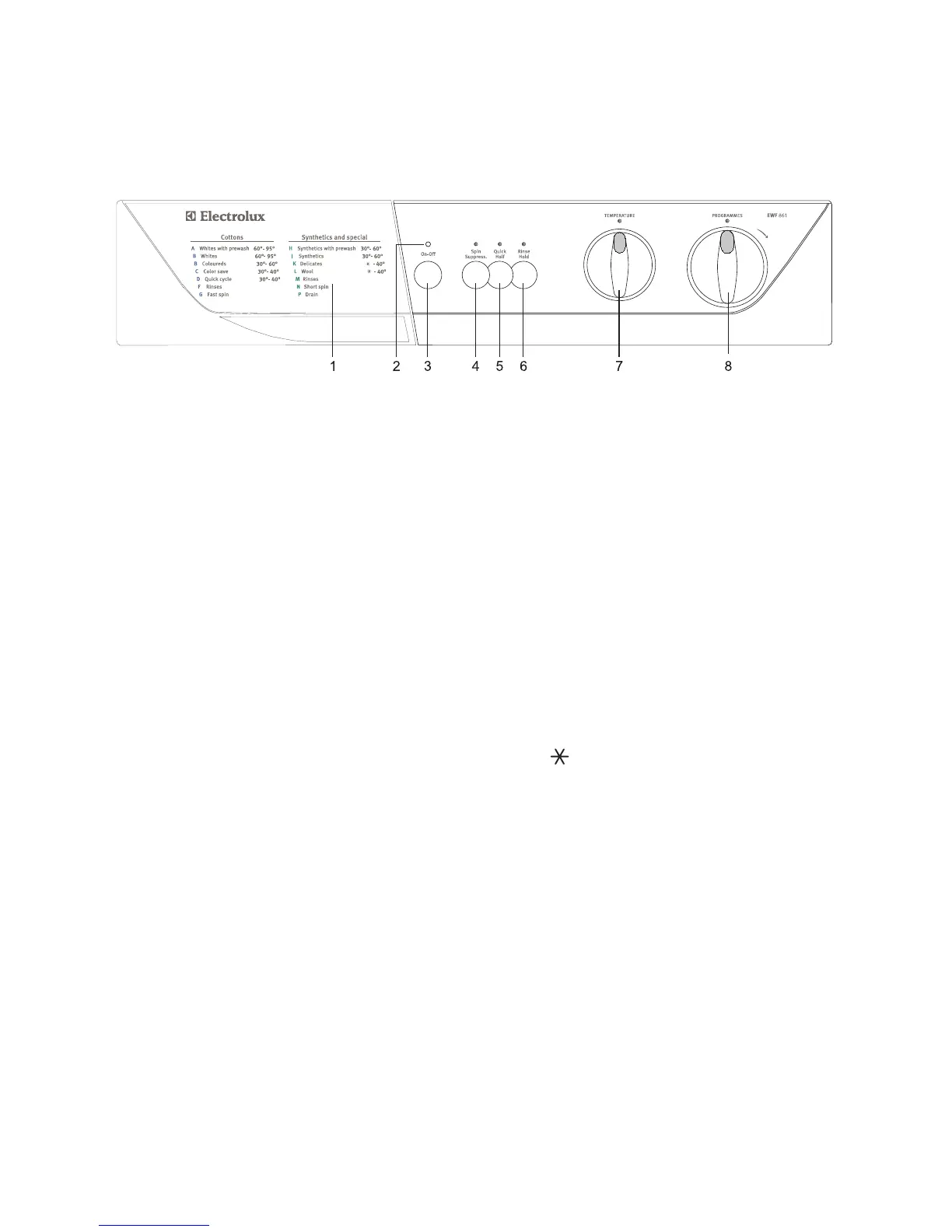
Control panel
1 Detergent dispenser drawer and
programme chart
2 Mains-on light
This light comes on when the On-Off button is
pressed, and goes out when it is pressed again.
3 On-Off button
Press this button to start the machine. The same
button is used to switch the machine off.
Before selecting a programme or changing an
ongoing programme the machine must be
switched off by depressing the On-Off button.
4 Spin Suppress. button
Select this button when you have to wash particulary
delicate cotton or linen items in order to exclude all
the spinning phases.
5 Quick Half button
Select this button to reduce water consumption on
the rinse cycle when washing a smaller load of
cottons (maximum load size = 2,5 kg).
6 Rinse Hold button
Press this button to make the machine stop with
water in the drum after the cotton, synthetic or
delicate wash cycles.
This prevents any creasing which may occur if the
clothes are left damp in the drum. When it is
convenient for you to empty the machine, simply
press this button again so that the machine can
proceed to drain the water, or select the programme
N (short spin).
If this button is not activated, the washing
programmes will end with a spin.
7 Temperature selector dial
Turn this dial to select the washing temperature.
Position = cold wash.
8 Programme selector dial
To select the required programme, turn this dial
clockwise until the programme letter is exactly
opposite the pointer.
Before selecting a programme or changing a
programme in progress the machine must be
switched off by depressing ON-OFF button.



 To Next Page