3.2 Program Chart
Program;
Temperature
range
Cold to 90°C
1200
rpm
Max.
1)
1200
rpm
4 kg
800
rpm
3 kg
1200
rpm
Max.
1)
1200
rpm
Max.
1)
1200
rpm
Max.
1)
1200
rpm
1.5 kg
1200
rpm
4 kg
4 kg
1200
rpm
––
Type of load and soil level Max.
Spin
Speed
Max. Load
(Dry
Clothes)
60°C
Lightly soiled synthetics or mixed fabrics.
Cold to 60°C
Cold to 40°C
30°C to 40°C
Bedding; Special program for one synthetic blanket, duvet,
bedspread and so on.
Rinse + Spin To rinse and spin the laundry.
Spin
To spin the laundry and drain the water in
the drum.
Energy
Saver;
40°C and
60°C
2)
White and colourfast cotton. Set this program to
have a good washing results and decrease the
energy consumption. The time of the washing
program is extended.
Daily wear coloured cotton clothes such as
shirts, blouses, towels and undergarments.
Ideal for low level of soil.
Cottons;
Mixed;
--
Off
Daily 39;
Quick 15;
Baby cotton clothes and delicate knitting items with
normal soil.
Tub Clean;
For cleaning the tub.
White and coloured cotton.
This position to reset program/switching off the
machine.
Synthetic or mixed fabric items.
Cold to 40°C
Cold to 30°C
Baby Care;
1200
rpm
4 kg
Cold to 40°C
Delicates;
Delicate fabrics such as acrylics, viscose, polyester
items.
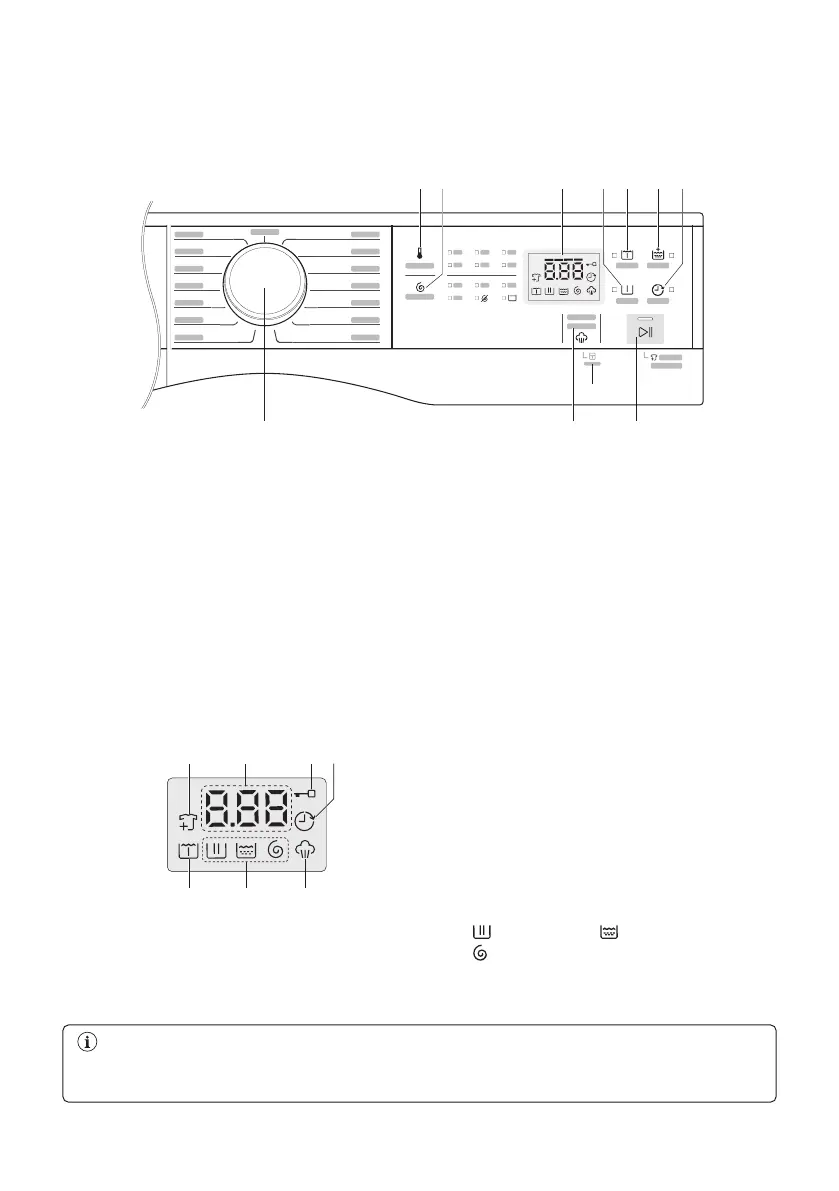
3. CONTROL PANEL
Press the touch buttons with your finger in the area with the symbol or name of the
option. Do not wear gloves when you operate the control panel. Make sure that the control



 To Next Page