
 Need help?
Do you have a question about the Electrolux Frigidaire FFPA0822R1 and is the answer not in the manual?
Notes on power cord safety, extension cords, and grounding.
Guidelines on grounding, receptacle use, and avoiding electrical hazards.
Warnings to prevent severe personal harm or fatalities.
Precautions to avoid injury or damage to the unit or surroundings.
Mandatory upright positioning for one hour before operating the unit.
Instructions on testing the power supply cord's current detection device.
Section to record model and serial numbers and register the product.
Descriptions of normal operating sounds like gurgling, hissing, rushing air, and chatter.
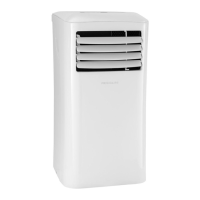
Identifies key parts of the portable air conditioner unit.
Lists all parts included in the package with their quantities.
Steps for connecting the exhaust hose and adaptor for hot air expulsion.
Instructions for installing the window slider kit for exhaust hose placement.
Detailed steps for installing the unit in a double-hung sash window.
Detailed steps for installing the unit in a sliding sash window.
Description of the buttons and display on the unit's control panel.
Explanation of the buttons and features available on the remote control.
Details on battery type, warnings, and FCC compliance.
Operating the unit in cooling, dry, and auto modes with hose requirements.
How to operate the unit using only the fan function without a hose.
Setting delay timers and using the sleep mode for gradual temperature change.
Using the filter indicator and selecting fan speeds.
Understanding error codes and proper condensate drainage procedures.
Advanced features like compressor delay, temperature conversion, and power outage memory.
Step-by-step instructions for cleaning or vacuuming the air filter.
How to clean the unit's exterior cabinet safely and effectively.
Recommendations for storing the appliance during the winter season.
Solutions for common occurrences like unit not operating or poor cooling.
Troubleshooting advice for noise, rapid cycling, and temperature problems.
Information on when to call for service and contact numbers.
Explains the one-year and five-year limited warranties on parts and the sealed system.
Lists items and conditions not covered by the appliance warranty.
Procedures for obtaining service and contact details for USA and Canada.
This document describes the use and care of a portable air conditioner, providing instructions for operation, installation, and maintenance.
The portable air conditioner is designed to cool and dehumidify a room, and can also operate in a fan-only mode for air circulation. It features a current detection device in the power supply cord to reduce the risk of fire. The unit is equipped with a compressor for cooling and a fan to circulate air. In cooling mode, it exhausts warm air outside through a hose. For dehumidification, it collects water that needs to be drained. The unit can be controlled via a control panel on the device itself or a remote control.
General Operation: Before operating, the unit must be placed upright for at least one hour. It should be positioned on a flat floor with a minimum of 12 inches clearance around it, and within reach of a single circuit outlet power source. The power supply cord has a TEST and RESET button. After plugging in, press TEST, then RESET to ensure electricity is supplied to the unit. The RESET button should always be pushed in for correct operation. If the power cord fails to reset or is damaged, it must be replaced by the product manufacturer.
Modes of Operation:
Timer Operation: Both delay stop and delay start functions can be set using the remote control, whether the unit is ON or OFF. To set a delay stop, press the TIMER OFF button, then adjust the timing in 0.5-hour increments up to 10 hours, and then 1-hour increments up to 24 hours. The setting is confirmed automatically after 5 seconds. Delay start is set similarly using the TIMER ON button. The timer indicator light on the control panel illuminates when activated. To check remaining time, press TIMER ON or TIMER OFF once. To cancel, change the timing to 0.0.
Sleep Operation: This feature is only available via the remote control and not in FAN or DRY modes. When activated, the selected temperature increases by 2°F after 30 minutes, and then by another 2°F after an additional 30 minutes. This new temperature is maintained for 7 hours before returning to the original setting. The "Sleep" mode can be cancelled at any time by pressing the "Sleep" button again. The sleep indicator light illuminates when this function is active.
Fan Speed Selection: Fan speed can be selected as AUTO, LOW, MED, or HIGH. The corresponding indicator light illuminates. In AUTO and DRY modes, fan speed cannot be manually selected.
Fault Codes:
Additional Features:
Air Filter Cleaning: The unit has an air filter located behind the grill of the back panel. A "Check Filter" LED illuminates after 250 hours of operation as a reminder to clean the filter. To clean, grasp the upper panel tab and remove the filter. Wash the filter with liquid dishwashing detergent and warm water, rinsing thoroughly. Gently shake off excess water and ensure it is thoroughly dry before replacing. Alternatively, the filter can be vacuumed clean. After cleaning, press the "Filter" button to reset the reminder light.
Cabinet Cleaning: Always unplug the air conditioner before cleaning to prevent shock or fire hazards. The cabinet and front can be dusted with an oil-free cloth or wiped with a cloth dampened in a solution of warm water and mild liquid dishwashing detergent. Rinse thoroughly and wipe dry. Avoid using harsh cleaners, wax, or polish on the cabinet front. Wring excess water from the cloth before wiping around the controls to prevent damage to the air conditioner.
Drainage: In dehumidifying mode, a garden hose (sold separately) is needed to drain condensate. Remove the rubber stopper from the hose connector and screw on the garden hose. The hose can discharge into a drain lower than the unit or be connected to a condensate pump. In cooling mode, the rubber stopper should be replaced in the hose connector for maximum performance.
Winter Storage: If the appliance is to be stored during winter, cover it with plastic or return it to its carton.
Safety Precautions:
 General
| Type | Portable Air Conditioner |
|---|---|
| Cooling Capacity | 8000 BTU |
| Dehumidification | 1.7 pints/hour |
| Noise Level | 52 dB |
| Power Supply | 115V |
| Room Size | Up to 350 sq. ft. |
| Operating Voltage | 115V |
| Operating Frequency | 60 Hz |
| Fan Speed Settings | 3 |
| Installation Type | Portable |
| Cooling Amps | 7.5 A |
| Filter Type | Washable |



 To Next Page