35
Decalcication for Model E24CM76GSS (Plumbed Version)
with Electrolux ACCFILT-24 water lter system installed.
The following instructions are for units with an Electrolux ACCFILT-24 water filter
system installed. An ACCKITA-24 flushing cartridge is required. For systems with
other types of filters, or non-filter systems, see page 37.
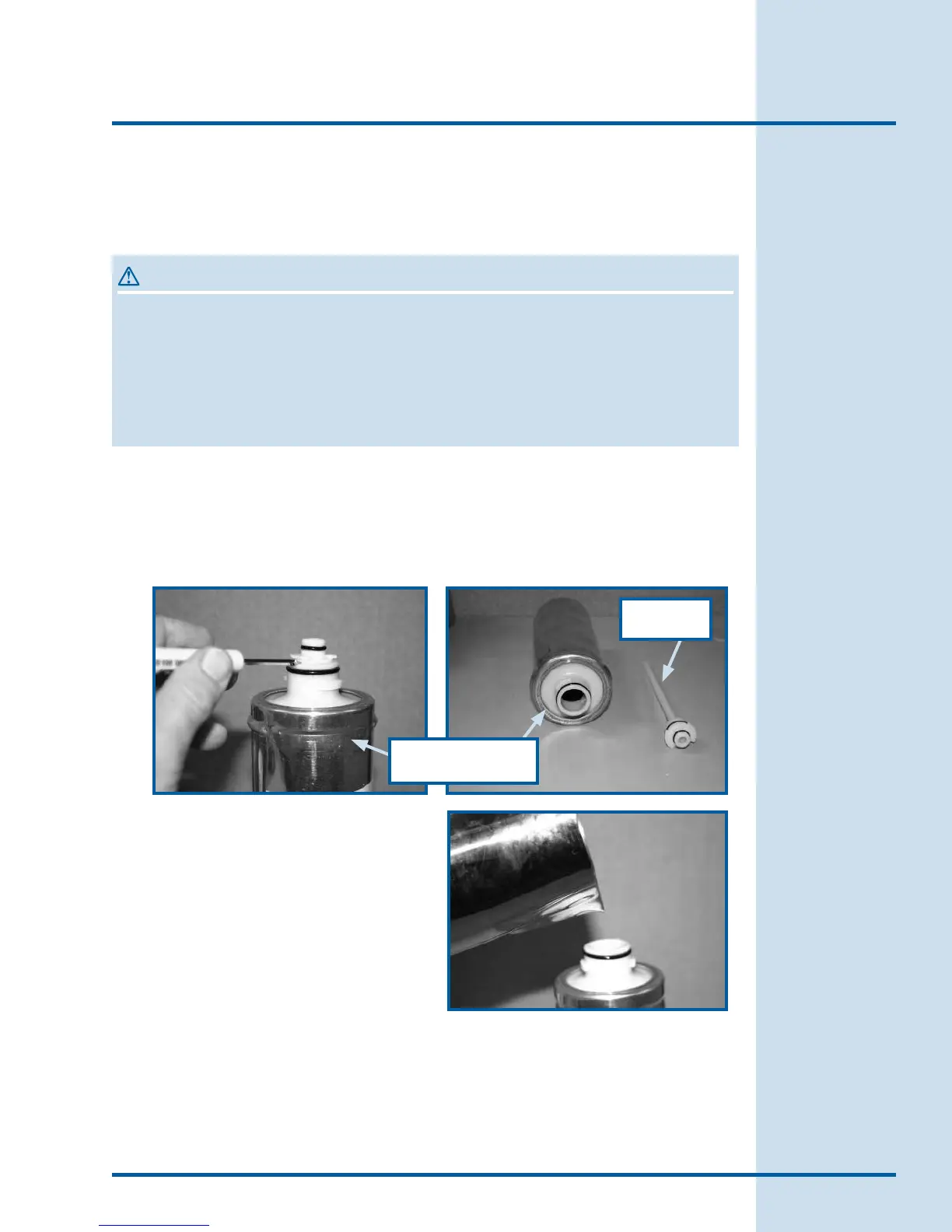
Remove the divider insert from the flushing cartridge with a small
screw driver.
Dissolve one packet of Puly
Decalcifying Powder in 12 ounces
of warm filtered water. Use a
measuring cup.
Fill the flushing cartridge with the
solution and top it off with filtered
water. Reinstall the divider insert.
1.
2.
3.
WARNING
In case of power loss, or if the appliance is accidentally switched o during
cleaning:
Turn the coffee maker switch back on.
The appliance display will read “Please Wait Heating”.
When “Machine Ready” appears on the display, push the Decaf Coffee
button again to finish the cleaning cycle.
•
•
•
Flushing Cartidge
Divider
Insert
Care & Cleaning








 To Next Page