77
4. Operation
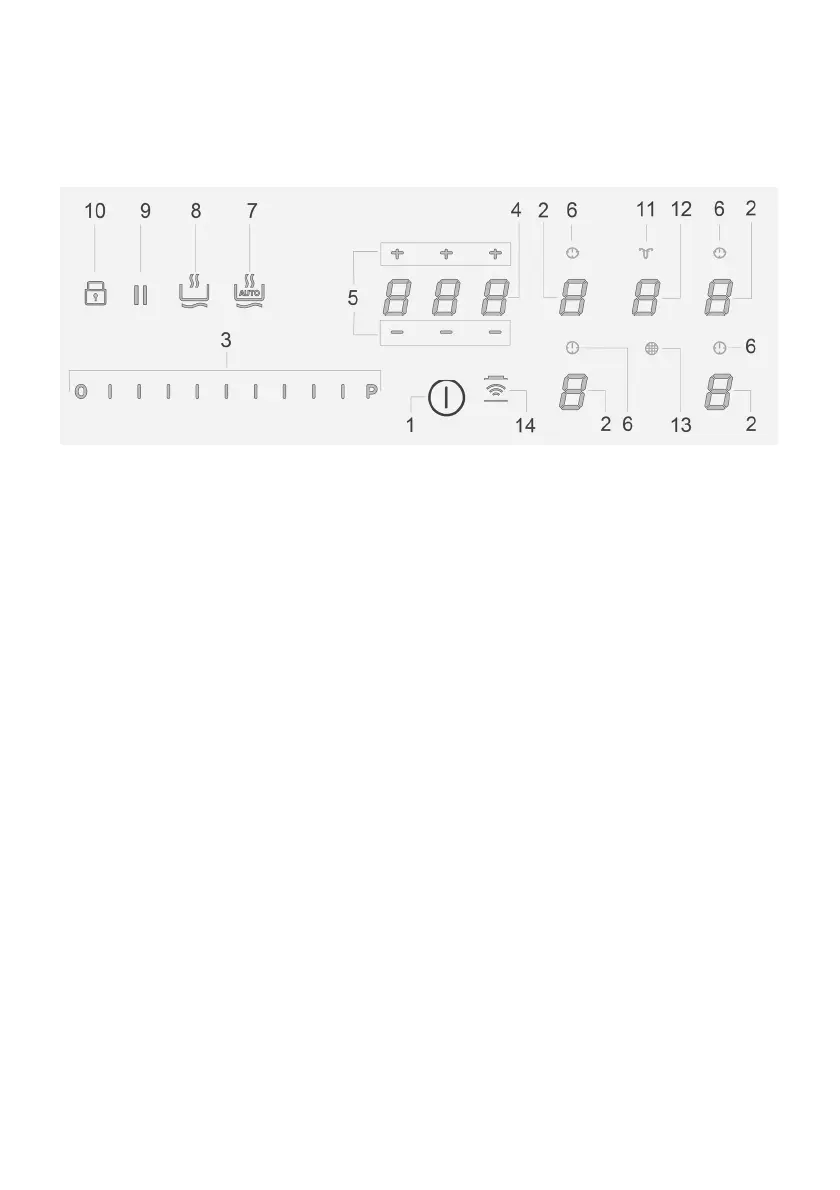
Control panel
Note: To select the commands, simply touch (press) the symbols representing them
Keys / Display
1. ON/OFF of the hob/extractor
8. Warming Function activation
2. Cooking zone selection 9. Pause
Cooking zone display
10. Key Lock
3. Increase/Decrease of Power Level and Extraction Powe
11. Indicator Extractor active
Display of Power Level and Extraction Powe
ctivation Filter Saturation Indicato
4.
ctivation “STAND_ALONE” time
12. Extractor Selection/Activation
Display : “STAND_ALONE” Timer / Cooking Zones Timer
Extractor Display
5. Increase/Decrease time Timer “STAND_ALONE” timer /
Cooking Zones Timer
Display saturation carbon/ceramic Filter
Grease
filter
6.
ctivation of Cooking Zones Time
13. Reset Filter Saturation
Indicator of Cooking Zones Timer a
tive
14.
ctivation of extractor automatic function
7.
utomatic Heat Up Activation



 To Next Page