EasyManua.ls Logo

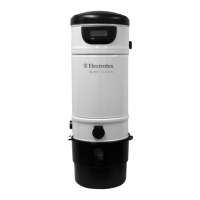
Electrolux SC385 LCD - User Manual

Electrolux SC385 LCD
4 pages
Print Icon
To Next Page IconTo Next Page
Loading...
Beam Central Vacuum Systems
PLATINUM LCD
INSTRUCTION MANUAL
Read This Manual Thoroughly Before Use
MAIN SCREEN
The main screen is shown when the system is
connected to an electrical outlet. This is the
screen displayed in regular operations mode with full system
performance. The system performance plus local time and
temperature can be viewed from the Main Screen.
Along the bottom of the screen the following icons are
displayed from left to right, the Power( ) icon, the Left( ) and
Right( ) Toggle Arrow icons and the Enter ( ) icon. To
scroll through the LCD menus, the button directly below each
corresponding icon executes the navigational feature.
USER SETUP
Your LCD enabled power unit provides the ability to customize
the temperature,(Celcius or Fahrenheit) and time formats,(12-
hour or 24-hour). Formats can be customized using the
USER SETUP menu. To enter the USER SETUP menu, press
the <Enter> button.
Temperature Customization
Use the Left and Right toggle buttons to select the
temperature format of either C or F. Once the correct format
has been selected, press the <Enter> button to proceed to the
next screen.
Time Format Customization
Use the Left and Right toggle arrows to select the temperature
format of either 12 or 24 hours. Once the correct format has
been selected, press the <Enter> button to proceed to the next
screen.
Time Setting
The time can be changed by using the Left and Right toggle
buttons. The  rst number  eld in the display is underlined with
a bar, indicating that it can be adjusted with the toggle buttons.
Press the <Enter> button to proceed to the next number  eld.
Review User Setup Settings
The next screen displays the temperature and time with the
user selected formats. Press the <Enter> button to return to
the Main Screen
Power Button
Toggle Buttons
Enter Button
Question and Answer IconNeed help?

Do you have a question about the Electrolux SC385 LCD and is the answer not in the manual?

Summary

Main Screen and User Setup

User Setup Navigation

Access and navigate the USER SETUP menu to customize system settings like temperature and time formats.

Temperature and Time Customization

Configure temperature units (C/F) and time display (12/24 hour) through dedicated menu options.

Review Setup Settings

View and confirm the selected user setup configurations before returning to the main display.

System Checks and Performance Monitoring

Dirt Receptacle Status

Indicates the dirt receptacle does not currently require emptying.

Airflow Performance Indicators

Displays system airflow levels; fewer bars suggest reduced performance due to filter load or wear.

Motor and Electrical System Status

Confirms that all electrical and motor components are functioning correctly.

Error Condition Check

Confirms no error conditions have been encountered, negating the need for immediate service.

System Run Time Display

Shows the total accumulated operating hours for the power unit.

System Alerts and Error Indicators

Flashing Main Screen Alert

Indicates an over-current situation; the system attempts automatic recovery.

Dirt Receptacle Emptying Alert

Displays a sad face with a bucket icon when the dirt receptacle needs to be checked and possibly emptied.

Performance Restriction Alert

Shows reduced airflow (2 or fewer bars) or flashing bars indicating urgent attention needed for blockages or wear.

Motor and Service Alerts

Motor Shutdown Due to Electrical Fault

Indicates motor shutdown from an electrical fault, with an attempt at automatic reset.

Service or Maintenance Required

Signals a failure requiring professional repair or 500-hour maintenance for motor brushes and filter.

Summary

Main Screen and User Setup

User Setup Navigation

Access and navigate the USER SETUP menu to customize system settings like temperature and time formats.

Temperature and Time Customization

Configure temperature units (C/F) and time display (12/24 hour) through dedicated menu options.

Review Setup Settings

View and confirm the selected user setup configurations before returning to the main display.

System Checks and Performance Monitoring

Dirt Receptacle Status

Indicates the dirt receptacle does not currently require emptying.

Airflow Performance Indicators

Displays system airflow levels; fewer bars suggest reduced performance due to filter load or wear.

Motor and Electrical System Status

Confirms that all electrical and motor components are functioning correctly.

Error Condition Check

Confirms no error conditions have been encountered, negating the need for immediate service.

System Run Time Display

Shows the total accumulated operating hours for the power unit.

System Alerts and Error Indicators

Flashing Main Screen Alert

Indicates an over-current situation; the system attempts automatic recovery.

Dirt Receptacle Emptying Alert

Displays a sad face with a bucket icon when the dirt receptacle needs to be checked and possibly emptied.

Performance Restriction Alert

Shows reduced airflow (2 or fewer bars) or flashing bars indicating urgent attention needed for blockages or wear.

Motor and Service Alerts

Motor Shutdown Due to Electrical Fault

Indicates motor shutdown from an electrical fault, with an attempt at automatic reset.

Service or Maintenance Required

Signals a failure requiring professional repair or 500-hour maintenance for motor brushes and filter.

Electrolux SC385 LCD Specifications

General IconGeneral
BrandElectrolux
ModelSC385 LCD
CategoryCentral Vacuum Systems
LanguageEnglish

Related product manuals