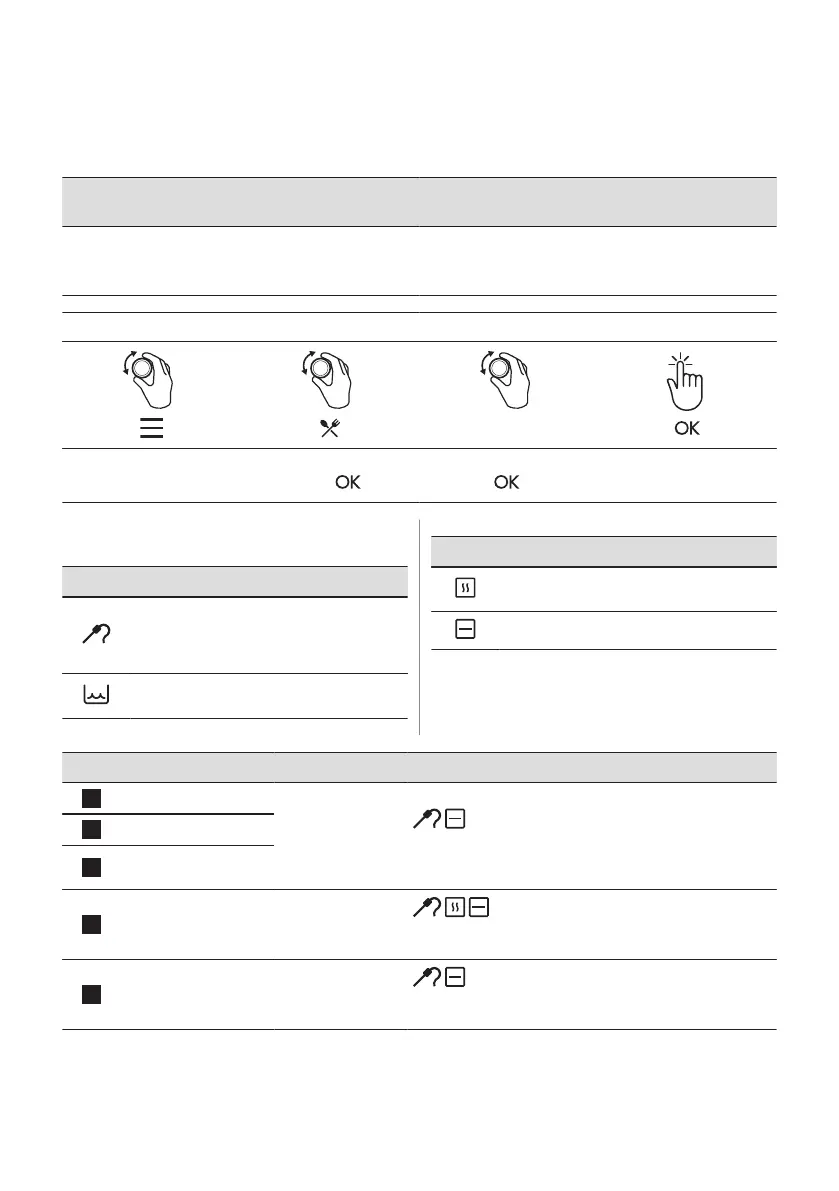
7.4 How to set: Assisted Cooking
Every dish in this submenu has a recommended heating function and temperature. Use the
function to prepare a dish quickly with default settings. You can also adjust the time and the
temperature during cooking.
For some of the dishes you can also cook
with:
The degree to which a dish is cooked:
• Food Sensor • Rare
• Medium
• Well done
Step 1 Step 2 Step 3 Step 4
P1 - P45
Enter the menu. Select Assisted Cooking.
Press .
Select the dish. Press
.
Insert the dish to the oven.
Confirm setting.
7.5 Assisted Cooking
Legend
Food sensor available. Place the Food
sensor in the thickest part of the dish.
The appliance turns off when the set Food
sensor temperature is reached.
The amount of water for the steam func‐
tion.
Legend
Preheat the appliance before you start
cooking.
Shelf level.
The display shows P and a number of the
dish that you can check in the table.
Dish Weight Shelf level / Accessory
1
Roast Beef, rare
1 - 1.5 kg; 4 - 5 cm
thick pieces
2; baking tray
Fry the meat for a few minutes on a hot pan. Insert to the
appliance.
2
Roast Beef, medium
3
Roast Beef, well
done
4
Steak, medium 180 - 220 g per
piece; 3 cm thick
slices
3; roasting dish on wire shelf
Fry the meat for a few minutes on a hot pan. Insert to the
appliance.
5
Beef roast / braised
(prime rib, top round,
thick flank)
1.5 - 2 kg
2; roasting dish on wire shelf
Fry the meat for a few minutes on a hot pan. Add liquid.
Insert to the appliance.
ENGLISH 137







 To Next Page