If the drying cycle is finished, the symbol
appears on the display. If the
Buzzer (Signal) option is activated, the
acoustic signal sounds intermittently for 1
minute.
If you do not turn off the
appliance, the anti-crease
phase starts (not active with
all programs). Flashing
symbol signals the execution
of the anticrease phase.
Laundry can be removed
during this phase.
To remove the laundry:
1. Push the On/Off (Ein/Aus) button
for 2 seconds to turn the appliance
off.
2. Open the appliance door.
3. Remove the laundry.
4. Close the appliance door.
10. HINTS AND TIPS
10.1 Ecological hints
• Spin the laundry well before drying.
• Do not exceed the load sizes which
are specified in the programs chapter.
• Clean the filter after each drying
cycle.
• Do not use fabric softener to wash
and then dry. In the tumble dryer
laundry becomes soft automatically.
• Use distilled water like that used for
steam ironing. If it is necessary, clean
the distilled water before (e.g. with a
coffee filter) to remove any particles.
• Always keep the airflow slots at the
bottom of the appliance clear.
• Make sure there is good airflow where
the appliance is to be installed.
10.2 Adjustment of default
dryness level
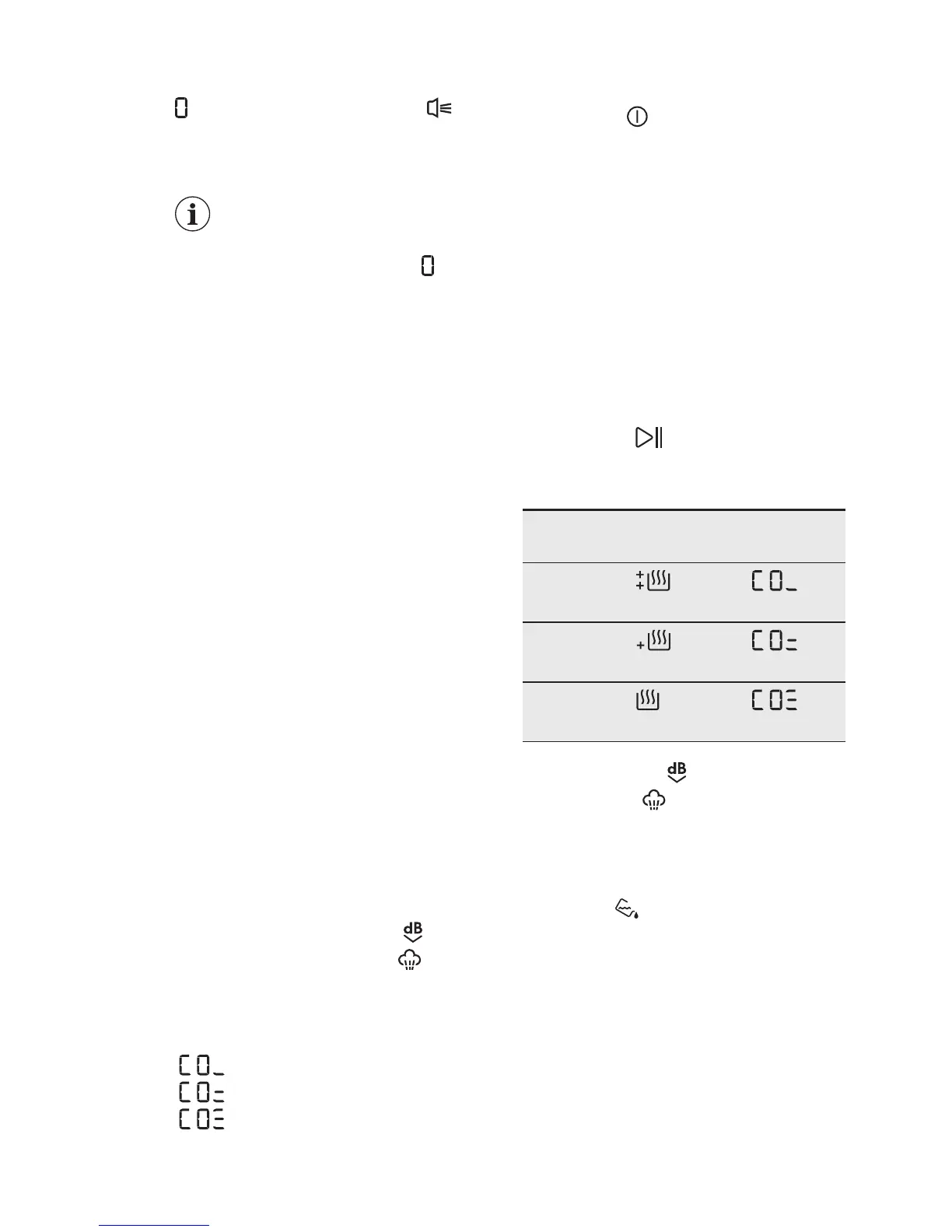
To change the default dryness level:
1. Turn the appliance on.
2. Select 1 of the available programs.
3. Touch and hold down the Extra
Silent (Extra Leise) and
Steam
Load (Dampf) buttons at the same
time.
One of the symbols appears on the
display:
- Maximum dryness
- Extra dryness
- Standard dryness
4.
Touch the Start/Pause button
repeatedly until you reach the
desired dryness level.
Dryness
level
Display symbol
Maximum
dryness
Extra dry‐
ness
Standard
dryness
5. To memorise the setting touch and
hold down the Extra Silent (Extra
Leise) and Steam Load (Dampf)
buttons at the same time for
approximately 2 seconds.
10.3 Deactivating the tank
indicator
The water container indicator is activated
by default. It illuminates at the end of the
drying cycle or during the cycle if the
water reservoir is full. If the draining kit is
installed the water container is drained
automatically and the indicator can be
deactivated.
To deactivate the indicator:
1. Turn the appliance on.
2. Select 1 of the available programs.
www.electrolux.com18



 To Next Page