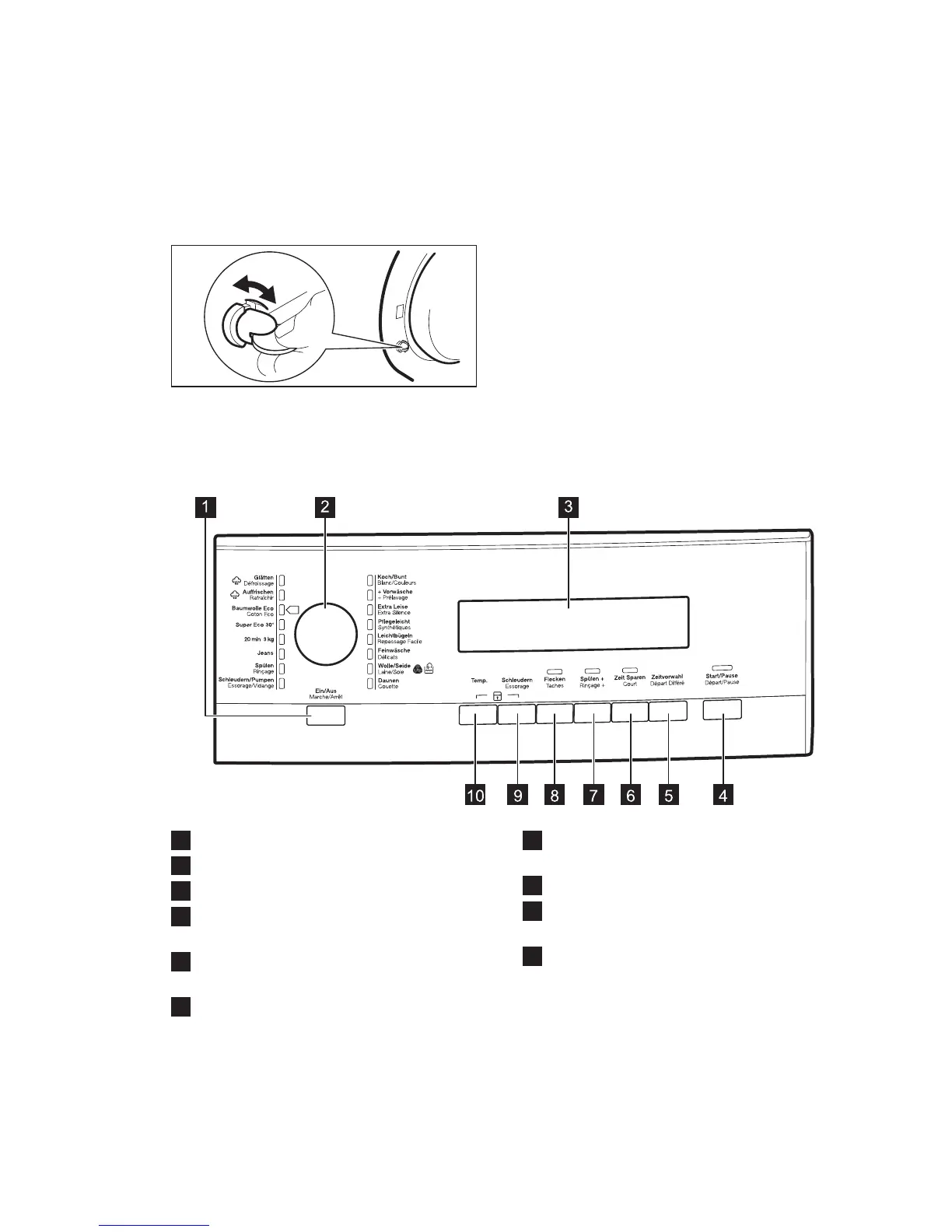
3.2 How to activate the child
safety device
This device prevents children or pets to be
closed in the drum.
Turn the device clockwise, until the groove
is horizontal.
You cannot close the door.
To close the door, turn the device
anticlockwise until the groove is vertical.
3.3 Fixing plate kit (4055171146)
Available from your authorized dealer.
If you install the appliance on a plinth,
secure the appliance in the fixing plates.
Read carefully the instructions supplied
with the accessory.
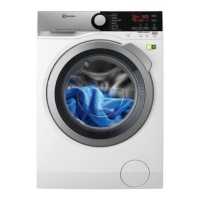
4. êONTROL PANEL
4.1 êontrol panel description
1
On/Off button (Ein/Aus - Marche/Arrt)
2
Programme knob
3
Display
4
Start Pause button (Start/Pause -
Dpart/Pause)
5
Delay start button (Zeitvorwahl -
Dpart Diffr)
6
Time save button (Zeit Sparen - êourt)
7
Extra rinse button (Spülen + - Rinçage
+)
8
Stain button (Flecken - Taches)
9
Spin reduction button (Schleudern -
Essorage)
10
Temperature button (Temp.)
www.electrolux.com6




 To Next Page