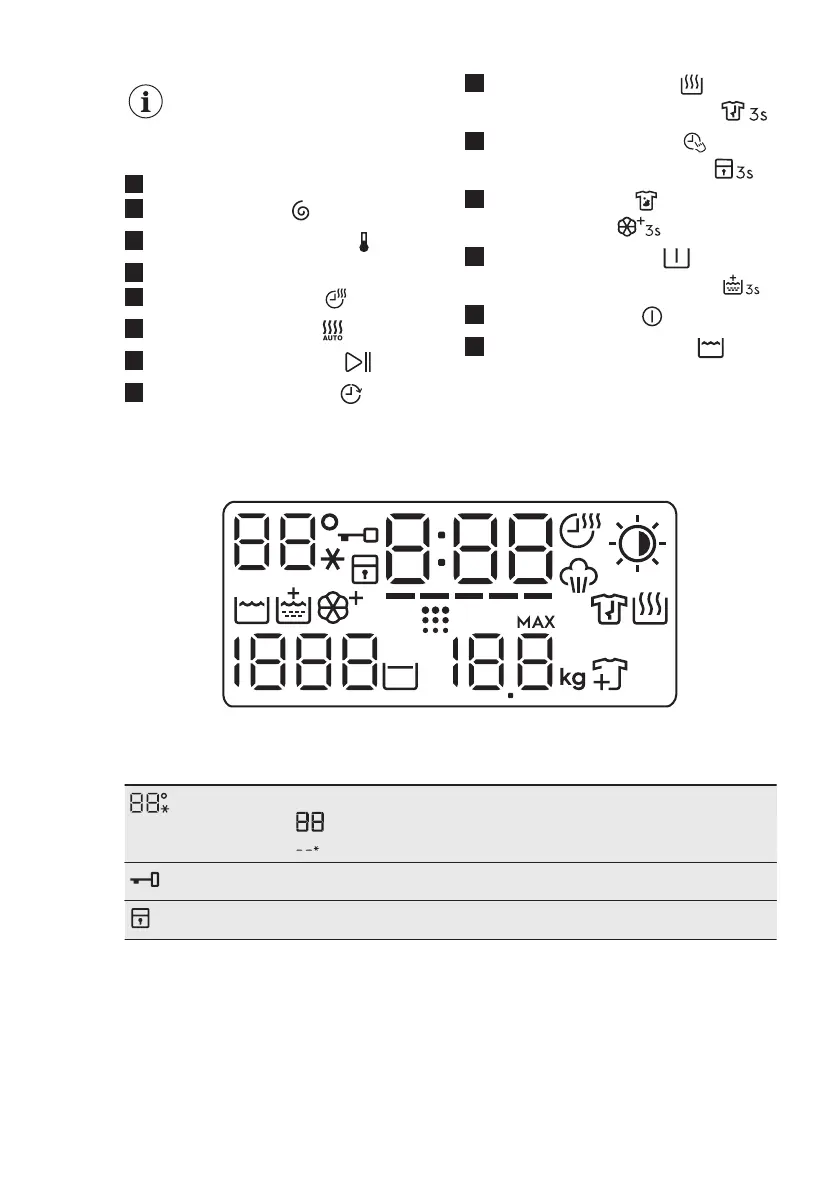
The permanent options are
set by holding pressed the
relative button for at least 3
seconds.
1
Programme dial
2
Spin touch button
3
Temperature touch button
4
Display
5
Time Dry touch button
6
Auto Dry touch button
7
Start/Pause touch button
8
Delay Start touch button
9
Mode - Dry touch button and
permanent Anti-crease option
10
Time Same touch button and
permanent Child Lock option
11
Stain touch button and permanent
Soft Plus option
12
Prewash touch button and
permanent Extra Rinse option
13
On/Off push button
14
Mode - Wash touch button
5.2 Display
The Temperature area:
Temperature indicator .
Cold water indicator.
Door locked indicator.
Child safety lock indicator.
www.electrolux.com18



 To Next Page