This document describes the US-HW1108 air cooler, a multi-functional appliance designed for cooling, humidifying, and air purification.
Function Description
The US-HW1108 operates on the principle of cool humidification. It draws cool water from a water tank using a pump or synchronous motor, which then flows through a wetted pad. A rotational wind wheel blows humid cool air around the wetted pad, utilizing water evaporation to achieve cooling.
In addition to cooling, the device incorporates ice crystal refrigeration and air humidifying technology. This helps to lower the temperature from the air vent, raise relative humidity, and prevent air drying.
The appliance also features an Anion function, which purifies and sterilizes the air by generating negative ions.
For air delivery, the unit can swing its blades automatically to deliver wind at a horizontal wide angle.
Important Technical Specifications
- Model No.: US-HW1108
- Rating Power: 120V~60Hz
- Fan Power: 75W
- Max Water Injection Rate: 8L
Usage Features
The US-HW1108 offers several user-friendly features:
- Control Panel: The device has a touch PCB panel on top for operation. Pressing a function point triggers a "Bi" sound.
- ON/OFF: A dedicated button starts and stops the appliance.
- Speed Settings: It offers three fan speeds: LOW, MID, and HIGH.
- Modes: Users can choose between Normal wind, Natural wind, and Sleeping wind modes, which cycle through sequentially.
- Swing Function: This feature enables automatic horizontal and vertical wind oscillation, which can be toggled on or off.
- Anion Function: Activates the anion generator for air purification. This function can also be toggled.
- Timer: A 12-hour timer design allows for scheduled operation.
- Cool Function: When frozen ice crystal boxes are added to the water tank, this function helps to further lower the temperature of the air vent. It can be activated or deactivated.
- Remote Control: A far-range remote control is included, offering the same functions as the control panel. It requires two AAA batteries. Users are advised not to mix old and new batteries and to remove batteries during long periods of non-use.
- Ice-Crystal Box Usage: The ice-crystal box helps to keep the water cool by absorbing heat. To use, fill the box with water (not full) and freeze it in a refrigerator. Then, open the door of the appliance and place the frozen box into the water tank. The device comes with two ice-crystal boxes for circular use.
Assembling and Watering
- Assembling Castors: Place the appliance on a flat surface, retrieve the wrench from the foam box, and assemble the castors. Note that the back castor has a brake, while the front one does not.
- Watering: Push the key on the door, open it, and draw out the water tank to add water.
- Water Level: Pay attention to the water level. It should never exceed the "MAX" scale. When humidifying, the total water level should not fall below the "MIN" scale.
- Ice Crystal Box: If using ice or frozen air crystal boxes to enhance cooling, ensure the total water level (including the boxes) does not exceed the "MAX" scale.
Maintenance Features
Regular cleaning and maintenance are crucial for the appliance's performance and longevity. Always cut off the power supply before cleaning.
- Air Filter Screen Cleaning:
- Cut off the power supply.
- Pull the handle of the air filter screen to remove it.
- Clean the screen with neutral detergent and a banister brush, then rinse with clear water.
- Reinstall the screen.
- Wetted Pad Cleaning:
- Cut off the power supply.
- Remove the air filter screen.
- Draw the wetted pad from its support.
- Clean the wetted pad with neutral detergent and a banister brush, then rinse with clear water.
- Reinstall the wetted pad horizontally to prevent leaking.
- Water Tank Cleaning:
- Cut off the power supply.
- Open the door and take out the water tank.
- Clean the tank with neutral detergent and wash it with clear water.
- Reinstall the tank.
- Note: The water in the tank can easily metamorphose and develop an odor in summer, so frequent water renewal is recommended.
- Shell Cleaning:
- Clean the shell with neutral detergent and a soft cloth.
- Do not leave any water on the control panel surface.
Cautions and Safety
- Use the appliance according to its rating voltage.
- Do not attempt to repair or remake the appliance yourself; it should be repaired by qualified personnel.
- Do not operate with wet hands.
- If the supply cord is damaged, it must be replaced by the manufacturer, its service agent, or similarly qualified persons to avoid a hazard.
- Switch off and unplug the appliance when not in use.
- Do not insert foreign objects into air outlets and inlets.
- Avoid using the appliance near explosive and combustible gases.
- Avoid long-term direct solar radiation.
- Use the appliance only on a flat surface.
- Do not use outdoors.
- Do not overturn the appliance. If it topples and contains water, unplug it immediately and send it for repair.
- Clean the appearance with a lightly damp cloth; do not use detergents or solutions, and do not rinse the appliance.
- Do not place air outlets near walls or curtains.
- Do not knock or shake the body during use, as it may cause automatic shutdown.
- This appliance is not intended for use by persons (including children) with reduced physical, sensory, or mental capabilities, or lack of experience and knowledge, unless supervised or instructed by a responsible person.
- Children should be supervised to ensure they do not play with the appliance.
- To avoid instability, fix the unit firmly according to the manual.
- Do not use this appliance in the immediate surroundings of a bath, shower, or swimming pool.
- If moving the unit after adding water, roll it gently to the desired position and activate the castors' brackets.
- Ensure the fan is switched off from the supply mains before removing the air filter screen.
- Always cut off the power supply when cleaning the appliance.
Troubleshooting
- No action:
- Causes: Power off or poor connection; power switch at the back of the body not pressed; "ON/OFF" key on the control panel not pressed.
- Solutions: Plug in the power cord and ensure good connection; press the power switch at the back of the body; press the "ON/OFF" key on the control panel.
- Poor effect of dedust:
- Causes: Air filter screen blocked with dust; air inlet blocked with foreign objects.
- Solutions: Purify the air filter screen; remove foreign objects from the air inlet.
For abnormal action or issues not resolved by the above methods, or problems caused by water ingress or foreign objects, contact customer service.

 Need help?
 General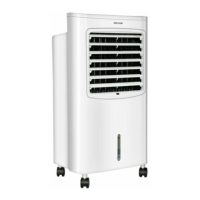

 To Next Page