13
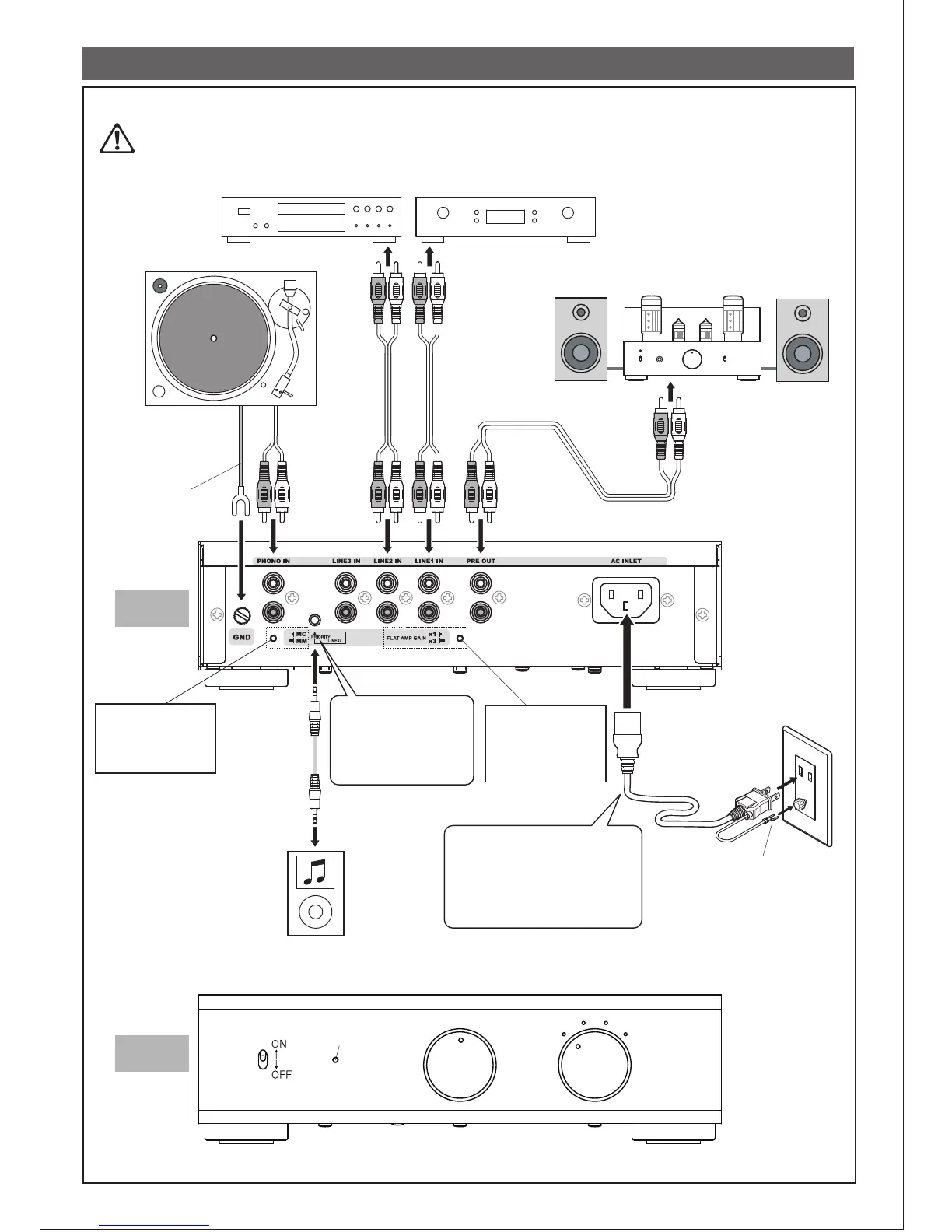
7. Connection
R
L
R
L
R
L
R
L
If the outlet is equipped with a
terminal, connect the ground
terminal to it.
Power indicator LED
Power SW
Input selector
Caution!
LINE1
LINE2
LINE3
PHONO
Ground wire
Stereo pin (RCA)
plug cord
Portable music player, etc
LINE3 IN is equipped
with a pin(RCA) jack and
a mini jack.
Mini jack has the priority.
After power ON, it blinks
32 times until it warms up.
* Cords and cables to connect devices are not included. Please prepare ones that match the devices you use.
Make sure to turn OFF the power of all the devices before connecting/disconnecting cords.
Stationary CD player, DA converter, Tuner, etc
Record player
* For a player with built in
equalizer, connect to
LINE IN.
* Some players do not
have one.
Power amp and speakers
Cartridge type
selector
Pressed :MC
Not pressed :MM
Stereo mini plug
(3-pole)
(without resistors)
Flat/Line amp part
Gain SW
Pressed : Approx. x1
Not pressed: Approx. x3
When the amp is used outside
Japan, make sure to set the VH
connector to appropriate position in
Page7 according to your local
voltage engironment, and use a plug
converter that matches the outlet of
your residence.
8500-02
AC cord
Plug into outlet
BACK
FRONT
Volume control


 To Next Page
 Loading...