eStat 761/762 400-132-028-A 11/6/07 1/3
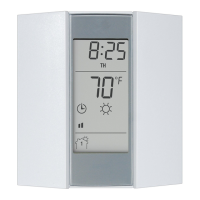
The elements eStat 761/762 programmable thermostats can be used
to control the ambient (room) temperature or the floor temperature,
depending on the models. The following models are available:
eStat 761
This model is designed to control the floor temperature. The temper-
ature sensor must be installed in the floor.
eStat 762
This model has two temperature sensors:
• One sensor is integrated in the thermostat to control the ambient
temperature.
• The other sensor must be installed in the floor to limit the floor
temperature.
n DAY/HOUR/MIN—Set the day and clock settings.
o PGM—Program the schedule (programs).
p MODE—Select the operating mode.
RETURN—To exit a function.
q To configure temperature setpoints:
Comfort, Economy and Vacation.
r Adjust the floor temperature limit (eStat 762 only).
s —Increase and decrease temperature.
t —Indicates the number of the current program
when Automatic mode is enabled.
u Current operating mode (auto / manual ). In Auto mode, the
program’s associated setpoint icon is also displayed ( ).
v Indicates the room OR floor temperature.
w % of heating time.
The thermostat displays the percentage of heating time required
to maintain the desired temperature. For example, is
displayed when heating is activated 40 percent of the time.
The eStat thermostat has two switches, located on the upper-left part
on the rear of the control module, which are used to set the following
options:
Early Start
When the Early Start function is enabled (disabled by default), the
eStat thermostat calculates the optimum system start time to obtain
the desired temperature by the set time. To enable this function:
Position switch #1 down.
Note: When this function is enabled, the system can
be activated before the program’s start time.
Temperature Display
By default, the eStat thermostat displays the temperature in °C. If you
wish to change to °F:
Position switch #2 up.
Note: When you switch from °C to °F or vice versa, the ,
and setpoints must be redefined.
n Refer to the installation guide of the power base.
o Insert the tabs at the top of the control module in the slots at the
top of the power base.
p Secure the control module using the captive screw underneath
the base.
n
Description
1.
Display
% of heating time 1 to 24% 25 to 49% 50 to 74% 75 to 99% 100%
p
Configure the Switches
2.
q
Installation
3.
Power base
Control module
eStat 761/762
User Guide
Programmable Thermostat
400-132-028-A (CJ Electric Elements TH132 F_AF 15-min eStat 761_762) ENG.fm Page 1 Monday, June 11, 2007 4:26 PM

 Need help?
 General

 To Next Page