Need help?
Do you have a question about the Elen B1 Series and is the answer not in the manual?
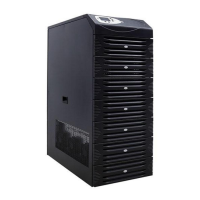
The B1 Series Uninterruptible Power Supply (UPS) is designed to protect electrical devices by providing a stable and continuous power supply. Manufactured with the latest technology, including Online Double Conversion UPS and Three-Level Inverter technologies, it ensures high efficiency and reliable operation. The UPS is available in a 10kVA power rating (7kW).
The B1 Series UPS operates in several modes to ensure continuous power. In Normal Mode, the rectifier and inverter units operate to generate a mains-independent, stable voltage and frequency, supplying the output via the bypass/inverter unit while charging batteries. When mains voltages and frequencies are outside tolerance limits, the UPS switches to Battery Mode, where the inverter unit operates on batteries to supply stable output voltage. The Bypass Mode transfers mains voltage to the output via the bypass line and bypass/inverter unit, typically used during malfunctions or warnings to ensure the load is supplied without interruption. Batteries are not charged in this mode, and output voltage will interrupt if mains power is lost. The Manual Bypass Mode allows the UPS to be separated from input energy, supplying loads directly from mains voltage for maintenance or in case of malfunction. This mode requires specific steps to ensure safety and prevent load malfunctions, including switching off input and battery circuit breakers.
The UPS features a front panel with LEDs and buttons for monitoring and control. LEDs indicate the status of mains, bypass, battery, normal operation, overload, and fault conditions. The Liquid Crystal Display (LCD) provides detailed operation information. Buttons allow for switching the UPS on/off, confirming/canceling tasks, entering/exiting warning lists, turning audio warnings on/off, browsing menu options, and reversing menu order.
For communication, the UPS includes an RS232 port for monitoring with UPSilon2000 software, allowing real-time voltage, current, battery information, and logging. An optional SNMP port enables advanced monitoring and management of multiple UPS units over a network, supporting real-time operation, logging, testing, and remote control. User outputs are available for remote monitoring of "Low Battery" and "Mains Failure" warnings via audible or visual devices, enhancing surveillance in environments where consistent monitoring is not possible.
The B1 Series UPS is designed for ease of use and safety. It requires installation in an access-restricted room and proper grounding. Users must adhere to load weight recommendations for safe handling, using appropriate devices for loads over 55 kg. The UPS should not be operated in environments with extreme temperatures, humidity, liquids, or foreign substances, and ventilation grids must not be clogged. Direct sunlight or heat sources should be avoided.
Switching on the UPS involves activating the Input and Battery Circuit Breakers, then pressing and holding the ON/OFF button. The system provides visual feedback via LEDs and audible warnings for various conditions, such as mains voltage/frequency limits. Switching off requires safely shutting down loads, entering bypass mode, and then pressing and holding the ON/OFF button until the display is off, followed by switching off output, battery, and input CBs.
The UPS performs an Automatic Battery Test every 30 days in normal mode to diagnose battery condition. This test can also be run after long power outages, though results should be disregarded if batteries are not charged for at least 10 hours. The user menu provides instant information on mains, bypass, output, inverter, battery charge voltage and capacity, and DC bus voltages. Battery charge voltage is 270V for 20 batteries and 405V for 30 batteries.
The UPS features Audio Warnings for various events, including battery high/low, overload, heat, DC bus issues, mains/bypass high/low, inverter fault, and overcurrent. A detailed Warnings Table provides definitions for events such as Battery Fault, Charger Failure, Emergency Stop, and various inverter/rectifier faults, indicating how the UPS operation mode is affected (e.g., remains unchanged, switches to bypass, battery, or normal mode, or shuts down output).
Maintenance of the B1 Series UPS must be performed by authorized service personnel only. Before any maintenance, the UPS must be completely off, and mains and battery connections disconnected, with batteries moved away. Regular cleaning of electronic boards, fans, and ventilation holes is recommended. The UPS body should be cleaned with a soft, moist cloth.
Checks should include the sturdiness of cable connections, screws, and sockets, as well as board supply voltages and components. Battery voltages should be measured separately. Calibration and adjustments should be checked for accuracy. The environment of the UPS room (dust, heat, temperature) should also be monitored. All maintenance activities must comply with the 'Important Safety Information' and 'Installation' instructions provided in the manual. Troubleshooting guidelines are provided to address common issues such as the UPS not switching on, 'Battery Mode' warnings, consistent audible warnings, overload, and low battery runtime, offering possible causes and solutions before contacting technical service. Cable connections and circuit breaker checks should also be performed by authorized personnel.

 To Next Page
 General