12
1. At the rst time when you install battery and switch on, all default parameters
are set as follow: Gender - Male; Height - 165 cm; Age - 25.
2. Parameters can be set in the following range:
Memory Gender Height Age
1~12 male/female 100~250 cm 10 ~ 100
3. Parameter setting
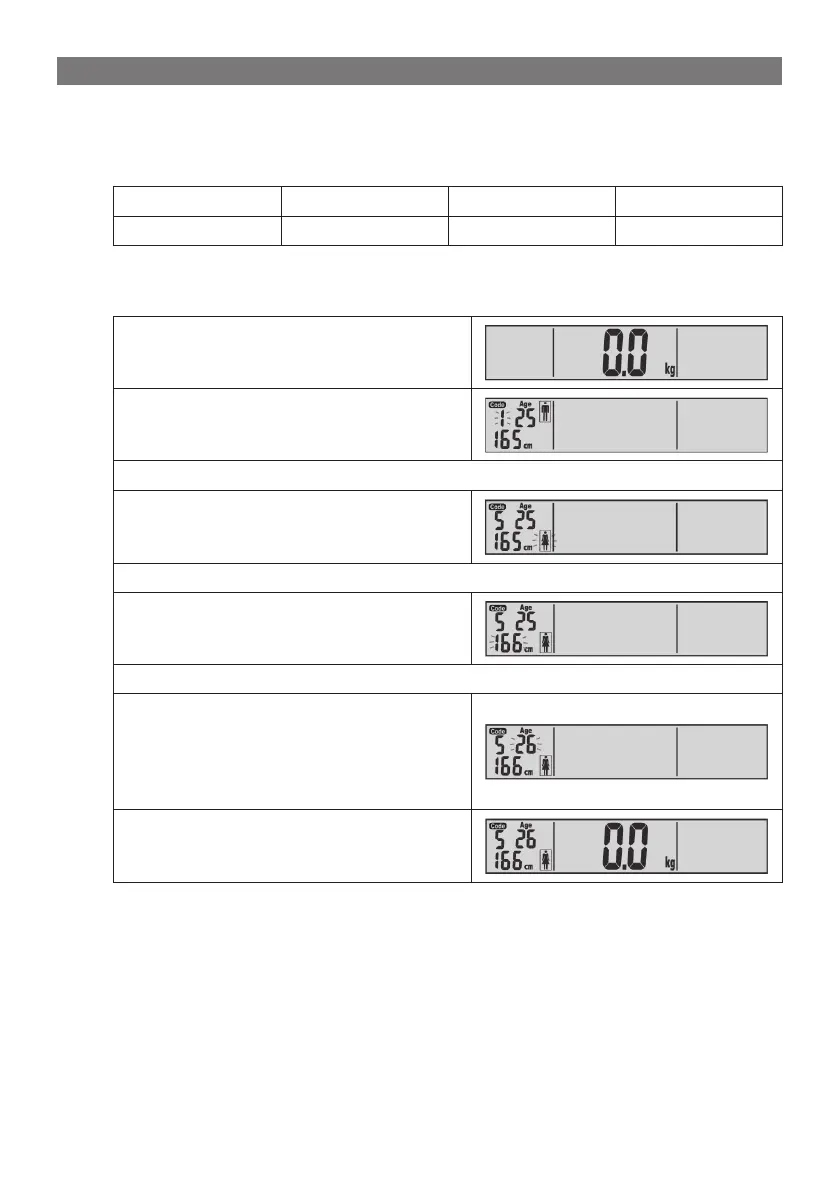
Example: the 5th user, female, 166 cm, 26 years old can set her parameters as
follow:
A. Press “SET” to switch on the unit.
B. Press ▲/▼ to select user code.
C. Press SET to conrm and switch to next setting.
D. Press ▲/▼ to select gender.
E. Press SET to conrm and switch to next setting.
F. Press ▲/▼ to select height.
G. Press SET to conrm and switch to next setting.
H. Press ▲/▼ to select age.
Slightly tap on the scale platform by
your hand or your foot.
Your personal parameters have
been saved).
I. LCD shows last measuring record of
the 5th user (No record in the rst
time of use).
Note:
• Duringtheparameter-setting,youcanalwaystapontheweighingplatform
anytimetosetthescaletozero-point.
• You can start measuring body fat/hydration based on the parameters just
set/updatedintothescale.
• After completing the setting cycle, you can always continue on pressing
againtogothroughanothersettingcycleofallparameters.
To ensure accuracy, please remove your shoes & socks before stepping on
scale.
1. You can set Your parameters, as described in previous chapter or load al
-



 To Next Page