39
IMPORTANT!
To get the best performance from your dishwasher, read all operat-
ing instructions before using it for the first time.
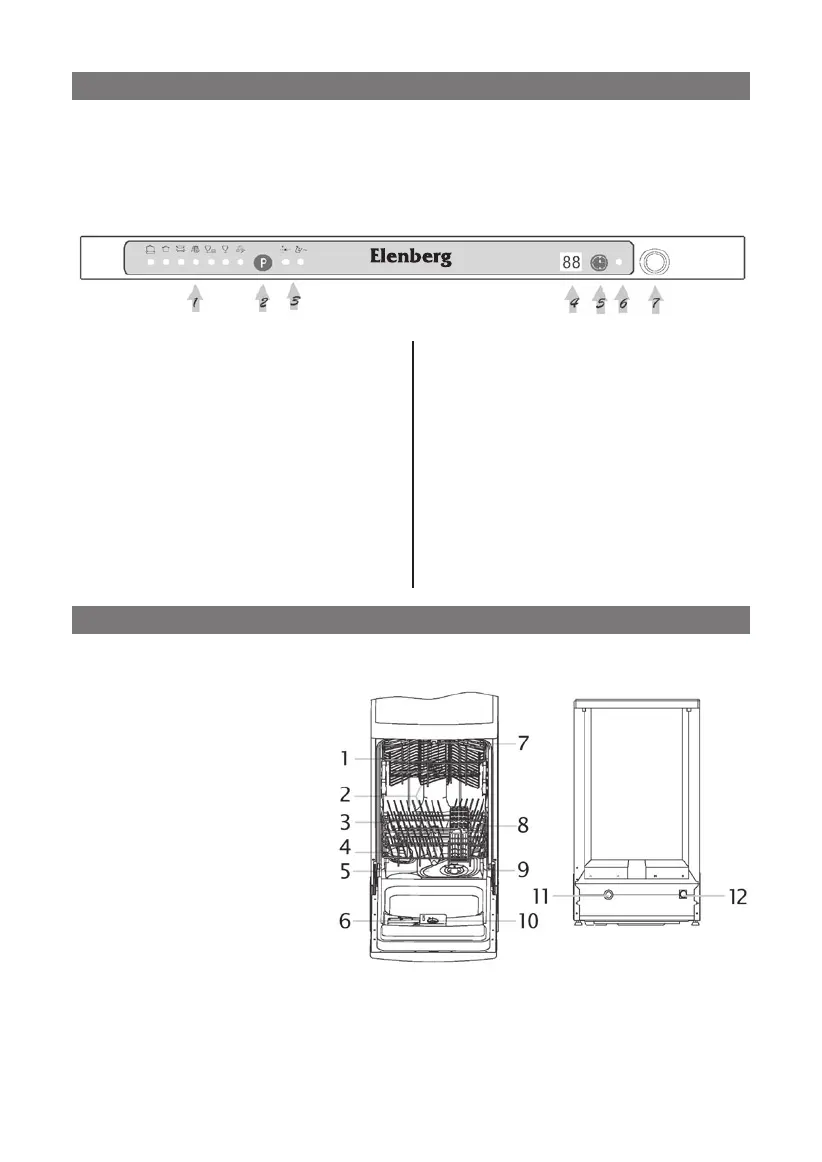
Control Panel
1. Programs indicator.
4.
Display Window: temperature,
delay time
.
2.
Program Button: pressed to choose
desired program, whose program in-
dicator light will come on
.
5. Delayed Start Button: press
this button to set the delayed
hours for washing.
3. Rinse Aid indicator light: comes
on when there is not enough rinse
agent or softener.
6. Power supply indicator light:
comes on when the power is on.
7. Power Switch
Dishwasher Features
1. Upper Basket
2. Spray Arms
3. Lower Basket
4. Water Softener
5. Main Filter
6. Detergent
dispenser
7. Cup Shelf
8. Silverware Basket
9. Coarse Filter
10. Rinse Aid Dispenser
11. Drain pipe
connector
12. Inlet pipe connector
CONTROL PANEL
DISHWASHER FEATURES
DW-9325



 To Next Page