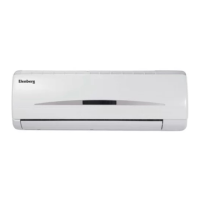
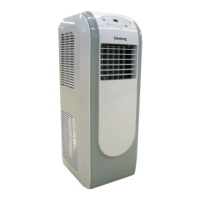
This document describes the Elenberg SPT-7070 split-type room air conditioner, providing details on its function, technical specifications, usage, and maintenance.
Function Description
The Elenberg SPT-7070 is a split-type room air conditioner designed for cooling and dehumidifying indoor spaces. It operates with an indoor unit and an outdoor unit, connected by piping and a drain hose. The device offers several operating modes: AUTO, COOL (cooling), DRY (dehumidification), and FAN (ventilation). It can be controlled manually via a button on the indoor unit or remotely using a dedicated remote controller.
In AUTO mode, the air conditioner automatically selects either cooling or fan-only operation based on the user-selected temperature and the current room temperature. It aims to maintain the room temperature around the set point. If the AUTO mode is uncomfortable, users can manually select other modes.
The COOL mode provides active cooling, with a recommended room temperature range of 21°C and above for optimal comfort. The outdoor temperature range for cooling is 15°C to 43°C.
The DRY mode is designed for dehumidification. In this mode, the unit automatically selects the drying operation based on the difference between the set temperature and the actual room temperature. Dehumidification is achieved by repeatedly turning the cooling operation or fan on and off. The fan speed is set to LOW in this mode. The optimal room temperature for drying is 10°C to 32°C, and the outdoor temperature is 11°C to 43°C.
The FAN mode provides ventilation without cooling or heating. Temperature settings are not applicable in this mode.
The air conditioner also features a SLEEP function, which, when activated during COOL or AUTO operation, gradually increases the set temperature by 1°C per hour for the first two hours, after which it stabilizes. The fan speed is automatically controlled in this mode.
A TIMER function allows users to set specific times for the unit to turn ON or OFF, or both. The timer can be adjusted in 30-minute increments.
The unit includes air direction adjustment features, allowing users to control both horizontal and vertical airflow louvers. The vertical louver can be adjusted manually or automatically using the AIR DIRECTION button on the remote controller. The horizontal louver can be adjusted automatically using the SWING button.
Important Technical Specifications
Outdoor and Indoor Unit:
- Cooling capacity: 7000 Btu/h
- Refrigerant: R22/590 g
- Design pressure: 2.6 MPa
- Rated voltage: 220-240 V
- Rated frequency: 50 Hz
- Rated current: 3.5 A
- Rated input: 800 W
- Max. Current: 5.0 A
- Max. Input: 1000 W
- Outdoor unit resistance class: IP24
- Weight: 8.5 kg (Indoor), 26 kg (Outdoor)
Remote Control:
- Rated Voltage: 3.0 V (Alkaline dry batteries “LR03”) X2
- Lowest Voltage of CPU Emitting Signal: 2.0 V
- Transmission Distance: 8 m
The optimal operating conditions for the unit are:
- Cooling: Room temperature > 17°C, Outdoor temperature 15°C - 43°C
- Drying: Room temperature 10°C - 32°C, Outdoor temperature 11°C - 43°C
The unit is designed to operate with room relative humidity less than 80%. If humidity exceeds this, condensation may form on the indoor unit.
Usage Features
Control:
- Manual Operation: A manual control button on the indoor unit allows for temporary operation in AUTO, COOL, or OFF modes if the remote controller is unavailable or its batteries are exhausted. The default temperature in AUTO mode is 24°C.
- Remote Control: The remote controller provides comprehensive control over all functions, including mode selection (AUTO, COOL, DRY, FAN), temperature adjustment, fan speed (AUTO, LOW, MED, HIGH), timer settings (TIMER ON, TIMER OFF), and air direction (AIR DIRECTION, SWING).
- Display Panel: The indoor unit features a display panel with indicators for AUTO, DEFROST (for cooling models only), DIGITAL display for temperature settings, OPERATION (flashes on power-up, illuminates during operation), and TIMER (illuminates when timer is set).
Airflow Direction:
- Vertical Airflow: Adjustable via the AIR DIRECTION button on the remote control. The louver automatically adjusts to the desired direction.
- Horizontal Airflow: Adjustable via the SWING button on the remote control, allowing for automatic oscillation. Manual adjustment of the horizontal louver is not recommended as it may cause malfunction.
Safety Features:
- The unit has safety protection features that may activate if it operates outside the specified optimal conditions, causing abnormal function.
- A 3-minute compressor protection delay is activated when the compressor starts, preventing rapid cycling.
- Some models may feature an Auto-restart function, which automatically restores previous settings after a power failure. For units without this feature, the ON/OFF button must be pressed to restart operation after power is restored.
Important Usage Notes:
- Avoid prolonged exposure to direct airflow.
- Ensure proper ventilation when using the air conditioner with stoves or other heating devices to prevent oxygen deficiency.
- Do not use the air conditioner for non-specified purposes like preserving precision devices, food, or art objects, as this may damage them.
- Keep doors and windows closed during COOL and DRY modes for optimal performance.
- Do not place objects near air inlets or outlets, as this can reduce efficiency and potentially stop the unit.
- Do not operate the unit with the horizontal louver in a closed position.
- A 10-second sound from the horizontal louver upon initial power connection is normal.
- Lightning or nearby wireless telephone operation may cause malfunction; disconnect and reconnect power, then restart the unit.
Maintenance Features
Regular maintenance is crucial for the efficient and safe operation of the air conditioner.
General Cleaning:
- Before Cleaning: Always stop the air conditioner and disconnect it from the power supply before cleaning.
- Indoor Unit and Remote Controller: Wipe with a dry, soft cloth. For heavy soiling on the indoor unit, a cloth dampened with cold water can be used.
- Front Panel: The front panel of the indoor unit can be removed and washed with water, then dried thoroughly before reinstallation.
- Avoid Harsh Cleaners: Do not use chemically treated cloths, duster, benzine, thinner, polishing powder, or similar solvents, as these can damage the plastic surfaces.
Air Filter Cleaning:
- Frequency: Clean the air filter at least once every two weeks. A clogged filter reduces cooling efficiency.
- Procedure:
- Lift the indoor unit panel until it clicks into place.
- Grasp the air filter handle and lift it slightly to release it from the holder, then pull it downwards to remove it from the unit.
- Clean the air filter using a vacuum cleaner or water. If using water, ensure it is completely dry before reinstallation.
- Air Freshening Filter: Remove the air freshening filter from its support frame (installation and removal methods may vary by model). Clean it with a vacuum cleaner and dry it. Replace the air freshening filter every 4-5 months and clean it at least once a month.
- Reinstallation: Install the air freshening filter and then the air filter back into position.
Long-Term Idling:
- If the unit will not be used for an extended period, perform the following:
- Operate the fan for about half a day to dry the inside of the unit.
- Stop the air conditioner and disconnect power. Remove batteries from the remote controller.
- The outdoor unit requires periodic maintenance and cleaning by a dealer or service technician.
Troubleshooting:
- If the OPERATION indicator or other indicators flash rapidly (5 times per second) and power cycling does not resolve the issue, or if the fuse blows frequently, objects or water enter the unit, or the remote controller malfunctions, immediately stop the unit, disconnect power, and contact a service center.
- Common issues like power cuts, unplugged units, blown fuses, exhausted remote control batteries, incorrect timer settings, inappropriate temperature settings, blocked air filters, open doors/windows, or blocked air inlets/outlets are addressed with specific solutions in the manual.
- Users are explicitly warned not to attempt to repair the unit themselves and to always consult an authorized service provider for any repairs.
The design and specifications of the Elenberg SPT-7070 are subject to change without notice. The service life of the product is 3 years from the moment of sale, after which users should contact a service center for consultation regarding continued operation.

 Need help?
 General

 To Next Page