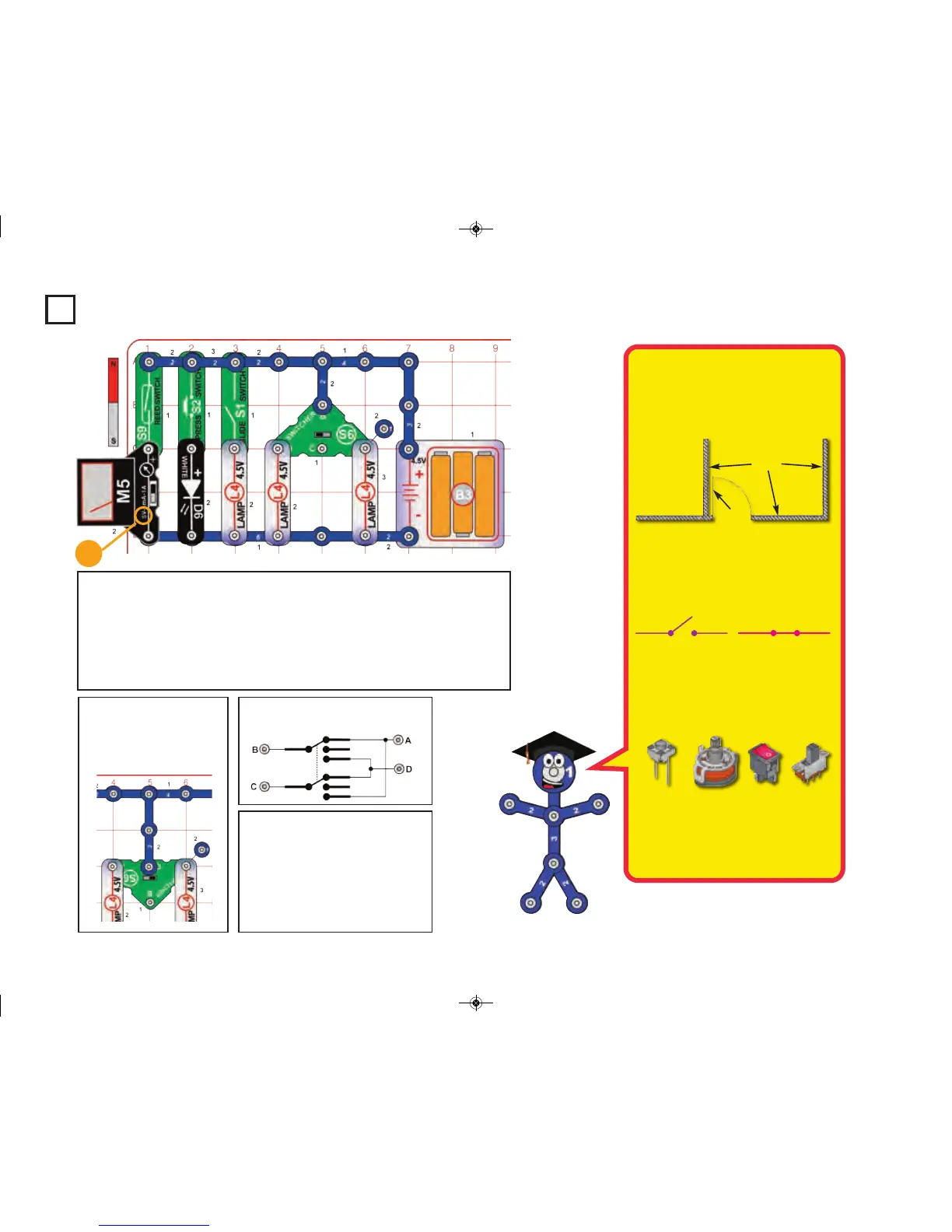
Project 8
Switches
Build the circuit, set the meter (M5) to the 5V setting, and initially set the switcher
(S6) to the middle position. Turn on each of the switches:
A. Hold the magnet near the reed switch (S9) to turn on the meter.
B. Push the press switch (S2) to turn on the white LED (D6).
C. Turn on the slide switch (S1) to turn on the left lamp (L4).
D. Set the switcher to the left position to turn on the center lamp.
E. Set the switcher to the right position to turn on the right lamp.
Name at least 10 things in your
home that use switches.
5V
Switches come in almost every shape
and size imaginable. There are mem-
brane, rocker, rotary, DIP, push button,
magnetic, and momentary types just to
name a few.
The “on” position of a switch is also
called the “closed” position. Similarly, the
“off” position is also called the “open” po-
sition. This is because the symbol for a
slide switch is similar to the symbol for a
door in an architect’s drawing of a room:
The electronics symbol for a simple slide
switch should be thought of as a door to
a circuit, which swings open when the
switch is off. The “door” to the circuit is
closed when the switch is on. This is
shown here:
Push Button
Computer
Keyboards
Rocker
Tools
Rotary
Selector Switch
on Appliances
Slide
Toys,
Household
Items
Walls
Door
Open Switch (turned off)
he current carrying capacity of a switch
depends on the contact material, size,
and the pressure between the contacts.
Closed Switch (turned on)
if you flip the switcher
(S6) around (as shown
below), how will it change
the circuit? (Try it.)
Note that the switcher’s connections look
like this:
-19-











 To Next Page