Once your baby is in the car seat and the eClip is securely in place, it’s
time to start monitoring.
As you drive your smartphone will display the eClip monitoring screen.
6. Time to Start Monitoring
7. eClip feature overview
1. Tap START MONITORING NOW.
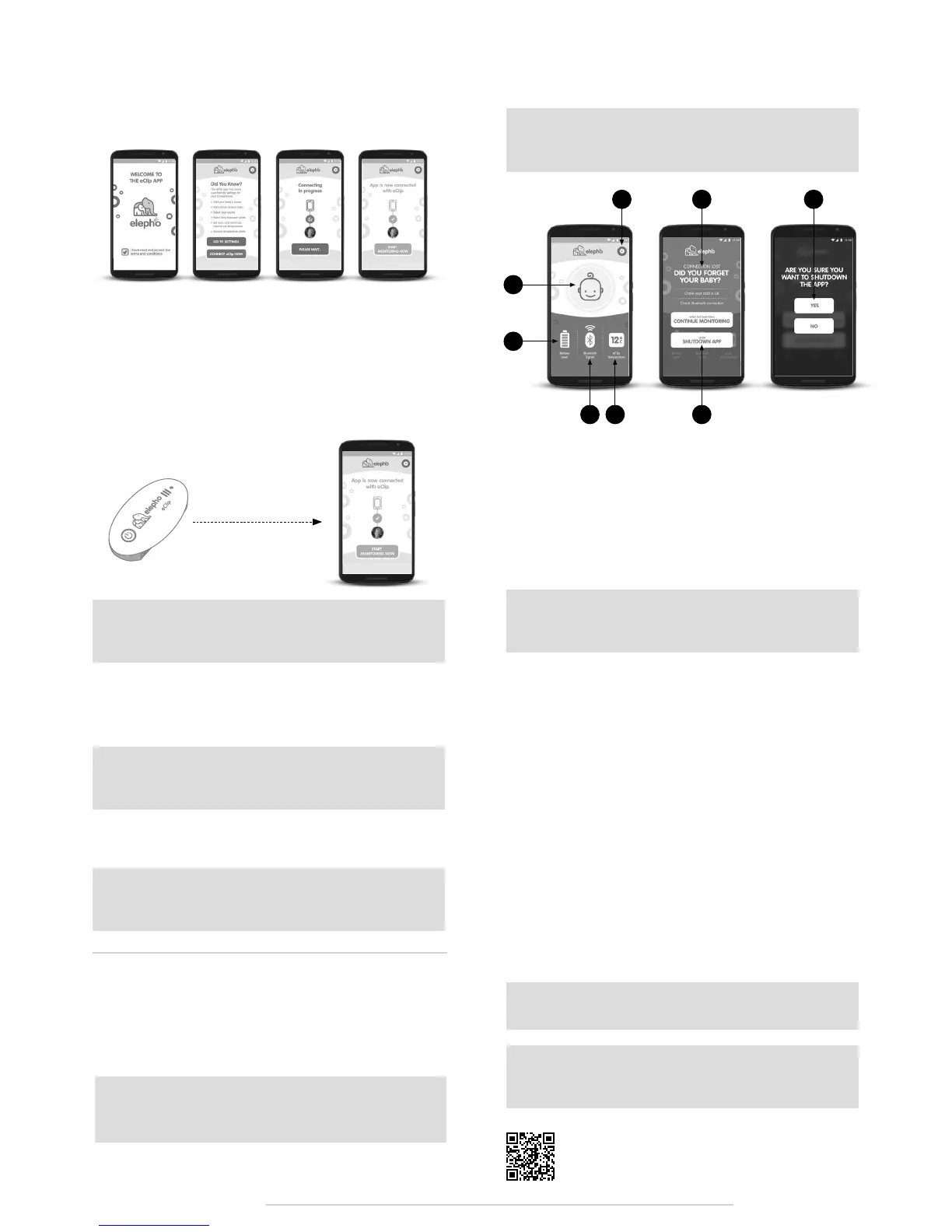
A. Your Baby. The main function of the eClip is giving you a visible
and audible alert if you move too far away from your child when you
have parked your car.
A1. If you take your baby out of the car, but didn’t turn off the eClip, just
tap SHUTDOWN APP and confirm by tapping YES. The eClip automat-
ically turns off three minutes later.
A2. Just in case you forget your baby you should receive a visual and
audible alert when you go beyond about 25 feet (8 meters) from the
car. Go back to your car and get your baby.
B. Settings. Of course, our baby icon has much less personality than
your baby. See the Full User Guide (see *) for more information about
how to access Settings, upload a picture and type in your baby’s
name to add another reminder that your baby is onboard with you.
C. Battery Level. The battery is good for 500 hours of continuous use.
Good battery health is very important, so we recommend that you
replace it at least twice a year: at the start of summer and the start of
winter. Always replace the battery when the battery level on the eClip
Monitoring screen shows fewer than two bars. See the Full User Guide
(see *) for more information about how to change the battery.
D. Bluetooth Signal. This shows the strength of your communication
signal by the number of green waves. If the signal is lost the waves
disappear, the icon turns red and the color of your eClip LED changes
from blue to red. Correct the Bluetooth settings on your smartphone
and tap CONTINUE MONITORING to renew the connection.
E. Temperature. The eClip app checks the eClip temperature every
few seconds. By default temperature alerts are disabled. See the Full
User Guide (see *) for information about how to enable alerts, change
the measurement unit, modify the checking frequency, or define your
temperature thresholds.
Note: Monitoring will automatically begin a few seconds after
the eClip has paired with the app even if you don’t tap the
Start Monitoring Now button
A
C
E A1
A2 A1B
D
www.elepho.comeClip - Quick Setup Guide
* elepho.com/eclip/full-user-guide.pdf
1. Launch the eClip app. Read and accept the terms and conditions
on the Welcome screen.
2. On the Did You Know? screen tap GO TO SETTINGS to personalize
your eClip with your child’s name and picture, and to modify your
sound alerts. See the Full User Guide* to do this now, or click the
settings gear icon, at any time, to do it later.
3. Turn on your eClip by pressing the On/Off switch continuously for
three seconds. The red LED flashes three times quickly, then once
a second until pairing has been completed. When it is paired it
flashes blue about once a second.
4. For ideal pairing setup, ensure that the eClip and app are less
than 6 ft (2m) apart.
5. On the Did You Know screen tap CONNECT to eClip NOW.
6. The app displays the Connecting in progress screen.
7. After a successful pairing the app displays the App is now
connected with eClip screen and the eClip red LED switches to a
blue LED that flashes about once a second.
Note: To prevent accidentally turning the eClip off, you have
to press the On/Off switch continuously for three seconds, to
activate or deactivate the eClip
Note: The eClip alert should sound at full volume even if you
have muted your phone. Once you have dismissed the alarm
the volume returns to its previous setting.
Note: Some iOS and Android devices attempt to override
visual alerts. However, you should still hear the audible alert
Caution: If your smartphone goes into sleep mode, or if the
screen turns off, the eClip app may also go into sleep mode
and you will not receive any alerts.
Note: For convenience the eClip automatically turns off three
minutes after you shutdown the app. This eClip auto-off
function enables you to save battery power.
Note: After your first successful set up and pairing of the app,
when you launch the app it should go straight through to the
connecting screen.
Note: If you see the Cannot connect with eClip screen first
check that the eClip is on and that your Bluetooth and GPS are
activated on your smartphone then click Try to connect again.
5. Now it’s time to get your
smartphone to communicate
with the eClip.
6 ft (2 m)


 To Previous Page
 Loading...
