Need help?
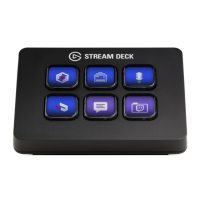
Do you have a question about the Elgato STREAM DECK MINI and is the answer not in the manual?
Download and install the Stream Deck application software.
Connect the Stream Deck Mini directly to a USB port, avoiding USB hubs.
Drag actions from the right panel onto desired keys on the left panel.
Configure actions and personalize keys with custom icons (72x72px JPG/PNG).
Use the right-click menu to copy, delete, or move keys on the Stream Deck.
 General
| Purpose | Universal |
|---|---|
| Hot keys | Yes |
| Pointing device | No |
| Device interface | USB |
| Country of origin | Taiwan |
| Recommended usage | Gaming |
| Keyboard key switch | - |
| Keyboard form factor | Mini |
| Connectivity technology | Wired |
| Keyboard number of keys | 6 |
| Product color | Black |
| Keyboard style | Straight |
| Cable length | 1.5 m |
| Depth | 199 mm |
| Width | 130 mm |
| Height | 118 mm |
 Weight and Dimensions
| Weight | 261 g |
|---|---|
| Keyboard weight | 160 g |
| Keyboard dimensions (WxDxH) | 84 x 60 x 58 mm |

 To Next Page