EasyManua.ls Logo

ELICA EPBI 680 MMF - User Manual

ELICA EPBI 680 MMF
20 pages
Print Icon
To Next Page IconTo Next Page
Loading...
Question and Answer IconNeed help?

Do you have a question about the ELICA EPBI 680 MMF and is the answer not in the manual?

Overview

This document describes the Elica EPBI 680 MMF Built-In Oven, providing detailed instructions for its installation, operation, and maintenance. It emphasizes safety precautions and proper usage to ensure the appliance's longevity and efficient performance.

Function Description

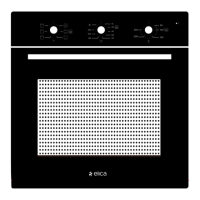
The Elica EPBI 680 MMF is a built-in oven designed for various cooking functions. It features a control panel with three rotary knobs (K1, K2, K3) for selecting cooking mode, time, and temperature, respectively. The oven offers several cooking modes to cater to different culinary needs:

  • Lamp: This mode illuminates the oven cavity, allowing users to observe the cooking progress without opening the door. The oven lamp will light up for all cooking functions, providing visibility.
  • Conventional: In this mode, both the top and bottom heating elements operate simultaneously. This setting is ideal for baking larger cakes and dishes that require even heat distribution from both above and below.
  • Bottom Heater: This function utilizes heating pipes located at the bottom of the oven. It is primarily used for keeping food warm or for achieving bottom browning and coloring for dishes.
  • Top Heater: This mode activates the heating pipes at the top of the oven. It is mainly used for food insulation and for browning or coloring the surface of dishes.
  • Radiant Heat: This mode is suitable for baking small amounts of food. For optimal results, food should be placed in the middle layer of the oven cavity.
  • Double Grill: This function engages the top two heating elements simultaneously. It is designed for baking small amounts of flat food, providing intense heat from above for grilling.
  • Hydro Clean: This specialized cleaning function uses steam to soften food residue and grease within the oven cavity, facilitating easier manual cleaning.

Usage Features

Before first use, it is crucial to prepare the oven by removing all packaging, accessories, and cleaning the cavity and surfaces. The manufacturer recommends running the oven with the conventional cooking function at 250°C for 90 minutes to clean oil impurities inside the cavity. During this initial run, it is normal for the oven to emit a slight smoke and an unpleasant smell due to the bonding agent in the insulation panels and the anti-corrosion coating on the heating tube. Adequate ventilation (opening a hood and windows) is advised during this period, and children and pets should be kept out of the kitchen.

For regular operation, users simply rotate knob K1 to select the desired cooking mode, knob K2 to set the cooking time, and knob K3 to adjust the cooking temperature. The oven is designed to be user-friendly, with clear controls for precise cooking.

The oven comes with essential accessories: a barbecue shelf and a baking tray. The barbecue shelf is used for grilling food or placing heat-resistant cooking containers. The baking tray is suitable for cooking large portions of food or catching food scraps. For proper operation, these accessories should be placed between the first and fifth levels of the oven. When used together, the baking tray should be positioned under the grill rack.

Maintenance Features

Regular cleaning and maintenance are essential to ensure the appliance's lifespan and hygienic operation. Before any cleaning or maintenance, the oven must be disconnected from the power supply.

The manual outlines two cleaning methods:

Cleaning Method 1 (General Cleaning):

  1. Allow the oven to cool completely after cooking.
  2. Remove and rinse oven accessories with warm water, then dry them.
  3. Clean up any food debris from the oven chamber.
  4. Wipe the oven surfaces with a soft cloth dampened with detergent, then dry with a dry soft cloth.
    • Note: Avoid using sharp cleaning tools, hard brushes, corrosive cleaning products, rough scrubbing agents, or sharp metal spatulas to prevent damage to the oven or its accessories, especially the door glass.

Cleaning Method 2 (Hydro-Clean):

This method utilizes the dedicated Hydro Clean function for deeper cleaning.

  1. After cooking, allow the oven to cool completely.
  2. Remove and rinse oven accessories with warm water, then dry them.
  3. Use a hot rag to clean any food residue or grease from the oven.
  4. Clean the oven surface with a soft cloth dampened with detergent and dry.
  5. Initiate the cleaning function:
    • Add approximately 250 ml of purified water and an appropriate amount of dish soap to the cavity and stir well.
    • Close the oven door.
    • Turn knob K1 to the Hydro Clean position.
    • Turn knob K2 to the 30-minute position.
    • Turn knob K3 to the 100°C position.
  6. Once the oven has cooled completely after the Hydro Clean cycle, dry the cavity with a clean absorbent sponge or soft cloth.

Lamp Replacement:

To replace the oven lamp:

  1. Switch off and disconnect the power supply to the oven. Ensure internal parts are cool to the touch.
  2. Remove the lamp cover by turning it counter-clockwise (it may be stiff).
  3. Replace the bulb with a new one of the same type, resistant to 300°C. Replacement bulbs can be obtained from a local service center.
  4. Re-fit the cover.
  5. If unsure, consult a qualified electrician.
    • Warning: To prevent electric shocks, ensure the electricity supply is switched off and the appliance is fully cold before removing the lamp lens.

The manual also provides a "Fault Handling" section to assist users with common issues, offering possible causes and processing methods before requiring professional service. This self-help guide covers scenarios such as fan noise after cooking, sounds in the oven cavity, unpleasant smells during first use, smoking, and undercooked food.

ELICA EPBI 680 MMF Specifications

General IconGeneral
Number of ovens1
Thermostat range50 - 250 °C
Energy efficiency classA
ColourBlack
Voltage220 - 240 V
Cooling FanYes
Self-CleaningNo
Width595 mm
Height595 mm
Frequency50 - 60 Hz

Related product manuals