

EasyManua.ls Logo

elink YL-71 - User Manual

elink YL-71
22 pages
Print Icon
To Next Page IconTo Next Page
Loading...
YL-71
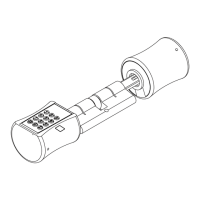
● Thank you for choosing YL-71 smart lock cylinder
● Please read this manual carefully before using it
● Please keep user's manual properly for future reference
Smart Lock
Smart Lock Cylinder User's Manual
Question and Answer IconNeed help?

Do you have a question about the elink YL-71 and is the answer not in the manual?

Summary

Included in the box

Product features

Technical Specification

Installation instructions

Confirmation before installation

Details on door material and thickness requirements for installation.

Product installation drawing

Visual guide to the step-by-step installation process of the smart lock.

Restoring factory settings

Factory default

Information on default settings, PIN code, and user experience mode.

Factory reset

Procedure to reset the lock to its factory default settings.

User settings

Registering the administrator user

Step-by-step guide to register the primary administrator user account.

Register the genneral user Pin code

Instructions for registering PIN codes for general users.

Register the genneral user fingerprint

Procedure for registering fingerprints for general users.
Delete general users

Vacation mode

Factory reset

Troubleshooting

Daily maintenance

Warranty Card

elink YL-71 Specifications

General IconGeneral
Brandelink
ModelYL-71
CategoryLocks
LanguageEnglish