
 Need help?
Do you have a question about the Elite Core PMA and is the answer not in the manual?
Lists the main capabilities including symmetric inputs, stereo/mix-mono modes, controls, sturdy case, and power options.
Details dimensions, weight, input/output jacks, frequency response, impedance, input levels, and power requirements.
Advises on potential hearing loss from high sound levels and suggests proper volume adjustment and earbud fit.
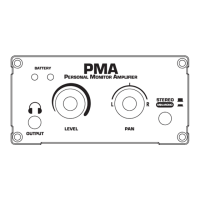
Connection for headphones or extension cables with minimum 16 ohm impedance per channel.
Indicates battery status: green for full, red+green for low, red for replacement needed.
Adjusts the volume level for both output channels of the amplifier.
Balances L/R channels in STEREO mode or adjusts L/R ratio in MIX-MONO mode.
Selects between STEREO mode (left/right signals to respective headphones) and MIX-MONO mode (mixed signals).
Function to switch the personal monitor amplifier unit on and off.
Connects to the input signal source via balanced XLR/TRS jacks.
Port for connecting the included AC/DC adapter or an equivalent power supply.
Instructions for setting up mono operation by connecting to one input and centering the Pan control.
Enables user-specific monitor mixes by assigning different signals to L and R inputs.
 General
| Channels | 2 |
|---|---|
| Inputs | XLR |
| Outputs | Binding Posts |
| Frequency Response | 20Hz - 20kHz |
| Input Sensitivity | 1V |
| Input Impedance | 10kΩ |

 To Next Page