OPERATION
VOICE Only mode
(Jumper JP4 in VOICE position)
In this mode the 4 channels are all voice recordable and can
hold up to 2 minutes of messages each. Two or more
channels can be combined into longer messages up to the
combined maximum of 8 minutes.
Positive (+) Voltage Activation
To activate a channel simply apply 12 Volts DC between the
NEG terminal and the positive (+) channel input. Multiple
channels can be combined (activated at the same time) to
achieve mixed playback of voice sounds.
+V1 = Recordable Voice Channel 1 input.
+V2 = Recordable Voice Channel 2 input.
+S3 = Recordable Voice Channel 3 input.
+B4 = Recordable Voice Channel 4 input.
NOTE: Pulsing Voltage Activation is not available in
Voice Only Mode.
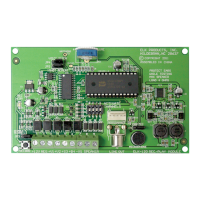
The 4 channels of the ELK-120 v.2 must be configured by Jumper JP4, located in the top left corner of the board. With JP4 in the
Siren position the unit will be configured as 2 recordable voice channels and 2 fixed siren sounds. With JP4 in the Voice position,
the unit will be configured as 4 recordable voice channels. Voice messages are stored in non-volatile memory and may be re-
recorded as needed. Simply configure Jumper JP4 according to your choice of operation and connect according to one of the
installation diagrams and the following instructions.
SIREN with VOICE mode
(Jumper JP4 in the SIREN position)
In this mode the 4 channels are split into 2 siren and 2 voice.
The siren channels are +S3 (Yelp) and +B4 (Temporal
Coded Horn). The voice channels are +V1 and +V2 and
have 4 recordable minutes each or 8 minutes combined.
Positive (+) Voltage Activation Terminals
Each channel may be activated by applying 12 Volts DC
between the NEG terminal and the positive (+) input. Both a
siren and voice channel may be activated at the same time
to achieve mixed siren and voice output.
+V1 = Recordable Voice Channel 1 input.
+V2 = Recordable Voice Channel 2 input.
+S3 = Yelp Siren input.
+B4 = Temporal Coded Horn input.
Pulsing Voltage Activation
Terminals +S3 and +V1 can automatically detect a pulsed
versus a steady activation and play the alternate channel.
For example: if channel +S3 (Yelp) is pulsed then channel
+B4 (Horn) will be played. If channel +V1 (Voice 1) is
pulsed then channel +V2 (Voice 2) will be played.
Negative (-) Activation Terminal
There is a single terminal marked -VS for controls (eg: DSC)
that switch the negative of the alarm output. This terminal
automatically plays the appropriate siren and voice
combination based upon the input being a steady or a pulse.
If the input is a steady negative, the Yelp Siren and
Recordable Voice 1 will play. If the input is a pulsed
negative, the Horn and Recordable Voice 2 will play. Refer
to the wiring diagram.
Mixing Siren Sounds and Voice Messages
To combine a siren sound with a voice message apply +12
Volts DC to both a Siren input and a Voice input at the same
time. EG: To obtain a Yelp siren followed by a burglary
voice message, +12 Volts DC voltage to channel +S3 and
+V1 at the same time. The two channels will alternately play
until the trigger is removed. Exception: Voice channels can
be set to play only once per activation cycle by placing
jumper JP2 to the 1SHOT position. The siren sound(s)
continue until the activation input is removed.
Instructions Common To Both Modes
Volume and Current Adjust
Turning the Volume knob clockwise will increase the
output volume. The louder the volume, the higher the current
draw. The volume and current draw may be adjusted to
match the current capability of the power source.
Connecting A Constant Power Source
(To Allow Activation By Low Current Devices)
By connecting the +12V and NEG terminals to a constant
power source the current draw of the channel inputs can
be reduced to approximately 30 milliamps since all the
operating power will then be drawn from the constant
power source. A constant power source also allows a
voice channel to be activated by a momentary voltage and
then finish playing until the end.
Options for Playback of the Voice Channels
The switches marked "Activate Channels" are provided
for programming and for user convenience where manual
activation of the channel(s) may be desired. A constant
power source must be connected to +12V and NEG
terminals in order to use these switches.
The 1SHOT position of Jumper JP2 restricts playback of a
voice channel to only once per activation cycle. The
channel activation must be removed and then re-applied
before the message will be allowed to play again. NOTE:
1SHOT does not work with a pulsing activation.
The REPEAT position of Jumper JP2 permits the voice
channel to play repeatedly for as long as the channel input
is activated.
Recording Voice Messages
Messages may be recorded from the on-board microphone,
or from a PC with a sound card and an ELK-129 interface.
To record from the onboard microphone place Jumper JP1
in the MIC position, JP2 in the REPEAT position, and JP3 in
the RECORD position. Activate the desired channel either
by using the on-board DIP switches(requires power to be
applied to +12V and NEG terminals) or by applying +12 Volts
DC to the desired input (+V1, +V2, +S3, or +B4). The current
message (if any) will start to play. While it is playing, press
and hold the record switch SW1 and speak clearly into the
on-board microphone. Note that the REC/EOM LED should
light before you begin speaking. To minimize any noise,
gently release SW1 after speaking. The new message will
immediately be played. To stop the playback turn off the
channel switch or remove the trigger voltage. To re-record
the message, or to record another channel, repeat the
above procedure.
To record with the ELK-129 sound card interface place
Jumper JP1 in the PRG position, and JP2 in the REPEAT
position. Plug the ELK-129 five pin ribbon cable into
Programmer Connector J1. Power the ELK-129 and move
the SW1 slide switch to CH1(this will provide power to the
ELK-120). Select the channel to record with the on-board
DIP switch. Follow the instructions for the ELK-129, Play a
"scripted" WAV.


 To Next Page
 Loading...