49 of 83ELM329DSC Elm Electronics – Circuits for the Hobbyist
www.elmelectronics.com
J1939 Support (continued)
the values assigned to the PDU Format field. If the
PDU Format value begins with ‘F’ (when expressed as
a hexadecimal number), it is PDU2. Any other value
for the first digit means that it is a PDU1 Format frame,
which contains an address.
To summarize, PDU1 format frames are sent to a
specific address, and PDU2 frames are sent to all
addresses. To further complicate matters, however,
PDU1 frames may be sent to all addresses. This is
done by sending the message to a special ‘global
address’ which has the value FF. That is, if you see a
PDU1 message (where the first digit of the PDU
Format byte is not an F), and the Destination Address
is FF, then that message is being sent to all devices.
The J1939 recommended practices document
provides a list of addresses that should be used by
devices. It is particularly important to adhere to this list
with the ELM329, as the IC uses a fixed address
method and is not able to negotiate a different one, per
J1939-81. OBD Service Tools should use either F9 or
FA as their address (the ELM329 uses F9). If you wish
to change this, you can use the AT TA (tester address)
command, or simply define it with the header.
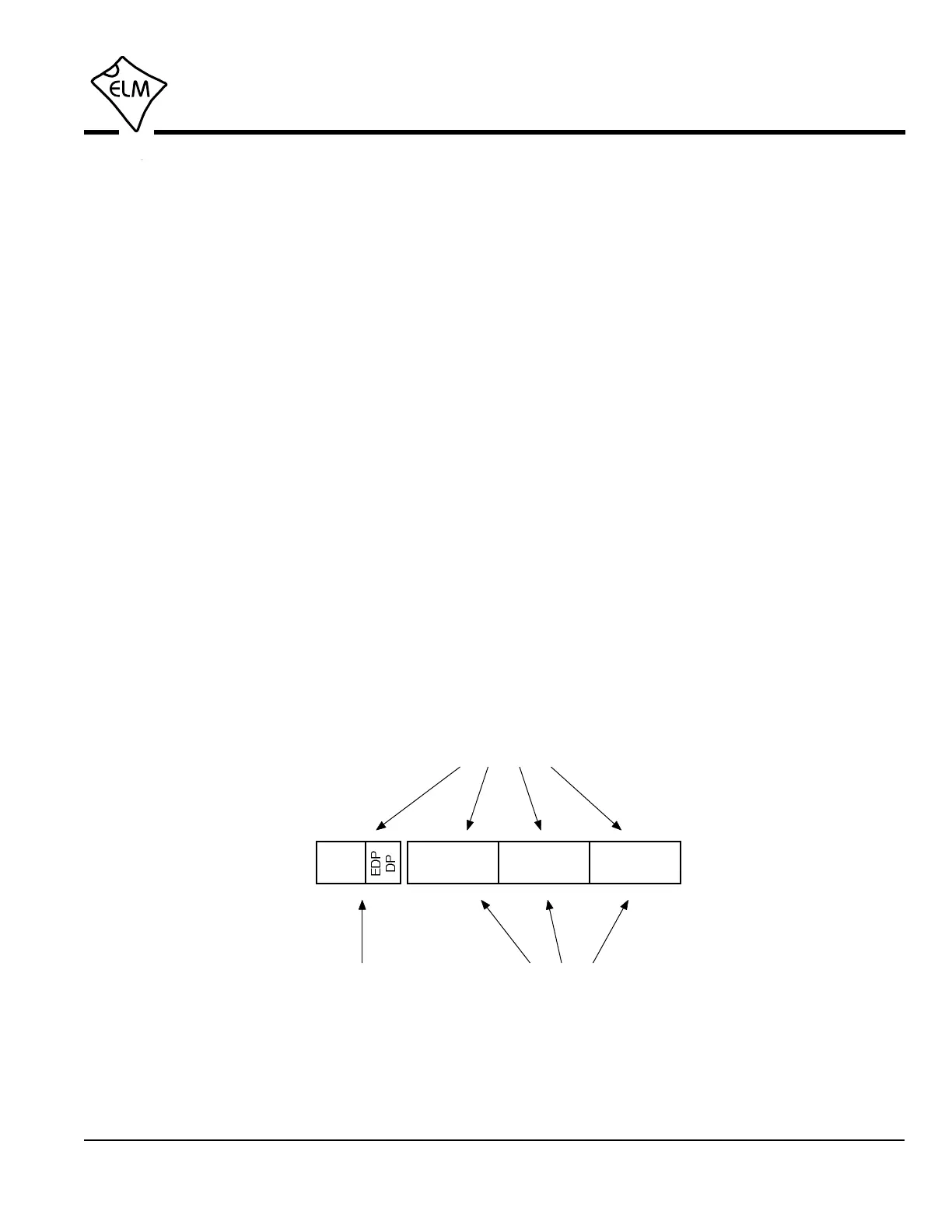
Headers (ID bits) are assigned using the Set
Headers command. All 29 bits may be assigned at
once, as shown below, or they may be set in two steps
(using the AT CP and AT SH commands). The two
step process may be useful if you only want to change
some of the ID bits rather than all of them (the priority
values only rarely change, so it’s often quicker to use
the three byte AT SH command, and leave the priority
bits unchanged). Note that whether you use the
AT CP, or the four byte AT SH command, the three
most significant bits are ignored by the ELM329.
This has tried to cover the basics of the J1939
message structure, but if you want more information,
look at the standards mentioned previously. One other
one that gives good examples of actual data is J1939-
84 which describes the compliance tests and shows
the expected responses.
Even at 250 kbps, J1939 data is transferred at a
rate that is more than ten times faster than the
previous heavy duty vehicle standard (SAE J1708),
and several of the light duty standards. As designers
build more into each system, the amount of
information required continues to grow, however, so
the 500 kbps version of J1939 will be a welcome
addition.
SAE J1939 Messages (continued)
Setting the J1939 CAN ID
>AT SH ww xx yy zz
5 bits
only
Priority
PDU
Format
Destination
Address
Source
Address
>AT SH xx yy zz>AT CP vv
5 bits
only


 To Next Page