To select, edit & save the
value / parameter
To decrement value and
scroll the parameter
True RMS measurement.
User configurable (Editable) password.
Simultaneous sampling of Volts & Amps.
Optional RS485 & wifi.
Over current, Under and Over voltage protection is available for both
EB and DG.
Intelligent controller trips exactly on the programmed settings.
Programmable EB and DG phase selection (All phases/1Phase).
Programmable KWh and KVAh.
Fire fighting DG Start/stop.
Universal Auxiliary supply 12 to 24V.
DG start/stop potential free contacts.
Remote controlling through PLC/SCADA/EMS.
to enter Setup mode Display shows 0000).
If Password is correct, eding is possible.
Enter Password (default is 1000).
Blinking digit indicates eding of that digit.
Programming Parameter
Default
Option/Range
DEVICE ID
Password
Phase selection S1
Range :1 to 247
Range :1000 to 4999
Range: 3ph/1ph
Over Voltage S1
Under Voltage S1
Range: 230-285V
Range: 155-210V
to decrement values / change the available opons.
to save the opon / value of the parameter.
Press Down to change the opons y(save) or n(not save).
Press Up to save.
and
to edit next parameter ll end of last parameter
display screen will prompt with display reads blinking.
to view the setup parameter.
Press Up to view the parameter opon /value.
Again press Up key to select and edit parameter value /opon
PG/ATeSL/CON100/V0/0823
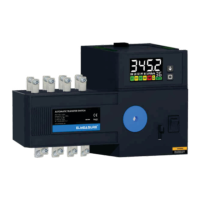
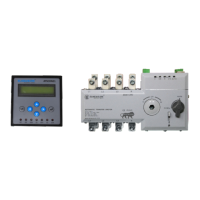
ATeSL CON100
support@elmeasure.com
Toll Free: 1800 120 5048
User Manual
www.elmeasure.com
Head office & Manufacturing Unit 1
Plot N0.: 47-P, KIADB Hardware Park,
Huvinayakanahalli, Bengaluru - 562 149,
Karnataka INDIA.
Manufacturing Unit 2
Goutham Garden, No.4, Veerapandi,
Coimbatore - 641019 Tamil Nadu, INDIA
Elmeasure India Private Limited
www.elmeasure.com
Under Voltage S2
Range: 155-210V
Over Voltage S2
Range: 230-285V
Phase selection S2
Range: 3ph/1ph
Current limit S1
Range: 0.5-40A
Current limit S2
Range: 0.5-40A
Password
Range:5000-9999
delay time
Range: 0 to 180s
number of cycles
Range:2 - 10Cycles
Cycle 1 set time
Range:5s - 150s
Cycle 2 set time
Cycle 3 set time
Cycle 4 set time
Range:5s - 150s
Range:5s - 150s
Range: 5s - 150s
Save
Yes/No
0-4800 / 1-9600 / 2-19200 / 3-38400
0-Even /1- Odd /2- No
Setup -2
Setup -1
3.3 Display
SET
Source Priority
Range :P.S.S1/P.S.S2/none
Phase Sequence
Range: Enable/Disble
Save
Yes/No
Transfer delay time
Range: 3s-600s
Transfer delay time
Range: 3s-600s
DG Ideal time
Range: 3s-600s
UPS
Range: Enable/Disble
UPS (DG Start)
Range: 0 to 180s
Analog Current
Range: Enable/Disble
CT Primary
Range: 0.5 to 99kA
Under Frequency
Over Frequency
Range: 45 to 50Hz
Range: 50 to 65Hz
Unbalance Current
Range: Enable/Disble
Unbalance Current
value
Range: 10 to 90%
Unbalance Current
Range: Enable/Disble
Unbalance Current
value
Range: 10 to 90%
Centre of Delay
Range: Enable/Disble
Centre of Delay time
Range: 0 to 180s
Trip
Range: Enable/Disble
Mode Selection
Range: Remote DI/Manual
Current rating: CON100: 125A/160A/200A/250A/400A/630A/800A/1000A/1250A/1600A.
Press Up/Down key connuously for 5 secs or unl display
shows Display starts to scroll parameters every 5 sec.
To disable Autoscrolling, Press any key, display shows and remains
in a parcular page.
3.4 Enabling and Disabling Auto Scrolling
Display
Meaning Meaning
Display
Balance Page
4. Display of Parameter:
VLN R DG
VLN R DG
VLN B DG
Amps Rphase EB
Amps Yphase EB
Amps Bphase EB
Was R EB
Was Y EB
Was B EB
Var R EB
Var Y EB
Var B EB
VA R EB
VA Y EB
VA B EB
PF d1 EB
PF d2 EB
PF d3 EB
PF t1 EB
PF t1 EB
VLL BR DG
EB Balance
Average Current EB
Voltage line to line EB
Voltage line to Neutral EB
Frequency EB
DG Balance
Voltage line to line EB
Voltage line to Neutral EB
Frequency EB
Was Total EB
VA R Total EB
Total VA EB
Displacement PF EB
True Power Factor EB
Average Current DG
Was Total DG
VA R Phase DG
Total VA DG
Power Factor DG
Power Factor DG
R
OH
LH
S2
PF
M
kWArh
S1
S1
S2
S2
TRIP
AUTO
MANUAL
AUTO


 To Next Page
 Need help?
 General