support@elmeasure.com
1800 120 5048
AC 33B Ulizaon Category Standard ( IEC 60947-6-1 )
High short circuit withstands capacity.
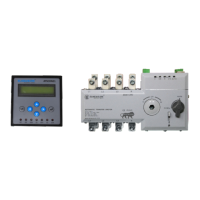
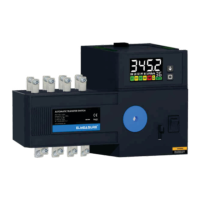
Inbuilt microprocessor based AMF Controller
Inbuilt control switch for Auto/Manual operaon
Oponal Overload tripping with inverse curve Logic
Motor Bandwidth operang voltage ( 150-285 VAC )
RS485 & cloud connecvity for IoT Applicaon
Easy installaon and simple wiring
Oponal remote display for monitoring, programming & controlling
3 Posion isolaon lock for – Source I – Off – Source II
Integrated switch posion auxiliary contact for Source I – Off – Source
II indicaon output.
Inbuilt source availability LED
1. PRODUCT FEATURES
2. AMF CONTROLLER FEATURES
Microcontroller based technology.
Mains source & Alternave source Protecon -Under/over voltage,
and phase missing.
Mains failure based automac DG start/stop operaon.
Timers for transfer delay, recovery delay, start & stop delay.
Remote display for programming, and monitoring the real-me system
voltage Current for both sources.
Auto Mode
Manual Mode
Remote Mode
3. OPERATION MODES
4. WIRING DIAGRAM
Source II
Control output terminal
Remote display port
Control part
Source availability Indicaon
Auto/Manual Lock
Padlock pull rod
Operang handle
Padlock posion
Load
Source I
R
Y
B
N
U
V
W
N
5. REMOTE DISPLAY TERMINAL DESCRIPTION
6. REMOTE DISPLAY PROGRAMMING MODE
Key-press instruction
When controller is working, press button, Password Screen Will Appear, Use
To Set Password 123, After Editing Program Press Button to Save the program.
Head office & Manufacturing Unit 1
Plot N0.: 47-P, KIADB Hardware Park,
Huvinayakanahalli, Bengaluru - 562 149,
Karnataka INDIA.
Manufacturing Unit 2
Goutham Garden, No.4, Veerapandi,
Coimbatore - 641019 Tamil Nadu, INDIA
T: 0422 2697200. TF: 0422 2695200
E: contactcbe@elmeasure.com
Elmeasure India Private Limited
PG/ATeS/V2.1/0823
www.elmeasure.com
www.elmeasure.com
User Manual
ATeS Controller
1. ENTER
2. SAVE
3. S1H - HEALTHY INDICATION
4. S1 - LOAD ON INDICATION
5. S2 - HEALTHY INDICATION
6. S2H - LOAD ON INDICATION
7. OFF - OFF INDICATION
8. OC - OVER CURRENT INDICATION
9. OT - OVER TEMPERATURE INDICATION
OT OC S1H S1 OFF S2 S2H
ATSCON21
1
8
3
4
5
679
ATSCON21
sw 3.2 I hw 3.0
S/R
Under voltage transfer value , Press Enter & Press Source I
increase, press decrease
S1 Verification time setting, Press Enter & Press
increase,
press decrease
Source II Over voltage transfer value setting, Press Enter & Press
increase, press decrease
Source II Under voltage transfer value setting, Press Enter & Press
increase, press decrease
S2 Verification time setting , Press Enter & Press
increase,
press decrease
Over voltage transfer value Press Enter & Press Source I
increase press decrease
ATSCON21
sw 3.2 I hw 3.0
press to input the password :123 & Press Enter
Restore time delay time setting, Press Enter & Press
increase, press decrease
Transfer time delay, Press Enter & Press
increase, press decrease
Source Priority setting , Press Enter & Set for
1 S1 & Set 2 for S2
10
Generator Stop Delay, Press Enter & Press
increase press decrease
High frequency protection value setting, Press
increase, press decrease
11
Generator Star delay, Press Enter & Press
increase, press decrease
11
High frequency protection value setting, Press
increase, press decrease
11
Phase Loss Protection , Press Enter to Disable
press to Enable
12
High frequency protection value setting, Press
increase, press decrease
11
S1 Phase Failure Verification Time, Press Enter & Press
increase, press decrease
13
High frequency protection value setting, Press
increase, press decrease
11
S2 Phase Failure Verification Time, Press Enter & Press
14
increase, press decrease
Press Enter
S/R
Made In India
Enable
High frequency protection value setting, Press
increase, press decrease
11
Phase sequence Press Enter to Enable
15
press to Disable
Disable
Manufacturing Unit 3
SHED NO.: A-17/1 MARUTI INDUSTRIAL ESTATE,
PHASE-1, GIDC VATAV, VATVA ROAD,
AHMEDABAD, GUJARAT - 382445


 To Next Page
 Need help?
 General