EasyManua.ls Logo

ELREHA TKP 3130/1 - User Manual

ELREHA TKP 3130/1
18 pages
Print Icon
To Next Page IconTo Next Page
Loading...
Characteristics briefly
refrigeration controller for all applications of cold stores, freezers,
shelfs, chest freezers...
for use as a single controller or in a network
6 temperature sensors inputs, 6 relays, 4 digital inputs, analog output
available in 3 standard housings for rail, panel and 19" mounting
Some Standard Functions
LC-Display, dot-matrix, plain text, operation by 4 keys on the front
Temperature control, multiple setpoints/setpoint layers, alarm thermostats
Compressor Idle-Time, runtime monitoring of refrigeration
Fan control with delay times for start and stop
Roller blind control, frame heater control, pulsed, different for day/night
Analog output usable for actual value image or for P, PI, PID-T1-control
Adjustable Emergency Mode
Door contact input
Intelligent defrost control, able to learn
(x140 only)
Technical manual 5310902-11/25e/00
2018-05-30 tkd/jr
Cold Storage
from SoftwVers. 7.01 (Rev.P)
Controllers
TKP TKC TKC
3130 5130 19130
3130/1 5140 19140
3140
ELEKTRONISCHE REGELUNGEN GMBH
Please note Safety Instructions !
Operating / Operating Elements
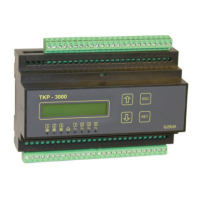
Operating Elements of the TKP 3130/3140 (The operating elements of all
TKP/TKC-types look very similar).
The units can be operated by 4 keys, all parameters will be displayed in plain
text on the backlighted LC-display. The TKP 3130/1 will be operated from keypad
and display of the VPR Compound Control System.
Available Types
TKP 3130 ...... 230V, for DIN-rail
TKP 3130/1 ... without display and keys, TF-501 (Pt1000) probes only
TKP 3140 ...... like 3130 + intelligent defrost
TKP 23130 ....115V, for DIN-rail
TKP 23140 ....like 23130 + intelligent defrost
TKC 5130 ......230V, panel mounting (front frame 96 x 96mm)
TKC 5140 ......like 5140 + intelligent defrost
TKC 25130 .... 115V, panel mounting (front frame 96 x 96mm)
TKC 25140 .... like 25140 + intelligent defrost
TKC 19130 .... 230V, 19"-Al-cassette, 14 TE
TKC 19140 .... like 19130 + intelligent defrost
TKC 29130 .... 115V, 19"-Al-cassette, 14 TE
TKC 29140 .... like 29130 + intelligent defrost
act.fail page
20.02.18 11:492
actual values
20.02.18 11:49
setpoint page
20.02.18 11:49
defrost page
20.02.18 11:49
mode page
20.02.18 11:49
assignment page
20.02.18 11:49
hist.fail page
20.02.18 11:49
ESC
RET
RET
RET
RET
RET
RET
RET
current failure,
etc.
last failure 1,
etc.
sensor 1, etc
setpoint level X,
etc.
defrost mode,
etc.
configuration
TKP/TKC Test
20.02.18 11:49
RET
User Code
date, time, etc.
Parameter Pages
In controllers with older software versions some functions may
be not available.
TKP-3000
RET
ELREHA
ESC
leave page
up/down
keys
LCD-Display f0r
parameters and values
circuit 1
circuit 2
circuit 3
cooling
alarm
circuit 4
circuit 3
circuit 2
circuit 1
defrost
enter page /
confirm values
Identification
Enter :> 0 <
Caution
Notice
Programming
All readable and adjustable values (parameters) of the TKx units are listed
on several pages. While normal operation or if no key is pressed for about
3 minutes, the display shows the following information:
1. priority: current failure (only if there is a failure at the moment)
2. priority: controller states (e.g. if it is turned OFF by a digital input)
3. priority: the selected 'Basic Display'
Call up and changing of parameters:
Key Action
ESC .......If no pagename is displayed
........Select desired page
RET ........Enter this page
........Select parameter
RET ........Start programming, parameter name flashes.
Eventually, the unit asks here for an access code
........Adjust desired value. Pressing and holding a key effects
that the value will be incremented or decremented
automatically faster and faster.
RET ........Leave programming mode, confirm new value
ESC ........Back to page overview.
Identification
If this display appears
then this parameter is protected by a password. The controller expects
a code number. This code-no. (Code 1) is related from the actual time of
the day as the sum of the hour (0...23) plus 10
Changing User level
To change the user level do the following:
Select "Basic Display", press key "RET"
Enter code of the desired user level
- Code for the service level is: (fixed) - 88 -
- Code for the confoguration level: month + hour + 20
Manual defrost release
Select "Defrost Page"
Set parameter "manual defrost" to "start"
Types:
Question and Answer IconNeed help?

Do you have a question about the ELREHA TKP 3130/1 and is the answer not in the manual?

Summary

Standard Controller Functions

Operating Elements and Navigation

Programming and Configuration

Parameter Access and Modification

Guide to accessing, changing, and confirming parameters using the controller keys.

Parameter Protection and User Levels

Explains password protection, identification codes, and changing user access levels.

Manual Defrost Initiation

Procedure for manually releasing a defrost cycle via the controller interface.

Available ELREHA Controller Types

Parameter Pages Overview

Software Variations and Features

Technical Data Specifications

General Safety Instructions

Operational Hazards

Conditions under which the device must not be operated to avoid health risks or loss of life.

Electrical Safety and Installation

Guidelines for safe electrical installation, grounding, and proper enclosure use.

Installation and Wiring Precautions

Recommendations for safe installation, component placement, and interface wiring.

Cleaning Procedures

Instructions for cleaning the controller using a dry, lint-free cloth.

Actual Values Display

Failure Management and Codes

Configuration Concept

Input;Output Assignment

Describes how to preset the function of each input and output on the assignment page.

Configuration Process

Parameter Details Overview

Actual Values Parameters

Parameters related to sensor readings, run times, door openings, and delay times.

Setpoint Parameters

Parameters for setpoint layers, warning offsets, PID control settings, and timing controls.

Defrost Parameters

Mode Page Parameters

Assignment Page Parameters

Controller Dimensions and Connections

Access Protection and User Levels

User Levels Explained

Details the three user levels: Customer, Service, and Configuration.

Parameter Identification and Codes

Explains password protection and the identification code based on the current time.

Display and Unit Text Settings

Sensor Configuration

Cooling Circuit Control

Setpoint Management

Runtime Monitoring and Heating Function

Emergency Operation Mode

Temperature Alarms

Digital Input Applications

Controller and Circuit Shutdown

How digital inputs can disable the controller or specific cooling circuits.

Safety Chain and Door Contact

Utilizing digital inputs for compressor safety monitoring and door contact functions.

Analog Output Control

Real Time Clock and Time Settings

Defrost Control Methods

Defrost Termination Criteria

Details how defrost cycles are terminated by time limits or temperature sensor readings.

Manual and Pulsed Defrost

Procedures for manual defrost initiation and the operation of pulsed defrost for efficiency.

Demand Defrost Method

Uses differential temperature measurement to initiate defrost when icing is detected.

Intelligent Defrost (Adaptive)

Intelligent Defrost Key Characteristics

Highlights key features like reduced energy use, automatic adaptation, and easy parameterization.

Intelligent Defrost Operational Process

Step-by-step description of how the adaptive defrost cycle operates.

Handling Extreme Conditions

Describes how the system handles extreme conditions or potential defrost control malfunctions.

Evaporator Fan Control

Fan Operation Modes

Explains different fan operation modes like permanent and interval, with examples.

Roller Blind and Frame Heater Control

Extending Cold Storage Systems

Refrigeration Lock and Forced Control

Details controlling refrigeration using digital inputs for locking or forcing.

Network Communication (RS-485 E-LINK)

VPR System Integration

How TKx controllers integrate with VPR compound control systems and handle failures.

Data Lines and Remote Displays

Sensor Placement Guidelines

Installation and Initial Start-Up

Initial Configuration Steps

Key steps for basic controller configuration, including language, sensors, and modes.

TKP 3130;1 Specific Setup

Procedure for configuring the TKP 3130/1 model which lacks integrated operating elements.

Product Disposal and Battery Removal

EC Declaration of Conformity

ELREHA TKP 3130/1 Specifications

General IconGeneral
BrandELREHA
ModelTKP 3130/1
CategoryController
LanguageEnglish

Related product manuals