Notice technique 5350001-00/01F
Système de gestion basé sur la
technologie Internet
ELREHA Gmbh
D-68766 Hockenheim, Germany,
Schwetzinger Str. 103
Telefon 0 62 05 / 2009-0 - Fax 0 62 05 / 2009-39 - team@elreha.de
Technical Data
Supply Voltage ........................... external AC/DC-Adaptor, 230 V, 50...60 Hz
Power Consumption ...................................................................... max. 60 VA
Ambient Temperature .......................................................................0...+40 °C
Ambient Humidity ..............................................10-90% r.H. , not condensing
Interfaces .................................... ELREHA E-Link (RS-485), COM (RS-232),
3x Ethernet (LAN)
Construction .............................fanless, SSD-Harddisk, no moving parts
Housing ...................................................................................Aluminium
Dimensions (W x H x D) ............................................. 275 x 50 x 172mm
Weight ......................................................................................appr. 2 kg
server
Description
L'UNIServer assure l'enregistrement,
la surveillance et la gestion de votre
installation frigorique. Il se connecte au
réseau TCP/IP et s'interroge comme un
site Internet via Internet Explorer.
Caractéristiques de l'UNIServer
• Le hardware de l'UNIServer est
compact et sans ventilateur. I l ne
contient pas de disque dur : les
données sont enregistrées dans
une mémoire non-volatile.
• Il comprend plusieurs types
d'interfaces et protocoles RS-485
pour centraliser différents types de
régulateurs (froid, chauffage...).
• Tous les enregistrements de
température sont visualisables
sous forme de graphiques ou de
rapports (démarche HACCP).
• Les défauts/alarmes peuvent être
envoyés par email.
• Les températures et messages
d'alarmes sont convertis et
peuvent être consultés comme un
site Internet.
• La visualisation des données et
des paramètres s'effectue via
Internet Explorer (gratuit), sans
avoir recours à un autre logiciel
• Il est possible de connecter
l'UNIServer sur un réseau existant
grâce à ses interfaces.
Tous les ordinateurs du réseau
local ont accès aux informations
transmises par l'appareil.
• Pour que l'UNIServer puisse
communiquer à distance par le
biais d'un routeur, il est nécessaire
de lui attribuer une adresse IP xe.
Certains sites Internet proposent
de changer votre adresse IP
dynamique en adresse IP xe (ex :
dyndns.org).
• La page d'accès par login
permet de limiter les
fonctionnalités proposées selon le
type d'utilisateur.
distribué par
S.V.P Lire les consignes de sécurité !
Please note Safety Instructions !
L'UNICenter
L'UNICenter est une option permettant
de sauvegarder les données de votre
installation frigorique ainsi que les
paramètres de chaque régulateur vers
des serveurs sécurisés. Cette opération
est sûre car aucune donnée ne sera
perdue en cas de défaut. De plus, la
mise à jour du logiciel de l'UNIServer
se fera automatiquement.
Caractéristiques techniques
Tension d'alimentation ..........Adaptateur externe AC/DC, 230 V, 50 à 60 Hz
Puissance consommée ......................................................... 60 VA maximum
T°C ambiante / stockage ................................................................ 0 à +40 °C
Humidité .............................................................. 10-90% h.r., non condensée
Interfaces .................................... ELREHA E-Link (RS-485), COM (RS-232),
3x ports Ethernet (LAN)
Hardware ............................................ Sans ventilateur, Disque dur SSD
Boîtier ......................................................................................Aluminium
Dimensions (L * l * h) ................................................ 275 x 172 * 50 mm
Poids..................................................................................... environ 2 kg
System Overview
The UNIServer is an universal Moni-
toring/Data Logger System based on
internet technology for refrigeration
plants.
The UNIServer
• TheUNIServerisacompact,fanless
unit without a harddisk, all data is
storedinaashmemory.
• TheUNIServercommunicates
locally via interfaces with controller
units of the refrigeration plant.
• Itcollectsallalarmandstatusmes-
sages of the plant and logs measured
values, e.g. to achieve the HACCP
requirements.
• Alarmmessagescanbeforwarded
as emails.
• It converts all temperature values
and alarm messages and offers them
as web pages.
• Toviewthevalues,youneedthefree
of charge Microsoft Internet
Explorer only, no additional software
is necessary.
• The UNIServer can be integrated
in an existing local network by its
ethernet interface, so also a connec-
tion to the internet is possible.
All PC's in this network are able to
retrieve the stored information.
• The UNIServer gets an individual
address in the local network and
communicates via a router with the
service bureau.
Dynamic IP-addresses of the plant
can be exchanged via a web service
(e.g. "dyndns.org"), so the UNI-Server
can be reached by the same
name even if the provider has been
changed.
• Bydifferentaccessrights,the
contents of the websites can be
personalized.
The UNICenter
With purchasing the UNIServer, it
is stipulated that logged data will be
stored at servers of a special service via
internet. So it is secured that no data will
be lost in case of a defect. This service
called UNICenter also stores plant and
controller congurations and serves
for necessary software updates of the
UNIServers on site.

 Need help?
 General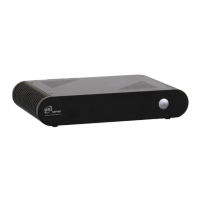

 To Next Page