Find your installation
instructions on Youtube:
eltrona.lu/tvplus-installation
TV+ Quickstart
Setup Instructions
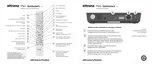
Installing the Eltrona box is very simple:
EN
Start / stop (standby)
Number keys
Teletext
Search function
Confirm entry
Navigation buttons
TV programs
Menu
Switch to the decoder source
Higher channel (+) /
lower channel (-)
Play / pause (recording / replay /
VOD)
Stop (recording / replay /
VOD) current program
Open streaming settings
Tuen off the TV screen (radio)
Show favourites list
Select date / time
Give a negative rating
to content
Reset channel order /
favourites list
Go to help
Delete text
Return to previous selection
View summary
View show details
Browse pages (up / down)
Return
Volume louder (+) and softer (-)
Mute
Fast forward / rewind
Rapid fast forward / rewind
Record show / delete recording
Delete search term
Remove mobile device
Give a positive rating to content
1
2
3
4
5
6
7
8
9
10
11
12
13
14
15
16
17
18
19
20
21
22
23
24
TV+ Quickstart
Operating the Remote Control
Eltrona TV+ allows you to turn on both
the decoder and TV set at the same
time with the button on top of the set
top box or via the remote control.
EN
4
3
4
5
Connect your Eltrona box and your modem using the
Ethernet cable provided. If you would prefer to use
WiFi, skip this step and follow the WiFi configuration
instructions on the TV screen once the box is turned on, after step 4.
Connect your Eltrona box to your TV using the
provided HDMI cable.
Turn on your Eltrona box using the button on top or
via the remote control. Wait a few moments and start
watching!
2
1
Connect your Eltrona box to an electrical outlet using
the provided cable and power port.
Attach your existing coaxial cable (antenna cable) to
the Eltrona box.

 Need help?
 General

 To Next Page