The Elumen8 MP75 LED Fresnel RGBW is a compact, robust, and user-friendly stage lighting fixture designed for small stages, studios, and display lighting applications. It offers a superb light output and benefits from temperature-controlled fan cooling for quiet operation. The fixture is available in two housing colors: black (ELUM105) and white (ELUM105A).
Function Description:
The MP75 LED Fresnel RGBW provides versatile lighting with its 75W quad-color COB LED (RGBW). It supports both DMX control and manual dimming modes, allowing for precise customization and creation of lighting shows. The fixture features a manually adjustable beam angle from 10° to 50°, making it suitable for various lighting needs. Its 1.8kHz refresh rate ensures smooth and flicker-free operation.
Important Technical Specifications:
- LED Type: 1 x 75W quad-color COB LED (RGBW)
- Beam Angle: Manually adjustable 10°-50°
- Luminance: 6031 Lux @ 2m (full on)
- Refresh Rate: 1.8kHz
- DMX Channels: Selectable 4, 5, or 7 channels
- Dimming: 0-100%
- Dimming Curves: 4 dimming curves (Linear, Square Law, Inverse Square Law, S-curve) in both LED and halogen profiles.
- Display: 4 push-button menu with LCD display
- Power Connection: Captive power connection
- DMX Input/Output: 3-Pin XLR
- Power Consumption: 86W
- Power Supply: 100~240V, 50/60Hz
- Dimensions: 250 x 210 x 265mm
- Weight: 3.8kg
- Order Codes: ELUM105 (Black Housing), ELUM105A (White Housing)
Usage Features:
DMX Mode:
The DMX mode offers the greatest flexibility for customizing lighting shows. Users can control each individual trait of the fixture independently.
- DMX Address Setting: Access the DMX address mode by pressing the "MENU" button to display "DMX ADDR". Use the "ENTER", "UP", and "DOWN" buttons to set the desired DMX address (1-511) and confirm with "ENTER".
- DMX Channel Mode: Access the DMX channel mode by pressing the "MENU" button to display "Channel". Use the "ENTER", "UP", and "DOWN" buttons to select between 4, 5, or 7 DMX channel modes and confirm with "ENTER".
- 4 Channel Mode:
- Channel 1: Red (0-100%)
- Channel 2: Green (0-100%)
- Channel 3: Blue (0-100%)
- Channel 4: White (0-100%)
- 5 Channel Mode:
- Channel 1: Red (0-100%)
- Channel 2: Green (0-100%)
- Channel 3: Blue (0-100%)
- Channel 4: White (0-100%)
- Channel 5: Master dimmer (0-100%)
- 7 Channel Mode:
- Channel 1: Colour change (0-100, slow-fast), Colour fade (101-200, slow-fast), Sound active (201-255, sensitivity low-high)
- Channel 2: Red (0-100%)
- Channel 3: Green (0-100%)
- Channel 4: Blue (0-100%)
- Channel 5: White (0-100%)
- Channel 6: Dimming curve selection (Linear LED, Linear Halogen, Square LED, Square Halogen, Inverse Square LED, Inverse Square Halogen, S-curve LED, S-curve Halogen)
- Channel 7: Master dimmer (0-100%)
- DMX Linking: DMX is a universal protocol allowing different manufacturers' fixtures to be linked and operated from a single controller. DMX data is sent serially from fixture to fixture via 3-pin XLR DATA "IN" and "OUT" terminals. The order of fixtures in a DMX line does not affect DMX addressing.
- DMX Cable Requirements: Standard 3-pin XLR connectors are required for data input/output. DMX cable must be daisy-chained and cannot be split.
Built-in Programs:
The fixture includes 4 built-in programs (01-04) for quick setup.
- Accessing Programs: Press "MENU" to display "01.STATIC". Use "ENTER", "UP", and "DOWN" to select a program.
- Static Mode (01.STATIC): Choose from 15 colors (Blackout, Red, Green, Yellow, Blue, Magenta, Cyan, White (RGB), White (W), Pastel Red, Pastel Green, Warm white, Pastel Blue, Pastel Magenta, Pastel Cyan, White (RGBW)) by pressing "ENTER" and using "UP" and "DOWN".
- Change, Fade, Auto Modes (02.CHANGE, 03.FADE, 04.AUTO): Adjust the speed level (00-99) for these programs by pressing "ENTER" and using "UP" and "DOWN".
- Change: 15 color change, speed adjustable.
- Fade: 15 color fade, speed adjustable.
- Auto: 15 color change & fade, speed adjustable.
Sound Active Mode:
- Accessing Mode: Press "MODE" to display "Sound".
- Sensitivity Adjustment: Press "ENTER" and use "UP" and "DOWN" to adjust the sound sensitivity level (00-31), where 01 is low sensitivity and 31 is high sensitivity. Confirm with "ENTER".
Manual Dimming Mode:
- Accessing Mode: Press "MENU" to display "Manual".
- Brightness Adjustment: Press "ENTER" and use "UP" and "DOWN" to set the brightness for Red ("R"), Green ("G"), Blue ("B"), and White ("W") from 0 to 99 (0 = LED off, 99 = full brightness). Confirm each setting with "ENTER".
Dimming Curves:
The fixture offers 4 dimming curves to suit different preferences and applications.
- Accessing Curves: Press "MENU" to display "DimCurve".
- Curve Selection: Press "ENTER" and use "UP" and "DOWN" to select the desired curve:
- "Linear" - Linear dimming curve
- "Square" - LED Square dimming curve
- "INV.Squa" - LED Inverse Square dimming curve
- "S-Curve" - LED S-Curve dimming curve
- LED/Halogen Selection: To choose between LED and Halogen dimmer curves, press "MENU" to display "LampCurv". Press "ENTER" and use "UP" and "DOWN" to select "LED" or "Halogen" curves. Confirm with "ENTER".
- Display Timeout: Set the display to turn off ("Display OFF") or stay on ("Display ON", 30 seconds timeout).
- Fixture Time: View the fixture's operating time.
- Version: View the software version.
- Temp: View the current temperature.
- Default: Reset factory settings by selecting "Yes?" and confirming.
Included Accessories:
Maintenance Features:
The manual emphasizes safety precautions, including:
- Always connect the fixture to a grounded power outlet.
- Ensure proper ventilation and avoid covering the fixture.
- Disconnect from power before cleaning or servicing.
- Only use the fixture indoors in dry locations.
- Regularly check the power cable for damage.
- If the equipment is dropped or damaged, do not operate it and have it inspected by a qualified technician.
- WEEE notice: The product should not be disposed of with other household waste. It should be recycled responsibly to promote the sustainable reuse of material resources. Household users should contact their retailer or local government office for recycling details. Business users should contact their supplier.

 Need help?
 General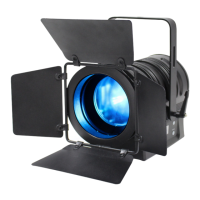

 To Next Page