4
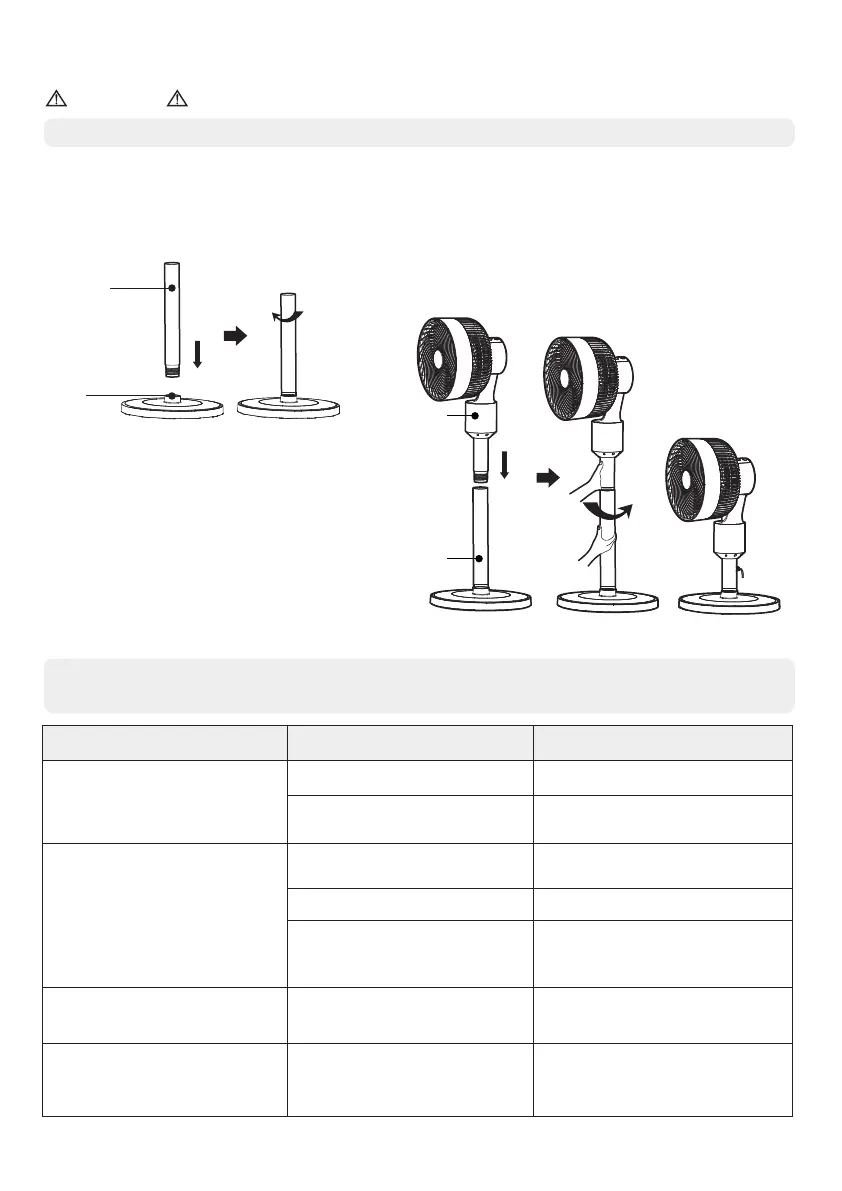
Installation Method
When installing the fan, do not insert the power cord plug into the socket.
NOTICE
1. Base installation
Align the threaded end of the column with
the threaded hole of the base, and
rotate the column clockwise until it is
tightened.
2. Head assembly installation
Align the threaded end of the machine head
with the threaded hole of the column.
Hold the head firmly while turning the column
anti-clockwise until it is tightened.
(The column is detachable, and the machine
head can be connected to the base for use
as a desk fan.)
Column
Threaded
hole
• If the fan cannot work normally after the following rectification, please contact the
customer service center or local maintenance point.
Fault Issues
Solution
Incorrect mode chosen
Please press the
correct button
Motor failure
Please send it to the dealer
or contact our company
for servicing
Fan does not operate
The power socket is dead
The power cord is not
connected in place
Change to a live socket
Connect the power cord
correctly
Noise during operation
Loose fan blades
Tighten the fan blade
Dirty fan blades
Remove the front guard
and clean the fan blade
No head oscillation
The fan blade is jammed
by foreign matters
Turn off the power supply
of the fan and take out
the foreign matters
Fan blade stuck
Fault Reasons
Fault Rectifications
Column
Column
Stand Fan Table Fan
Or



 To Next Page