7
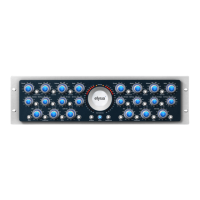
Low Cut (Low Band): switches the lter characteristics from Low Shelf to Low Cut with ad-
ditional resonance peak (p. 11)
Cut Gain (Low Band): switches the corresponding gain controller from boost to cut mode.
This is only relevant for Low Shelf, but not for Low Cut mode. (p. 10)
Narrow Q (Bottom Band): switches the quality factor (Q) of the corresponding frequency
band from low (wide curve) to high (narrow curve). (p. 11)
Cut Gain (Bottom Band): switches the corresponding gain controller from boost to cut
mode. (p. 11)
Narrow Q (Middle Band): switches the quality factor (Q) of the corresponding frequency
band from low (wide curve) to high (narrow curve). (p. 12)
Cut Gain (Middle Band): switches the corresponding gain controller from boost to cut mode.
(p. 12)
Narrow Q (Top Band): switches the quality factor (Q) of the corresponding frequency band
from low (wide curve) to high (narrow curve). (p. 12)
Cut Gain (Top Band): switches the corresponding gain controller from boost to cut mode.
(p. 12)
High Cut (High Band): switches the lter characteristics from High Shelf to High Cut with
additional resonance peak (p. 11)
Cut Gain (High Band): switches the corresponding gain controller from boost to cut mode.
This is only relevant for High Shelf, but not for High Cut mode. (p. 10)
Left/Right: activates the respective channel of the equalizer. In deactivated state, the input
is directly routed to the output by a hardwire bypass.
Warm: reduces the slew rate of the output amplier stages. Adds harmonics and produces a
vintage-like warm sound. (p. 13)
BASICS – Controls



 To Next Page